Driver Side Door Entry Unlock Function does not Operate [12/2019 - 11/2023]: Procedure
- CHECK POWER DOOR LOCK CONTROL SYSTEM
- When the door control switch on the multiplex network master switch assembly is operated, check that the doors unlock and lock according to the switch operation.
Refer to OPERATION CHECK [12/2019 - 11/2023]
OK
Door locks operate normally.
Result
Proceed to OK NG
Result:
NG
GO TO POWER DOOR LOCK CONTROL SYSTEM
Refer to HOW TO PROCEED WITH TROUBLESHOOTING [12/2019 - 11/2023]
Result:
OK
See step 2
- When the door control switch on the multiplex network master switch assembly is operated, check that the doors unlock and lock according to the switch operation.
- CHECK ENTRY OPERATION
- Check that the entry unlock function.
- Turn the ignition switch off.
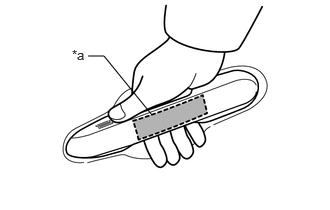
*a Unlock Sensor (Backside) - Open and close the driver door.
- With the electrical key transmitter sub-assembly outside of the vehicle, press the lock switch of the electrical key transmitter sub-assembly to lock all of the doors.
- Hold the electrical key transmitter sub-assembly at the same height as the door outside handle assembly and approximately 0.3 m (0.984 ft.) from the driver door.
- Check that the LED of the electrical key transmitter sub-assembly blinks.
- Touch the unlock sensor on the backside of the front door outside handle assembly (for driver door) for 2 seconds or more.*
- *: Perform this step 3 seconds or more after performing step (3).
HINT:
When checking the operation of the unlock sensor again, make sure to perform the procedure from step (1).
Result
Result Proceed to Entry function does not operate normally A Entry function operates normally B - Turn the ignition switch off.
Result:
B
GO TO CHECK FOR INTERMITTENT PROBLEMS (OPERATION HISTORY)
for HV Model: Refer to CHECK FOR INTERMITTENT PROBLEMS [12/2019 - 11/2023]
for Gasoline Model: Refer to CHECK FOR INTERMITTENT PROBLEMS [12/2019 - 11/2023]
Result:
A
See step 3
- Check that the entry unlock function.
- READ VALUE USING GTS (FL DOOR LOCK POS)
- Read the Data List according to the display on the GTS.
Body Electrical > Main Body > Data List
Tester Display Measurement Item Range Normal Condition Diagnostic Note FL Door Lock Pos Front door LH unlock detection switch signal UNLOCK or LOCK UNLOCK: Front door LH unlocked
LOCK: Front door LH locked- Body Electrical > Main Body > Data List
Tester Display FL Door Lock Pos OK
The GTS display changes correctly in response to the lock/unlock operation of the driver door.
Result
Proceed to OK NG
Result:
NG
GO TO LIGHTING SYSTEM (Proceed to Door Unlock Detection Switch Circuit)
Refer to Door Unlock Detection Switch Circuit [12/2019 - 11/2023]
Result:
OK
See step 4
- Read the Data List according to the display on the GTS.
- READ VALUE USING GTS (D-DOOR TOUCH SENSOR)
- Open and close the driver door.
*a Unlock Sensor (Backside) - With the electrical key transmitter sub-assembly outside of the vehicle, press the lock switch of the electrical key transmitter sub-assembly to lock all of the doors.
- Hold the electrical key transmitter sub-assembly at the same height as the door outside handle assembly and approximately 0.3 m (0.984 ft.) from the driver door.
- Check that the LED of the electrical key transmitter sub-assembly blinks.
- Read the Data List according to the display on the GTS.
- Touch the unlock sensor on the backside of the front door outside handle assembly (for driver door) for 2 seconds or more.*
- *: Perform this step 3 seconds or more after performing step (f).
HINT:
When checking the operation of the unlock sensor again, make sure to perform the procedure from step (a).
Body Electrical > Smart Key > Data List
Tester Display Measurement Item Range Normal Condition Diagnostic Note D-Door Touch Sensor Driver door touch sensor (unlock sensor) OFF or ON OFF: Driver door touch sensor (unlock sensor) not touched
ON: Driver door touch sensor (unlock sensor) touched- Displays whether the unlock sensor is on or off (even if the sensor is touched and contact is maintained, "ON" is displayed only momentarily).
- Use this Data List item to help determine if there is an unlock sensor malfunction when the entry unlock function does not operate.
Body Electrical > Smart Key > Data List
Tester Display D-Door Touch Sensor OK
The GTS display changes correctly in response to the operation of the front door outside handle assembly (for driver door).
Result
Proceed to OK NG
Result:
OK
REPLACE CERTIFICATION ECU (SMART KEY ECU ASSEMBLY)
Refer to REMOVAL [12/2019 - 11/2023]
Result:
NG
See step 5
- Open and close the driver door.
- CHECK HARNESS AND CONNECTOR (CERTIFICATION ECU (SMART KEY ECU ASSEMBLY) - FRONT DOOR OUTSIDE HANDLE ASSEMBLY (FOR DRIVER DOOR))
- Disconnect the M5 certification ECU (smart key ECU assembly) connector.
- Disconnect the J25 front door outside handle assembly (for driver door) connector.
- Measure the resistance according to the value(s) in the table below.
Standard Resistance
Tester Connection Condition Specified Condition M5-17 (CLG1) - J25-6 (ANT1) Always Below 1 Ω M5-16 (CG1B) - J25-4 (ANT2) Always Below 1 Ω M5-17 (CLG1) or J25-6 (ANT1) - Other terminals and body ground Always 10 kΩ or higher M5-16 (CG1B) or J25-4 (ANT2) - Other terminals and body ground Always 10 kΩ or higher - Reconnect the J25 front door outside handle assembly (for driver door) connector.
- Reconnect the M5 certification ECU (smart key ECU assembly) connector.
Result
Proceed to OK NG
Result:
NG
REPAIR OR REPLACE HARNESS OR CONNECTOR
Result:
OK
See step 6
- READ VALUE USING GTS (D-DOOR TOUCH SENSOR)
- Open and close the driver door.
*a Unlock Sensor (Backside) - With the electrical key transmitter sub-assembly outside of the vehicle, press the lock switch of the electrical key transmitter sub-assembly to lock all of the doors.
- Hold the electrical key transmitter sub-assembly at the same height as the door outside handle assembly and approximately 0.3 m (0.984 ft.) from the driver door.
- Check that the LED of the electrical key transmitter sub-assembly blinks.
- Read the Data List according to the display on the GTS.
- Touch the unlock sensor on the backside of the front door outside handle assembly (for driver door) for 2 seconds or more.*
- *: Perform this step 3 seconds or more after performing step (g).
HINT:
When checking the operation of the unlock sensor again, make sure to perform the procedure from step (a).
Body Electrical > Smart Key > Data List
Tester Display Measurement Item Range Normal Condition Diagnostic Note D-Door Touch Sensor Driver door touch sensor (unlock sensor) OFF or ON OFF: Driver door touch sensor (unlock sensor) not touched
ON: Driver door touch sensor (unlock sensor) touched- Displays whether the unlock sensor is on or off (even if the sensor is touched and contact is maintained, "ON" is displayed only momentarily).
- Use this Data List item to help determine if there is an unlock sensor malfunction when the entry unlock function does not operate.
Body Electrical > Smart Key > Data List
Tester Display D-Door Touch Sensor OK
The GTS display changes correctly in response to the operation of the front door outside handle assembly (for driver door).
Result
Proceed to OK NG
Result:
OK
END (CONNECTOR WAS NOT CONNECTED SECURELY)
Result:
NG
REPLACE FRONT DOOR OUTSIDE HANDLE ASSEMBLY (FOR DRIVER DOOR)
Refer to DISASSEMBLY [12/2019 - 10/2022] , or refer to DISASSEMBLY [10/2022 - 11/2023]
- Open and close the driver door.