Touching Unlock Sensor for Certain Period of Time does not Unlock All Doors [12/2019 - 11/2023]: Procedure
- CHECK CUSTOMIZE SETTING (DOOR UNLOCK MODE2)
- Read the customize setting according to the display on the GTS.
Smart Key / Access
Tester Display Description Default Setting ECU Door Unlock Mode2 Function that sets which doors are unlocked by the entry unlock function. Driver 0:All, 1:Driver Certification ECU (Smart key ECU assembly) HINT:
Touching the unlock sensor for a certain period of time to unlock all of the doors can only be performed if the customize setting "Door Unlock Mode2" is set to "Driver".
Result
Result Proceed to The customize setting is set to Driver A The customize setting is set to All B
Result:
B
PERFORM CUSTOMIZE SETTING
Refer to CUSTOMIZE PARAMETERS [12/2019 - 10/2022] , or refer to CUSTOMIZE PARAMETERS [10/2022 - 11/2023]
Result:
A
See step 2
- Read the customize setting according to the display on the GTS.
- CHECK CUSTOMIZE SETTING (DOOR UNLOCK SENSOR TOUCH TIME ADJUST)
- Read the customize setting according to the display on the GTS.
Smart Key / Access
Tester Display Description Default Setting ECU Door Unlock Sensor Touch Time Adjust Function that sets the length of time the unlock sensor on the door outside handle assembly (for driver door) must be touched to unlock all of the doors. Middle 00:OFF, 01:Short, 10:Middle, 11:Long Certification ECU (Smart key ECU assembly) Result
Result Proceed to The customize setting is set to Short, Middle or Long A The customize setting is set to OFF B
Result:
B
PERFORM CUSTOMIZE SETTING
Refer to CUSTOMIZE PARAMETERS [12/2019 - 10/2022] , or refer to CUSTOMIZE PARAMETERS [10/2022 - 11/2023]
Result:
A
See step 3
- Read the customize setting according to the display on the GTS.
- READ VALUE USING GTS (D-DOOR TOUCH SENSOR)
- Open and close the driver door.
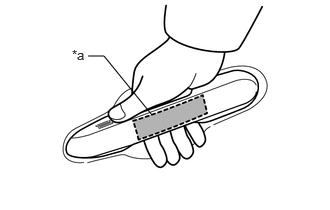
*a Unlock Sensor (Backside) - With the electrical key transmitter sub-assembly outside of the vehicle, press the lock switch of the electrical key transmitter sub-assembly to lock all of the doors.
- Hold the electrical key transmitter sub-assembly at the same height as the door outside handle assembly and approximately 0.3 m (0.984 ft.) from the driver door.
- Check that the LED of the electrical key transmitter sub-assembly blinks.
- Read the Data List according to the display on the GTS.
- Touch the unlock sensor on the backside of the front door outside handle assembly (for driver door) for 2 seconds or more.*
- *: Perform this step 3 seconds or more after performing step (f).
HINT:
When checking the operation of the unlock sensor again, make sure to perform the procedure from step (a).
Body Electrical > Smart Key > Data List
Tester Display Measurement Item Range Normal Condition Diagnostic Note D-Door Touch Sensor Driver door touch sensor (unlock sensor) OFF or ON OFF: Driver door touch sensor (unlock sensor) not touched
ON: Driver door touch sensor (unlock sensor) touched- Displays whether the unlock sensor is on or off (even if the sensor is touched and contact is maintained, "ON" is displayed only momentarily).
- Use this Data List item to help determine if there is an unlock sensor malfunction when the entry unlock function does not operate.
Body Electrical > Smart Key > Data List
Tester Display D-Door Touch Sensor OK
The GTS display changes correctly in response to the operation of the front door outside handle assembly (for driver door).
Result
Proceed to OK NG
Result:
OK
REPLACE CERTIFICATION ECU (SMART KEY ECU ASSEMBLY)
Refer to REMOVAL [12/2019 - 11/2023]
Result:
NG
REPLACE FRONT DOOR OUTSIDE HANDLE ASSEMBLY (FOR DRIVER DOOR)
Refer to DISASSEMBLY [12/2019 - 10/2022] , or refer to DISASSEMBLY [10/2022 - 11/2023]
- Open and close the driver door.