No Answer-Back [11/2023 - ]: Procedure
- CHECK CUSTOMIZE SETTING USING GTS
- Select the setting by referring to the table below.
Wireless Door Lock
Tester Display Description Default Setting ECU Wireless Buzzer Response Function Function that enables/disables the wireless door lock buzzer response Enable $00:Disable, $01:Enable Main body ECU (Multiplex network body ECU) Hazard Answer Back Function Function that flashes the hazard warning lights once when the doors are locked by wireless operation and twice when the doors are unlocked by wireless operation* Enable $00:Disable, $01:Enable Main body ECU (Multiplex network body ECU) Wireless Buzzer Volume Setting Function that adjusts the wireless door lock buzzer volume* Level5 $00:Level7 (MAX), $01:Level6, $02:Level5, $03:Level4, $04:Level3, $05:Level2, $06:Level1, $07:Level0 (MIN) Main body ECU (Multiplex network body ECU) - *: Customize settings may not be able to be selected from "Wireless Door Lock" if the vehicle recognizes driver 1, 2 or 3 with the My Settings function. In that case, change the settings from "My Settings".
Refer to CUSTOMIZE PARAMETERS [11/2023 - ]
Result
Result Proceed to All settings are Enable and other than Level0 A A setting is Disable or Level0 B - *: Customize settings may not be able to be selected from "Wireless Door Lock" if the vehicle recognizes driver 1, 2 or 3 with the My Settings function. In that case, change the settings from "My Settings".
Result:
B
PERFORM CUSTOMIZE FUNCTION. Refer to CUSTOMIZE PARAMETERS [11/2023 - ]
Result:
A
See step 2
- Select the setting by referring to the table below.
- CHECK WIRELESS DOOR LOCK CONTROL FUNCTIONS
- Check the wireless door lock control function using the electrical key transmitter sub-assembly.
Refer to OPERATION CHECK [11/2023 - ]
Result
Result Proceed to Wireless door lock/unlock operates properly A Wireless door lock/unlock does not operate properly B
Result:
B
GO TO PROBLEM SYMPTOMS TABLE. Refer to PROBLEM SYMPTOMS TABLE [11/2023 - ]
Result:
A
See step 3
- Check the wireless door lock control function using the electrical key transmitter sub-assembly.
- READ VALUE USING GTS
- Read the Data List according to the display on the GTS.
Body Electrical > Main Body > Data List
Tester Display Measurement Item Range Normal Condition Diagnostic Note FR Door Lock Position Switch Status Front door RH lock status Lock or Unlock Lock: Front door RH locked
Unlock: Front door RH Unlocked- FL Door Lock Position Switch Status Front door LH lock status Lock or Unlock Lock: Front door LH locked
Unlock: Front door LH Unlocked- RR Door Lock Position Switch Status Rear door RH lock status Lock or Unlock Lock: Rear door RH locked
Unlock: Rear door RH Unlocked- RL Door Lock Position Switch Status Rear door LH lock status Lock or Unlock Lock: Rear door LH locked
Unlock: Rear door LH Unlocked- Body Electrical > Main Body > Data List
Tester Display FR Door Lock Position Switch Status FL Door Lock Position Switch Status RR Door Lock Position Switch Status RL Door Lock Position Switch Status OK
The GTS display changes correctly in response to the lock/unlock operation.
Result
Proceed to OK NG
Result:
NG
GO TO POWER DOOR LOCK CONTROL SYSTEM. Refer to HOW TO PROCEED WITH TROUBLESHOOTING [11/2023 - ]
Result:
OK
See step 4
- Read the Data List according to the display on the GTS.
- CHECK WIRELESS ANSWER-BACK OPERATION
- Check the wireless answer-back operation using the electrical key transmitter sub-assembly.
Refer to OPERATION CHECK [11/2023 - ]
Result
Result Proceed to Only wireless door lock buzzer answer-back does not occur. (for Gasoline Model) A Only hazard warning light answer-back does not occur. B
Result:
B
See step 8
Result:
A
See step 5
- Check the wireless answer-back operation using the electrical key transmitter sub-assembly.
- CHECK MAIN BODY ECU (MULTIPLEX NETWORK BODY ECU)
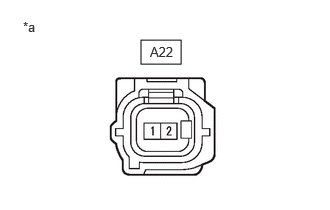
- Disconnect the A22 wireless door lock buzzer connector.
- Perform the Active Test according to the display on the GTS.
Body Electrical > Main Body > Active Test
Tester Display Measurement Item Control Range Diagnostic Note Wireless Buzzer Wireless door lock buzzer OFF/ON - Body Electrical > Main Body > Active Test
Tester Display Wireless Buzzer - Measure the voltage according to the value(s) in the table below.
Standard Voltage
Tester Connection Condition Specified Condition A22-1 - A22-2 Active Test Wireless Buzzer is OFF Below 1 V Active Test Wireless Buzzer is ON Pulse generation
(frequency: 2 kHz, high voltage: 11 to 14 V, low voltage: below 1 V)*a Front view of wire harness connector
(to Wireless Door Lock Buzzer)Result
Proceed to OK NG
Result:
OK
REPLACE WIRELESS DOOR LOCK BUZZER. Refer to REMOVAL [12/2019 - ]
Result:
NG
See step 6
- CHECK HARNESS AND CONNECTOR (WIRELESS DOOR LOCK BUZZER - MAIN BODY ECU (MULTIPLEX NETWORK BODY ECU) AND BODY GROUND)
- Remove the main body ECU (multiplex network body ECU) from the power distribution box assembly.
Refer to REMOVAL [11/2023 - ]
- Reconnect the power distribution box assembly connectors.
- Measure the resistance according to the value(s) in the table below.
Standard Resistance
Tester Connection Condition Specified Condition A22-1 - MB-3 (BZR) Always Below 1 Ω A22-2 - Body ground Always Below 1 Ω A22-1 or MB-3 (BZR) - Other terminals and body ground Always 10 kΩ or higher Result
Proceed to OK NG
Result:
OK
REPLACE MAIN BODY ECU (MULTIPLEX NETWORK BODY ECU). Refer to REMOVAL [11/2023 - ]
Result:
NG
See step 7
- Remove the main body ECU (multiplex network body ECU) from the power distribution box assembly.
- CHECK HARNESS AND CONNECTOR (WIRELESS DOOR LOCK BUZZER - POWER DISTRIBUTION BOX ASSEMBLY)
- Disconnect the 8E power distribution box assembly connector.
- Measure the resistance according to the value(s) in the table below.
Standard Resistance
Tester Connection Condition Specified Condition A22-1 - 8E-7 Always Below 1 Ω A22-1 or 8E-7 - Other terminals and body ground Always 10 kΩ or higher Result
Proceed to OK NG
Result:
OK
REPLACE POWER DISTRIBUTION BOX ASSEMBLY. Refer to REMOVAL [11/2023 - ]
Result:
NG
REPAIR OR REPLACE HARNESS OR CONNECTOR
- CHECK HAZARD WARNING LIGHTS OPERATION
- Check that the hazard warning lights blink when the hazard warning signal switch is pressed.
OK
Hazard warning lights blink.
Result
Proceed to OK NG
Result:
OK
REPLACE MAIN BODY ECU (MULTIPLEX NETWORK BODY ECU). Refer to REMOVAL [11/2023 - ]
Result:
NG
GO TO LIGHTING SYSTEM (Proceed to Hazard Warning Switch Circuit)
w/ AFS: Refer to Hazard Warning Switch Circuit [10/2022 - ]
w/o AFS: Refer to Hazard Warning Switch Circuit [10/2022 - ]
- Check that the hazard warning lights blink when the hazard warning signal switch is pressed.