Removal [11/2023 - ]: Procedure
- REMOVE COOLER (NO. 2 ROOM TEMP. SENSOR) THERMISTOR
- Apply protective tape around the cooler (No. 2 room temp. sensor) thermistor.

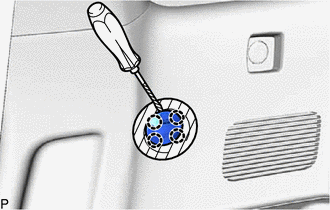
Protective Tape - Using a screwdriver, disengage the 4 claws to disconnect the cooler (No. 2 room temp. sensor) thermistor.
HINT:
Tape the screwdriver tip before use.
- Disconnect the connector to remove the cooler (No. 2 room temp. sensor) thermistor.NOTE:
Do not reuse the cooler (No. 2 room temp. sensor) thermistor removed from the deck trim side panel assembly RH. Reusing the removed cooler (No. 2 room temp. sensor) thermistor may cause it to loosen or come off.
- Apply protective tape around the cooler (No. 2 room temp. sensor) thermistor.