Installation [10/2022 - ]: Procedure
- INSTALL RADIO AND DISPLAY RECEIVER ASSEMBLY (for 8 Inch Display)
- INSTALL NO. 2 RADIO RECEIVER BRACKET (for 8 Inch Display)
- Install the No. 2 radio receiver bracket with the 2 screws.
- INSTALL NO. 1 RADIO RECEIVER BRACKET (for 8 Inch Display)
- Install the No. 1 radio receiver bracket with the 2 screws.
- INSTALL RADIO AND DISPLAY RECEIVER ASSEMBLY WITH BRACKET (for 8 Inch Display)
- Engage the 3 claws to temporarily install the radio and display receiver assembly with bracket.
- Install the radio and display receiver assembly with bracket with the 4 screws.
- INSTALL RADIO AND DISPLAY ASSEMBLY WITH AIR CONDITIONING CONTROL (for 8 Inch Display)
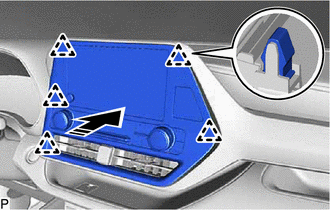
- INSTALL CENTER INSTRUMENT CLUSTER FINISH PANEL SUB-ASSEMBLY (for 8 Inch Display)
Refer to PROCEDURE - Step 23
- INSTALL RADIO AND DISPLAY RECEIVER ASSEMBLY (for 12.3 Inch Display)
- INSTALL AIR CONDITIONING CONTROL ASSEMBLY (for 12.3 Inch Display)
Refer to PROCEDURE - Step 1
- INSTALL NO. 2 RADIO BRACKET (for 12.3 Inch Display)
- Install the No. 2 radio bracket with the 2 screws.
- INSTALL NO. 1 RADIO BRACKET (for 12.3 Inch Display)
- Install the No. 1 radio bracket with the 2 screws.
- INSTALL RADIO AND DISPLAY ASSEMBLY WITH AIR CONDITIONING CONTROL (for 12.3 Inch Display)
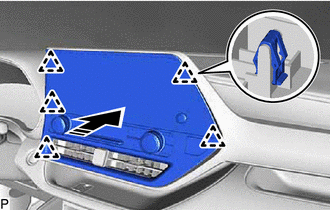
- INSTALL CENTER INSTRUMENT CLUSTER FINISH PANEL SUB-ASSEMBLY (for 12.3 Inch Display)
Refer to PROCEDURE - Step 23
- PERFORM REGISTRATION
HINT:
When replacing the radio and display receiver assembly, perform registration.
Refer to REGISTRATION [10/2022 - ]