Check Point
- Before proceeding with the following procedure, start diagnostic mode, enter the "MOST Line Check" screen and check the results.
- The following MOST line check result pattern table can be used to quickly identify trouble areas and inspection procedures.
MOST Network Outline
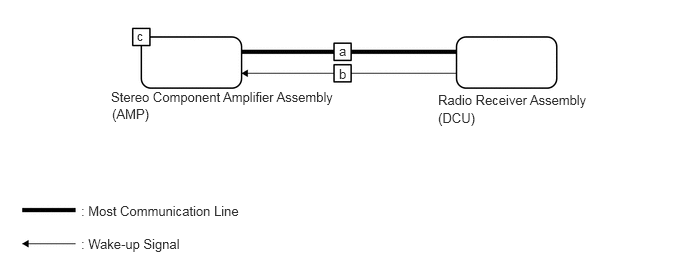
MOST LINE CHECK RESULT PATTERN
| Pattern | Device Name | Result | Trouble Area | Inspection |
|---|---|---|---|---|
| 1 | DCU | OK | a, c | Inspect MOST communication line between "DCU" and "AMP" |
| AMP | OK | |||
| 2 | DCU | OK | b, c | Inspect wake up communication line between "DCU" and "AMP" |
| AMP | NCON |