Failure to Restart from IG-ON Engine Stall [10/2022 - ]: Procedure
- CHECK VEHICLE CONTROL HISTORY (FAILURE TO RESTART FROM IG-ON ENGINE STALL)
- Enter the following menus: Powertrain / Stop and Start / Utility / Vehicle Control History (RoB).
Powertrain > Stop and Start > Utility
Tester Display Vehicle Control History (RoB) - Check vehicle control history.
HINT:
- Checking the Freeze Frame Data allows the vehicle conditions at the time of detection to be confirmed.
- As Vehicle Control History may be overwritten whenever the trigger conditions are met, make sure to save the Vehicle Control History data before performing any inspections.
Result
Result Proceed to Vehicle control history [X0874: Stop & Start Restart Failure (Engine Restart after Engine Stall)] is output A Vehicle control history [X0874: Stop & Start Restart Failure (Engine Restart after Engine Stall)] is not output B
Result:
B
GO TO ENGINE CONTROL SYSTEM (ROB CHART)
Diagnostic trouble code chart :
Refer to DIAGNOSTIC TROUBLE CODE CHART [10/2022 - 11/2023] , or refer to DIAGNOSTIC TROUBLE CODE CHART [11/2023 - ]
Vehicle control history (RoB):
Refer to VEHICLE CONTROL HISTORY (RoB) [10/2022 - 11/2023] , or refer to VEHICLE CONTROL HISTORY (RoB) [11/2023 - ]
Result:
A
See step 2
- Enter the following menus: Powertrain / Stop and Start / Utility / Vehicle Control History (RoB).
- CUSTOMER PROBLEM ANALYSIS AND SYMPTOM CONFIRMATION
- Consult with the customer to determine if they performed operations that could result in an AT engine stall.
HINT:
(ex.) Heavy load, frequent shifts, etc.
Result
Result Proceed to Driver operations that could cause engine stall were performed A None of the above conditions are met B
Result:
A
ENGINE STALL DUE TO DRIVER OPERATION
Result:
B
See step 3
- Consult with the customer to determine if they performed operations that could result in an AT engine stall.
- CHECK VEHICLE CONTROL HISTORY AND PROBLEM SYMPTOMS
- Enter the following menus: Powertrain / Stop and Start / Utility / Vehicle Control History (RoB).
Powertrain > Stop and Start > Utility
Tester Display Vehicle Control History (RoB) - Select a vehicle control history item to display the data from the time of control.
- Check the output data.
HINT:
- Checking the Freeze Frame Data allows the vehicle conditions at the time of detection to be confirmed.
- As Vehicle Control History may be overwritten whenever the trigger conditions are met, make sure to save the Vehicle Control History data before performing any inspections.
Result
Result Proceed to All recorded sections Starter Motor = OFF, and all recorded sections Engine Speed = 0 rpm
HINT:
It is possible that the starter drive command is not being sent from the engine stop and start ECU.A Starter Motor = ON for any sections, and all recorded sections Engine Speed = 0 rpm
HINT:
It is possible that the drive command is being sent from the engine stop and start ECU but the starter itself is not moving.B Engine Speed > 0 rpm for any sections
HINT:
It is possible that cranking was achieved but the engine stopped.C
Result:
A
REPLACE ENGINE STOP AND START ECU
Refer to REMOVAL [10/2022 - 11/2023] , or refer to REMOVAL [11/2023 - ]
HINT:
It is possible that there is a malfunction of the starter drive circuit inside the stop and start ECU.
Result:
C
See step 8
Result:
B
See step 4
- Enter the following menus: Powertrain / Stop and Start / Utility / Vehicle Control History (RoB).
- CHECK VEHICLE CONTROL HISTORY AND PROBLEM SYMPTOMS
- Enter the following menus: Powertrain / Stop and Start / Utility / Vehicle Control History (RoB).
Powertrain > Stop and Start > Utility
Tester Display Vehicle Control History (RoB) - Select a vehicle control history item to display the data from the time of control.
- Check the output data.
HINT:
- Checking the Freeze Frame Data allows the vehicle conditions at the time of detection to be confirmed.
- As Vehicle Control History may be overwritten whenever the trigger conditions are met, make sure to save the Vehicle Control History data before performing any inspections.
Result
Result Proceed to Cranking Time is 1.5 seconds or more
HINT:
It is possible that there is an external malfunction outside of the stop and start ECU (drive circuit).A Cranking Time is less than 1.5 seconds
HINT:
It is possible that there is a malfunction in the stop and start ECU (drive circuit).B
Result:
B
REPLACE ENGINE STOP AND START ECU
Refer to REMOVAL [10/2022 - 11/2023] , or refer to REMOVAL [11/2023 - ]
Result:
A
See step 5
- Enter the following menus: Powertrain / Stop and Start / Utility / Vehicle Control History (RoB).
- CHECK ENGINE STOP AND START ECU (+B VOLTAGE)
- Disconnect the engine stop and start ECU connector.
- Turn the ignition switch to ON.
- Turn off any electrical loads.
- Measure the voltage according to the value(s) in the table below.
Standard Voltage
Tester Connection Switch Condition Specified Condition A34-1 (+B) - Body ground Ignition switch ON 11 V or higher Result
Proceed to OK NG
Result:
NG
See step 7
Result:
OK
See step 6
- CHECK VEHICLE CONTROL HISTORY (BATTERY VOLTAGE)
- Enter the following menus: Powertrain / Stop and Start / Utility / Vehicle Control History (RoB).
Powertrain > Stop and Start > Utility
Tester Display Vehicle Control History (RoB) - Select a vehicle control history item to display the data from the time of control.
- Check the output data.
HINT:
- Checking the Freeze Frame Data allows the vehicle conditions at the time of detection to be confirmed.
- As Vehicle Control History may be overwritten whenever the trigger conditions are met, make sure to save the Vehicle Control History data before performing any inspections.
- Depending on RoB detection timing, the minimum voltage from the previous startup will be stored for the Minimum Voltage (Cranking) and the Minimum Voltage (Starter Solenoid Engagement). For the battery condition at the start of the current driving cycle, see Battery Voltage.
- When the value is 20 V, the value is being calculated.
Result
Result Proceed to Battery voltage is 8.92 V or more A Battery voltage is less than 8.92 V B
Result:
A
INSPECT STARTER SYSTEM
Refer to Starter Signal Circuit [10/2022 - 11/2023] , or refer to Starter Signal Circuit [11/2023 - ]
Result:
B
See step 7
- Enter the following menus: Powertrain / Stop and Start / Utility / Vehicle Control History (RoB).
- INSPECT BATTERY
Result:
OK
INSPECT STARTER SYSTEM
Refer to Starter Signal Circuit [10/2022 - 11/2023] , or refer to Starter Signal Circuit [11/2023 - ]
Result:
NG
REPLACE BATTERY
- CHECK VEHICLE CONTROL HISTORY (CRANKING TIME AND STARTER OFF PERMISSION HISTORY (ECM))
- Enter the following menus: Powertrain / Stop and Start / Utility / Vehicle Control History (RoB).
Powertrain > Stop and Start > Utility
Tester Display Vehicle Control History (RoB) - Select a vehicle control history to display the "Cranking Time" and "Starter OFF Permission History (ECM)" data from the time of control.
- Check the output data.
HINT:
- Checking the Freeze Frame Data allows the vehicle conditions at the time of detection to be confirmed.
- As Vehicle Control History may be overwritten whenever the trigger conditions are met, make sure to save the Vehicle Control History data before performing any inspections.
Result
Result Proceed to "Cranking Time" is less than 1.5 seconds "Starter OFF Permission History (ECM)" is ON
HINT:
It is possible that the ECM made a judgment of complete combustion and the ECM then stopped the starter.A "Starter OFF Permission History (ECM)" is OFF
HINT:
It is possible that the engine stop and start ECU made a judgment of complete combustion and the engine stop and start ECU then stopped the starter.B "Cranking Time" is 1.5 seconds or more
HINT:
It is possible that the stop and start ECU did not stop the starter.- C
Result:
A
ENGINE CONTROL SYSTEM (POOR STARTABILITY)
Refer to Engine Difficult to Start [10/2022 - ]
HINT:
Check whether the speed value of the EFI ECU is not a higher value than the original NE.
Result:
C
See step 12
Result:
B
See step 9
- Enter the following menus: Powertrain / Stop and Start / Utility / Vehicle Control History (RoB).
- READ VALUE USING GTS (ENGINE SPEED AND ENGINE SPEED (ECM))
- Enter the following menus: Powertrain / Stop and Start / Data List / Engine Speed and Engine Speed (ECM).
Powertrain > Stop and Start > Data List
Tester Display Engine Speed Engine Speed (ECM) - Compare the Data List items displayed on the GTS.
Result
Result Proceed to Engine Speed > Engine Speed (ECM) + 100 rpm A None of the above conditions are met B
Result:
B
See step 11
Result:
A
See step 10
- Enter the following menus: Powertrain / Stop and Start / Data List / Engine Speed and Engine Speed (ECM).
- CHECK DATA POINTS (ENGINE SPEED AND ENGINE SPEED (ECM))
- Enter the following menus: Powertrain / Stop and Start / Utility / Vehicle Control History (RoB).
Powertrain > Stop and Start > Utility
Tester Display Vehicle Control History (RoB) - Select a vehicle control history item to display the data from the time of control.
- Check the data points in the data that was output.
HINT:
- Checking the Freeze Frame Data allows the vehicle conditions at the time of detection to be confirmed.
- As Vehicle Control History may be overwritten whenever the trigger conditions are met, make sure to save the Vehicle Control History data before performing any inspections.
Result
Result Proceed to For each and all of the data points, "Engine Speed" > "Engine Speed (ECM)" + 100 rpm A None of the above conditions are met B
Result:
A
READ VALUE USING GTS (ENGINE SPEED)
Refer to DTC P0335-62: Crankshaft Position Sensor "A" Signal Compare Failure [10/2022 - 11/2023] , or refer to DTC P0335-62: Crankshaft Position Sensor "A" Signal Compare Failure [11/2023 - ]
Result:
B
See step 11
- Enter the following menus: Powertrain / Stop and Start / Utility / Vehicle Control History (RoB).
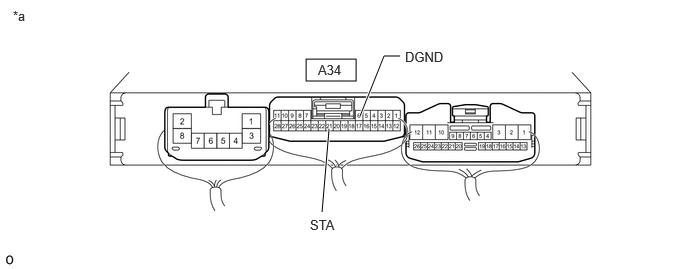
- CHECK ENGINE STOP AND START ECU (STA SIGNAL)
*a Component with harness connected
(Engine Stop and Start ECU)- - - Enter the following menus: Powertrain / Stop and Start / Active Test / Starter (Hood Close)
Powertrain > Stop and Start > Active Test
Tester Display Starter (Hood Close) - Measure the voltage according to the value(s) in the table below.
Refer to TERMINALS OF ECU [10/2022 - 11/2023] , or refer to TERMINALS OF ECU [11/2023 - ]
Standard Voltage
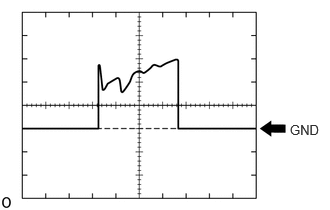
Tester Connection Condition Specified Condition A34-21 (STA) - A34-6 (DGND) Performing Active Test, while cranking. 6 to 14 V - Using an oscilloscope, measure the waveform immediately after starting.
Item Content Tester Connection A34-21 (STA) ←→ A34-6 (DGND) Tool Setting 10 V/DIV, 200 ms./DIV Condition During cranking OK
Voltage and waveform both normal
Result
Proceed to OK NG
Result:
OK
INSPECT ENGINE (ENGINE CONTROL SYSTEM, POOR STARTABILITY)
Refer to PROBLEM SYMPTOMS TABLE [10/2022 - ]
Result:
NG
REPLACE ENGINE STOP AND START ECU
Refer to REMOVAL [10/2022 - 11/2023] , or refer to REMOVAL [11/2023 - ]
- Enter the following menus: Powertrain / Stop and Start / Active Test / Starter (Hood Close)
- CHECK DATA POINTS (ENGINE SPEED)
- Enter the following menus: Powertrain / Stop and Start / Utility / Vehicle Control History (RoB).
- Select a vehicle control history item to display the data from the time of control.
- Check the output data.
HINT:
- Checking the Freeze Frame Data allows the vehicle conditions at the time of detection to be confirmed.
- As Vehicle Control History may be overwritten whenever the trigger conditions are met, make sure to save the Vehicle Control History data before performing any inspections.
Result
Result Proceed to When Starter Motor is ON, there is even 1 point at which Engine Speed < 300 rpm A None of the above conditions are met B
Result:
A
INSPECT STARTER SYSTEM
Refer to Starter Signal Circuit [10/2022 - 11/2023] , or refer to Starter Signal Circuit [11/2023 - ]
Result:
B
See step 13
- CHECK OPERATION
- Check how long it took the engine to stall after turning the starter off.
Result
Result Proceed to After starter turned off, engine immediately stalls.
HINT:
Engine stalls within 2 seconds.A After starter turned off, engine stalls after a time. B
Result:
A
ENGINE CONTROL SYSTEM (ENGINE DIFFICULT TO START)
Refer to Engine Difficult to Start [10/2022 - ]
Result:
B
ENGINE CONTROL SYSTEM (ENGINE STALLS)
Refer to Engine Stalls [10/2022 - ]
- Check how long it took the engine to stall after turning the starter off.