Additional Key cannot be Registered [10/2021 - 11/2023]: Procedure
- CHECK FOR DTC
- Check for DTCs.
Body Electrical > Smart Key > Trouble Codes
NOTE:If a malfunction occurs, do not remove/install the vehicle auxiliary battery before checking for DTCs.
OK
DTCs are not output.
Result
Proceed to OK NG
Result:
NG
GO TO DIAGNOSTIC TROUBLE CODE CHART. Refer to DIAGNOSTIC TROUBLE CODE CHART [12/2019 - 11/2023]
Result:
OK
See step 2
- Check for DTCs.
- READ VALUE USING GTS (UNMATCHED VEHICLE-ID)
- Read the Data List according to the display on the GTS.
Body Electrical > Smart Key > Data List
Tester Display Measurement Item Range Normal Condition Diagnostic Note Unmatched Vehicle-ID Key No. (incorrect or correct) No or Yes No: Communication normal
Yes: Communication malfunctionThe vehicle ID registered in the vehicle and the vehicle ID registered in the electrical key transmitter sub-assembly are different (if a key from another vehicle is brought into the vehicle exterior detection area while the doors are locked, "Yes" is displayed for "Unmatched Vehicle-ID" in the Data List). Other potential causes:
- An electrical key transmitter sub-assembly from a different vehicle is being used.
- A communication error due to wave interference.
- The electrical key transmitter sub-assembly or certification ECU (smart key ECU assembly) is malfunctioning.
Body Electrical > Smart Key > Data List
Tester Display Unmatched Vehicle-ID Result
Result Proceed to "No" is displayed A "Yes" is displayed B
Result:
B
See step 4
Result:
A
See step 3
- Read the Data List according to the display on the GTS.
- CHECK SMART KEY SYSTEM (for Start Function)
- Remove the transmitter battery from the electrical key transmitter sub-assembly.
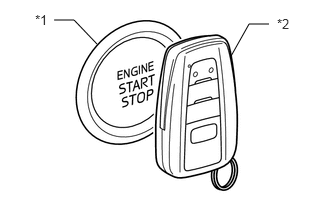
- With the brake pedal depressed, hold the electrical key transmitter sub-assembly near the engine switch and check if the power source mode changes.
OK
The power source mode changes.
HINT:
If the power source mode changes, the cabin verification is malfunctioning.
*1 Engine Switch *2 Electrical Key Transmitter Sub-assembly Result
Result Proceed to The power source mode changes A The power source mode does not change B
Result:
B
GO TO SMART KEY SYSTEM (for Start Function) (Power Source Mode does not Change to ON (IG and ACC)). Refer to Power Source Mode does not Change to ON (IG and ACC) [12/2019 - 10/2022] , or refer to Power Source Mode does not Change to ON (IG and ACC) [10/2022 - 11/2023]
Result:
A
See step 4
- REGISTRATION
- Using an unregistered electrical key transmitter sub-assembly, perform the additional registration procedure.
Refer to REGISTRATION [10/2021 - 10/2022] , or refer to REGISTRATION [10/2022 - 11/2023]
OK
Additional registration can be completed.
Result
Proceed to OK NG
Result:
OK
REPLACE ELECTRICAL KEY TRANSMITTER SUB-ASSEMBLY (FIRST REGISTERED KEY WAS DEFECTIVE)
Result:
NG
See step 5
- Using an unregistered electrical key transmitter sub-assembly, perform the additional registration procedure.
- REPLACE CERTIFICATION ECU (SMART KEY ECU ASSEMBLY)
- Temporarily replace the certification ECU (smart key ECU assembly) with a new one and register the electrical key transmitter sub-assemblies.
HINT:
- For replacement.
Refer to REMOVAL [12/2019 - 11/2023]
- For registration.
Refer to REGISTRATION [10/2021 - 10/2022] , or refer to REGISTRATION [10/2022 - 11/2023]
OK
All of the electrical key transmitter sub-assemblies could be registered to the new certification ECU (smart key ECU assembly) successfully.
Result
Proceed to OK NG - For replacement.
Result:
OK
END (CERTIFICATION ECU (SMART KEY ECU ASSEMBLY) WAS DEFECTIVE)
Result:
NG
GO TO OTHER PROBLEM (New key cannot be Registered). Refer to New Key cannot be Registered [10/2021 - 10/2022] , or refer to New Key cannot be Registered [10/2022 - 11/2023]
- Temporarily replace the certification ECU (smart key ECU assembly) with a new one and register the electrical key transmitter sub-assemblies.