Operation Check [10/2022 - 11/2023]
- WIRELESS CHARGING SYSTEM OPERATION CHECK
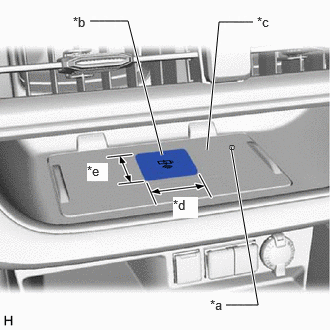
*a Indicator Light (Green/Amber) *b Charging Area *c Charging Tray *d Approximately 70 mm (2.76 in.) *e Approximately 60 mm (2.36 in.) - Turn the ignition switch to ACC and check that the indicator light (green) illuminates.
- Place a rechargeable device on the charging area and check that the indicator light (amber) illuminates, indicating charging is in progress.
HINT:
Refer to Precaution for details about Qi-compatible rechargeable devices.
Refer to PRECAUTION [10/2022 - 11/2023]
- Check that the indicator light (green) illuminates when charging is complete.
HINT:
Some mobile devices, cases or accessories may not cause the indicator (green) to illuminate when charging is complete, even though they are Qi-compatible. Check the mobile device to confirm the charge status.
- Turn the ignition switch off and check that the indicator light turns off.