Inspection [11/2023 - ]: Procedure
WARNING: This page is about a different variant/trim than selected.
- INSPECT POWER SWITCH
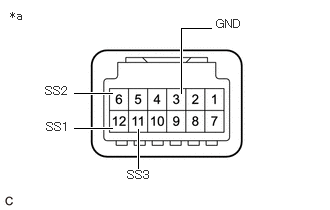
- Check the resistance.
- Measure the resistance according to the value(s) in the table below.
*a Component without harness connected
(Power Switch)Standard Resistance
Tester Connection Condition Specified Condition 12 (SS1) - 3 (GND)
6 (SS2) - 3 (GND)
11 (SS3) - 3 (GND)Not pushed 10 kΩ or higher Pushed Below 1 Ω If the result is not as specified, replace the power switch.
- Measure the resistance according to the value(s) in the table below.
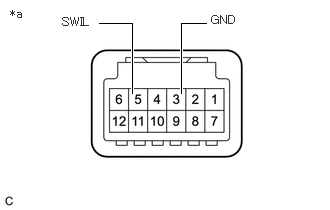
- Check the LED illumination.
- Apply auxiliary battery voltage between the terminals of the power switch and check the illumination condition of the power switch indicator light.
*a Component without harness connected
(Power Switch)OK
Condition Specified Condition Auxiliary battery positive (+) → Terminal 5 (SWIL)
Auxiliary battery negative (-) → Terminal 3 (GND)Illuminates If the result is not as specified, replace the power switch.
- Apply auxiliary battery voltage between the terminals of the power switch and check the illumination condition of the power switch indicator light.
- Check the resistance.