DTC C2141-87: Tire Pressure Monitor Transmitter ID 1 Missing Message; DTC C2142-87: Tire Pressure Monitor Transmitter ID 2 Missing Message; DTC C2143-87: Tire Pressure Monitor Transmitter ID 3 Missing Message; DTC C2144-87: Tire Pressure Monitor Transmitter ID 4 Missing Message; DTC C2145-87: Tire Pressure Monitor Transmitter ID 5 Missing Message [11/2023 - 11/2024]: Procedure
- CHECK FREQUENCY RECEIVING CONDITION
- Check that the following conditions are not met:
- Facilities or devices that use similar radio frequencies are located in the vicinity of the vehicle.
HINT:
If the vehicle is located in an area such as the one described above, the tire pressure warning light may illuminate after blinking for 1 minute due to interfering radio frequencies.
- Devices using similar radio frequencies are used in the vehicle.
HINT:
Radio transmissions may be interrupted due to the surroundings or devices installed by the user.
Result
Result Proceed to There is no device or facility that uses electrical waves of approximately the same frequency in the vicinity of the vehicle or inside the vehicle. A There is a device or facility that uses electrical waves of approximately the same frequency in the vicinity of the vehicle or inside the vehicle. B - Facilities or devices that use similar radio frequencies are located in the vicinity of the vehicle.
Result:
B
See step 9
Result:
A
See step 2
- Check that the following conditions are not met:
- CONFIRM OUTPUT DTC
- Check the stored DTC.
Chassis > Tire Pressure Monitor > Trouble Codes
Result
Result Proceed to Any DTCs from C2141-87 to C2144-87 (C2145-87: w/ Full Size Spare Tire) are output A All DTCs from C2141-87 to C2144-87 (C2145-87: w/ Full Size Spare Tire) are output B
Result:
B
See step 5
Result:
A
See step 3
- Check the stored DTC.
- IDENTIFY TRANSMITTER CORRESPONDING TO DTC (TIRE POSITION)
- Display the "ID Tire Position" value for each wheel using the GTS.
- Refer to the following chart and check the wheel position of the DTC and transmitter match.
Chassis > Tire Pressure Monitor > Data List
Tester Display Measurement Item Range Normal Condition Diagnostic Note ID 1 Tire Position ID1 tire position No Information, FL, FR, RL, RR, Spare or Judging ID1 tire position is displayed If no tire position information is stored, "No Information" will be displayed. ID 2 Tire Position ID2 tire position No Information, FL, FR, RL, RR, Spare or Judging ID2 tire position is displayed If no tire position information is stored, "No Information" will be displayed. ID 3 Tire Position ID3 tire position No Information, FL, FR, RL, RR, Spare or Judging ID3 tire position is displayed If no tire position information is stored, "No Information" will be displayed. ID 4 Tire Position ID4 tire position No Information, FL, FR, RL, RR, Spare or Judging ID4 tire position is displayed If no tire position information is stored, "No Information" will be displayed. ID 5 Tire Position ID5 tire position No Information, FL, FR, RL, RR, Spare or Judging ID5 tire position is displayed - If no tire position information is stored, "No Information" will be displayed.
- w/ Full Size Spare Tire
Chassis > Tire Pressure Monitor > Data List
Tester Display ID 1 Tire Position ID 2 Tire Position ID 3 Tire Position ID 4 Tire Position ID 5 Tire Position Result
Proceed to NEXT
Result:
NEXT
See step 4
- CHECK TRANSMITTER ID
- Refer to the following chart and record the tire pressure warning valve and transmitter ID of the output DTC.
Chassis > Tire Pressure Monitor > Data List
Tester Display Measurement Item Range Normal Condition Diagnostic Note Registered ID 1 Code Registered ID1 code min.: 0
max.: FFFFFFF*ID No. registered for transmitter ID1 displayed - Registered ID 2 Code Registered ID2 code min.: 0
max.: FFFFFFF*ID No. registered for transmitter ID2 displayed - Registered ID 3 Code Registered ID3 code min.: 0
max.: FFFFFFF*ID No. registered for transmitter ID3 displayed - Registered ID 4 Code Registered ID4 code min.: 0
max.: FFFFFFF*ID No. registered for transmitter ID4 displayed - Registered ID 5 Code Registered ID5 code min.: 0
max.: FFFFFFF*ID No. registered for transmitter ID5 displayed w/ Full Size Spare Tire HINT:
*: Displayed only when the ID No. is not registered.
Chassis > Tire Pressure Monitor > Data List
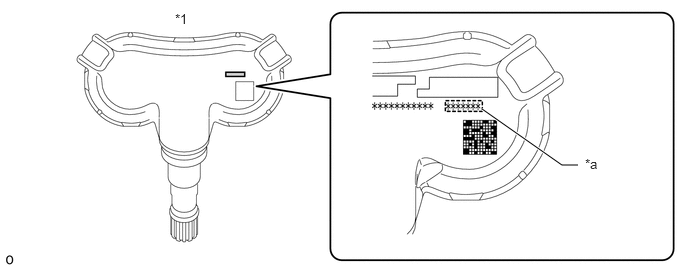
Tester Display Registered ID 1 Code Registered ID 2 Code Registered ID 3 Code Registered ID 4 Code Registered ID 5 Code - Disassemble the tire indicated in the output DTC and check the tire pressure warning valve and transmitter ID.
*1 Tire Pressure Warning Valve and Transmitter - - *a Transmitter ID (7-digit Number) - - - Confirm that the ID number on the transmitter and recorded transmitter ID match.
Result
Result Proceed to Match A Do not match B
Result:
A
REPLACE CORRESPONDING TIRE PRESSURE WARNING VALVE AND TRANSMITTER
Refer to REMOVAL [11/2023 - ]
Result:
B
See step 6
- Refer to the following chart and record the tire pressure warning valve and transmitter ID of the output DTC.
- CHECK TIRE PRESSURE WARNING VALVE AND TRANSMITTER
- Refer to the following chart and record all of the tire pressure warning valve and transmitter IDs.
Chassis > Tire Pressure Monitor > Data List
Tester Display Measurement Item Range Normal Condition Diagnostic Note Registered ID 1 Code Registered ID1 code min.: 0
max.: FFFFFFF*ID No. registered for transmitter ID1 displayed - Registered ID 2 Code Registered ID2 code min.: 0
max.: FFFFFFF*ID No. registered for transmitter ID2 displayed - Registered ID 3 Code Registered ID3 code min.: 0
max.: FFFFFFF*ID No. registered for transmitter ID3 displayed - Registered ID 4 Code Registered ID4 code min.: 0
max.: FFFFFFF*ID No. registered for transmitter ID4 displayed - Registered ID 5 Code Registered ID5 code min.: 0
max.: FFFFFFF*ID No. registered for transmitter ID5 displayed w/ Full Size Spare Tire HINT:
- *: Displayed only when the ID No. is not registered.
- The wheel position cannot be determined from ID1 through ID5 on the Data List.
Chassis > Tire Pressure Monitor > Data List
Tester Display Registered ID 1 Code Registered ID 2 Code Registered ID 3 Code Registered ID 4 Code Registered ID 5 Code - Disassemble all of the tires and check the tire pressure warning valve and transmitter IDs.
*1 Tire Pressure Warning Valve and Transmitter - - *a Transmitter ID (7-digit Number) - - - Confirm that the ID number on the transmitter and recorded transmitter ID match.
Result
Result Proceed to Match A Do not match B
Result:
A
REPLACE TIRE PRESSURE WARNING ECU AND RECEIVER
Refer to REMOVAL [11/2023 - ]
Result:
B
See step 6
- Refer to the following chart and record all of the tire pressure warning valve and transmitter IDs.
- REGISTRATION OF TRANSMITTER ID
- Perform registration.
Refer to REGISTRATION [11/2023 - 11/2024]
Result
Proceed to NEXT
Result:
NEXT
See step 7
- Perform registration.
- PERFORM INITIALIZATION
- Perform initialization.
Refer to INITIALIZATION [11/2023 - ]
Result
Proceed to NEXT
Result:
NEXT
See step 8
- Perform initialization.
- CLEAR DTC
Result:
NEXT
END
- CLEAR DTC
Result:
NEXT
END
Explain to the customer that there is a high possibility that a device (located near or inside the vehicle) or facility using electrical waves of approximately the same frequency is causing electrical wave interference.