Confirmation Driving Pattern
HINT:
- After repair has been completed, clear the DTC and then check that the vehicle has returned to normal by performing the following All Readiness check procedure.
- When clearing the permanent DTCs, refer to the "CLEAR PERMANENT DTC" procedure.
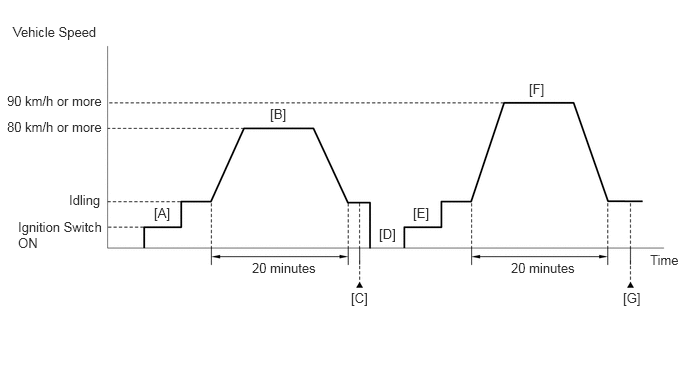
- Stop the engine and allow it to soak.
- Connect the GTS to the DLC3.
- Turn the ignition switch to ON [A].
- Turn the GTS on.
- Enter the following menus: Powertrain / Engine / Data List / Coolant Temperature and Intake Air Temperature.
- Check that the value of the Data List item Coolant Temperature is 56°C (133°F) or less and the value of the Data List item Intake Air Temperature is between 0 and 35°C (32 and 95°F).
- Set the heater control to MAX HOT with fresh air mode selected and turn the A/C off.
- Start the engine and drive the vehicle at 80 km/h (50 mph) or more for 20 minutes [B].WARNING:
When performing the confirmation driving pattern, obey all speed limits and traffic laws.
- After the value of the Data List item Coolant Temperature stabilizes, check that it is 75°C (167°F) or higher.
HINT:
If the value of the Data List item Coolant Temperature is less than 75°C (167°F) while driving the vehicle at 80 km/h (50 mph), inspect the cooling system and thermostat.
- Enter the following menus: Powertrain / Engine / Trouble Codes [C].
- Read the pending DTCs.
HINT:
- If a pending DTC is output, the system is malfunctioning.
- If a pending DTC is not output, perform the following procedure.
- Enter the following menus: Powertrain / Engine / Utility / All Readiness.
- Input the DTC: P0128-00 or P0128-07.
- Check the DTC judgment result.
GTS Display Description NORMAL - DTC judgment completed
- System normal
ABNORMAL - DTC judgment completed
- System abnormal
INCOMPLETE - DTC judgment not completed
- Perform driving pattern after confirming DTC enabling conditions
HINT:
- If the judgment result is NORMAL, the system is normal.
- If the judgment result is ABNORMAL, the system has a malfunction.
- If the judgment result is INCOMPLETE, If the judgment result is INCOMPLETE, perform steps [D] through [G].
- With the engine stopped, leave the vehicle outside overnight [D].
- Turn the ignition switch to ON [E].
- Turn the GTS on.
- Enter the following menus: Powertrain / Engine / Data List / Coolant Temperature.
- Check that the value of the Data List item Coolant Temperature is 25°C (77°F) or less.
- Start the engine and drive the vehicle at 90 km/h (56 mph) or more for 20 minutes [F].WARNING:
When performing the confirmation driving pattern, obey all speed limits and traffic laws.
- Enter the following menus: Powertrain / Engine / Trouble Codes [G].
- Read the pending DTCs.
HINT:
- If a pending DTC is output, the system is malfunctioning.
- If a pending DTC is not output, perform the following procedure.
- Enter the following menus: Powertrain / Engine / Utility / All Readiness.
- Input the DTC: P0128-00 or P0128-07.
- Check the DTC judgment result again.
GTS Display Description NORMAL - DTC judgment completed
- System normal
ABNORMAL - DTC judgment completed
- System abnormal
INCOMPLETE - DTC judgment not completed
- Perform driving pattern after confirming DTC enabling conditions
HINT:
- If the judgment result is NORMAL, the system is normal.
- If the judgment result is ABNORMAL, the system has a malfunction.
- [D] to [G]: Normal judgment procedure.
The normal judgment procedure is used to complete DTC judgment and also used when clearing permanent DTCs.
- When clearing the permanent DTCs, do not disconnect the cable from the battery terminal or attempt to clear the DTCs during this procedure, as doing so will clear the universal trip and normal judgment histories.