Confirmation Driving Pattern
HINT:
- This confirmation driving pattern is used for the "Perform Confirmation Driving Pattern" procedure of the following diagnostic troubleshooting procedure.
- Performing this confirmation driving pattern will activate the air fuel ratio sensor (sensor 2) monitor (the catalyst monitor is performed simultaneously). This is very useful for verifying the completion of a repair.
- After repair has been completed, clear the DTC and then check that the vehicle has returned to normal by performing the following All Readiness check procedure.
- When clearing the permanent DTCs, refer to the "CLEAR PERMANENT DTC" procedure.
P0136-16
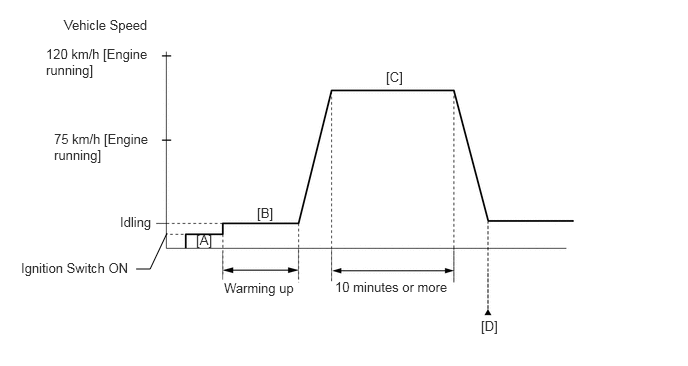
- Connect the GTS to the DLC3.
- Turn the ignition switch to ON.
- Turn the GTS on.
- Clear the DTCs (even if no DTCs are stored, perform the clear DTC procedure).
- Turn the ignition switch off and wait for at least 30 seconds.
- Turn the ignition switch to ON [A].
- Turn the GTS on.
- Put the engine in Inspection Mode (Maintenance Mode).
- Start the engine and warm it up until the engine coolant temperature is 75°C (167°F) or higher with the shift lever in P [B].
- Drive the vehicle at 75 to 120 km/h (46 to 75 mph) for 10 minutes or more [C].WARNING:
When performing the confirmation driving pattern, obey all speed limits and traffic laws.
HINT:
If the engine stops, further depress the accelerator pedal to restart the engine.
- Enter the following menus: Powertrain / Engine / Trouble Codes [D].
- Read the pending DTCs.
HINT:
- If a pending DTC is output, the system is malfunctioning.
- If a pending DTC is not output, perform the following procedure.
- Enter the following menus: Powertrain / Engine / Utility / All Readiness.
- Input the DTC: P0136-16.
- Check the DTC judgment result.
GTS Display Description NORMAL - DTC judgment completed
- System normal
ABNORMAL - DTC judgment completed
- System abnormal
INCOMPLETE - DTC judgment not completed
- Perform driving pattern after confirming DTC enabling conditions
HINT:
- If the judgment result is NORMAL, the system is normal.
- If the judgment result is ABNORMAL, the system is malfunctioning.
- If the judgment result is INCOMPLETE, perform steps [C] through [D] again.
- [B] to [D]: Normal judgment procedure.
The normal judgment procedure is used to complete DTC judgment and also used when clearing permanent DTCs.
- When clearing the permanent DTCs, do not disconnect the cable from the auxiliary battery terminal or attempt to clear the DTCs during this procedure, as doing so will clear the universal trip and normal judgment histories.
P013A-7C
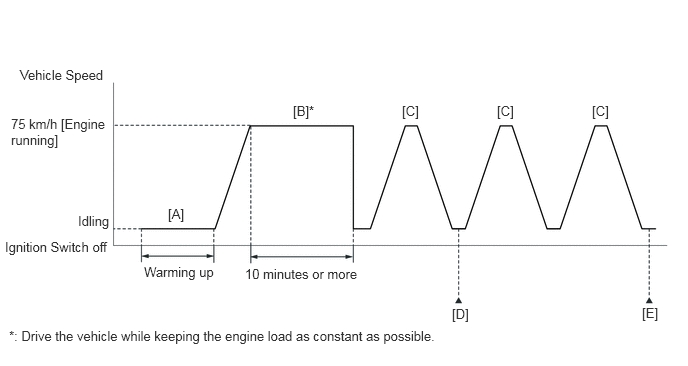
- Connect the GTS to the DLC3.
- Turn the ignition switch to ON.
- Turn the GTS on.
- Clear the DTCs (even if no DTCs are stored, perform the clear DTC procedure).
- Turn the ignition switch off and wait for at least 30 seconds.
- Turn the ignition switch to ON.
- Turn the GTS on.
- Enter the following menus: Powertrain / Engine / Monitor / Current Monitor.
- Check that Catalyst Efficiency / Current is Incomplete.
- Put the engine in Inspection Mode (Maintenance Mode).
- Start the engine and warm it up until the engine coolant temperature is 75°C (167°F) or higher with the shift lever in P [A].
HINT:
In order to keep the idle stable, turn off the A/C and all other electric loads and do not perform any shift operations.
- Drive the vehicle at approximately 75 km/h (46 mph) for 10 minutes or more [B].WARNING:
When performing the confirmation driving pattern, obey all speed limits and traffic laws.
HINT:
- Drive the vehicle while keeping the engine load as constant as possible.
- If the engine stops, further depress the accelerator pedal to restart the engine.
- With the shift lever in S, drive the vehicle at 75 km/h (46 mph), and then decelerate the vehicle by releasing the accelerator pedal for 5 seconds or more to perform the fuel-cut [C].WARNING:
When performing the confirmation driving pattern, obey all speed limits and traffic laws.
HINT:
If the engine stops, further depress the accelerator pedal to restart the engine.
- Enter the following menus: Powertrain / Engine / Monitor / Current Monitor / O2 Sensor / Details / SLOW RESPONSE B1S2 [D].
- Check the Test Value for SLOW RESPONSE B1S2.
HINT:
If Test Value displays 0, perform step [C] until in displays a value larger than 0, as the O2 Sensor monitor is not finished.
- Repeat step [C] 2 times or more in one driving cycle.
- Enter the following menus: Powertrain / Engine / Trouble Codes / Pending [E].
- Read the pending DTCs.
HINT:
- If a pending DTC is output, the system is malfunctioning.
- If a pending DTC is not output, perform the following procedure.
- Enter the following menus: Powertrain / Engine / Utility / All Readiness.
- Input the DTC: P013A-7C.
- Check the DTC judgment result.
GTS Display Description NORMAL - DTC judgment completed
- System normal
ABNORMAL - DTC judgment completed
- System abnormal
INCOMPLETE - DTC judgment not completed
- Perform driving pattern after confirming DTC enabling conditions
HINT:
- If the judgment result is NORMAL, the system is normal.
- If the judgment result is ABNORMAL, the system is malfunctioning.
- If the judgment result is INCOMPLETE, drive the vehicle with the shift lever in S, and then perform step [C] again.
- [A] to [E]: Normal judgment procedure.
The normal judgment procedure is used to complete DTC judgment and also used when clearing permanent DTCs.
- When clearing the permanent DTCs, do not disconnect the cable from the auxiliary battery terminal or attempt to clear the DTCs during this procedure, as doing so will clear the universal trip and normal judgment histories.