On-Vehicle Inspection [12/2019 - ]: Procedure
- INSPECT INNER REAR VIEW MIRROR ASSEMBLY NOTE:
- Perform this inspection indoors.
- When anti-glare is not operating, the mirror surface is bright. When anti-glare is operating, the mirror surface is darkened.
- Turn the ignition switch to ON.
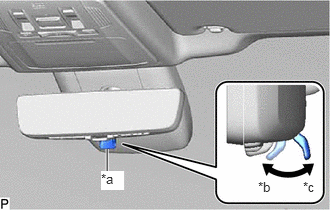
- Confirm that the mode selection lever is set to the optical mirror mode side.
*a Mode Selection Lever *b Digital Mirror Mode *c Optical Mirror Mode HINT:
If the mode selection lever is set to the digital mirror mode side, move it to the optical mirror mode side.
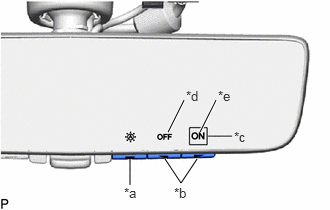
- Operate the menu/select switch and confirm that the cursor is in the location shown in the illustration and that anti-glare is not operating.
*a Menu/Select Switch *b Cursor Operation Switch *c Cursor *d Automatic Anti-glare Mode OFF *e Automatic Anti-glare Mode ON HINT:
- If the cursor is in the location shown in the illustration, automatic anti-glare mode is on and anti-glare is not operating.
- If the cursor is in a location other than that shown in the illustration, move the cursor to the location shown in the illustration using the menu/select and cursor operation switches.
- Depending on the ambient conditions, anti-glare may operate.
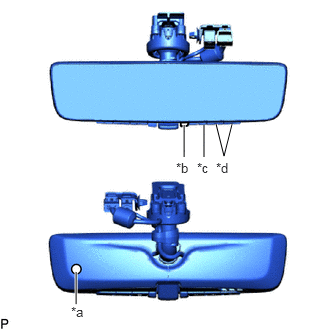
- Using the menu/select switch and cursor operation switches, turn off automatic anti-glare mode.
*a Ambient Light Sensor *b Rearward Facing Light Sensor *c Menu/Select Switch *d Cursor Operation Switch HINT:
When automatic anti-glare mode is off, anti-glare does not operate regardless of the ambient conditions.
- Using the menu/select switch and cursor operation switches, turn on automatic anti-glare mode.
- While covering the ambient light sensor with your hand, shine a light on the rearward facing light sensor and confirm that anti-glare operates.
- Remove your hand from the sensor and stop shining the light at the rearward facing light sensor and confirm that anti-glare stops operating.NOTE:
If the system does not operate as indicated above, perform the test several times with the digital inner mirror at different angles or with different ambient conditions.