Operation Check [12/2019 - 10/2022]
- CHECK TOUCH SWITCH
HINT:
- The touch switches on the screen are checked in the following procedure.
- Illustrations may differ from the actual vehicle screen depending on the device settings and options. Therefore, some detailed areas may not be shown exactly the same as on the actual vehicle screen.
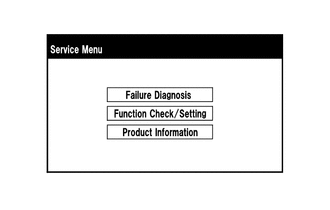
- Enter diagnostic mode.
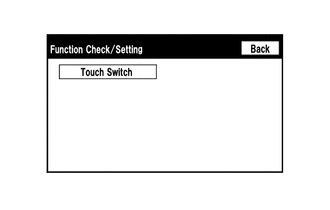
- Select "Function Check/Setting" from the "Service Menu" screen.
- Select "Touch Switch" from the "Function Check/Setting" screen.
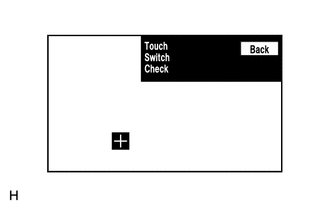
- Touch Switch Check
- Touch the display anywhere in the open area to perform the check when the "Touch Switch Check" screen is displayed.
HINT:
- A "+" mark is displayed where the display is touched.
- The "+" mark remains on the display even after your finger is removed.
- Touch the display anywhere in the open area to perform the check when the "Touch Switch Check" screen is displayed.