Touch Panel Switch does not Function [12/2019 - 10/2022]: Procedure
- CHECK TOYOTA MULTI OPERATION TOUCH SYSTEM (OPERATION CHECK)
- Check if the toyota multi operation touch system is malfunctioning.
Refer to OPERATION CHECK [12/2019 - 10/2022]
OK
No malfunctions are present in the toyota multi operation touch system.
Result
Proceed to OK NG
Result:
NG
GO TO TOYOTA MULTI OPERATION TOUCH SYSTEM. Refer to HOW TO PROCEED WITH TROUBLESHOOTING [12/2019 - 10/2022]
Result:
OK
See step 2
- Check if the toyota multi operation touch system is malfunctioning.
- CHECK MULTI-DISPLAY
- Check if there is any foreign matter caught between the display and exterior frame of the multi-display.
OK
No foreign matter is caught between the display and exterior frame of the multi-display.
HINT:
- If there is foreign matter between the display and exterior frame of the multi-display, the touch panel will remain pressed, preventing touch switch operation.
- Turn the ignition switch to ACC or to ON with your hand touching the operating section, non-response may occur.
Result
Proceed to OK NG
Result:
NG
REMOVE FOREIGN MATTER
Result:
OK
See step 3
- Check if there is any foreign matter caught between the display and exterior frame of the multi-display.
- CHECK TOUCH PANEL
Result:
NG
CLEAN DISPLAY AND RECHECK TOUCH PANEL
Result:
OK
See step 4
- CHECK TOUCH SWITCH (OPERATION CHECK)
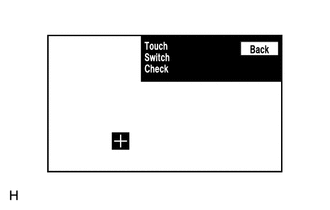
- Enter the "Touch Switch Check" screen. Refer to Check Touch Switch in Operation Check.
Refer to OPERATION CHECK [12/2019 - 10/2022]
- Touch the display in the area where the switch malfunction occurs.
OK
A "+" mark appears at the touched position.
Result
Proceed to OK NG
Result:
OK
REPLACE RADIO RECEIVER ASSEMBLY. Refer to REMOVAL [12/2019 - 10/2022]
Result:
NG
PROCEED TO NEXT SUSPECTED AREA SHOWN IN PROBLEM SYMPTOMS TABLE. Refer to PROBLEM SYMPTOMS TABLE [12/2019 - 10/2022]
- Enter the "Touch Switch Check" screen. Refer to Check Touch Switch in Operation Check.