Display does not Dim when Light Control Switch is Turned ON [12/2019 - 10/2022]: Procedure
- CHECK IMAGE QUALITY SETTING
- Turn the light control switch to the tail or head position.
- Check that the daytime screen setting on the display adjustment screen is set to on.
Result
Result Proceed to Daytime screen setting is set to on. A Daytime screen setting is set to off. B
Result:
A
CHANGE DAYTIME SCREEN SETTING TO OFF
Result:
B
See step 2
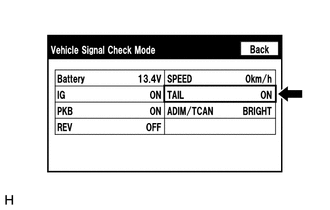
- CHECK VEHICLE SIGNAL (OPERATION CHECK)
- Enter the "Vehicle Signal Check Mode" screen. Refer to Check Vehicle Signal in Operation Check.
Refer to OPERATION CHECK [12/2019 - 10/2022]
- Check that the display changes between ON and OFF according to the light control switch operation.
OK
Light Control Switch Display Tail or head ON Off or AUTO OFF HINT:
- The display is updated once per second. It is normal for the display to lag behind the actual switch operation.
- Make sure to move the vehicle to a bright area before performing an operation check with the light control switch in the AUTO position.
Result
Proceed to OK NG
Result:
OK
REPLACE RADIO AND DISPLAY RECEIVER ASSEMBLY. Refer to REMOVAL [12/2019 - 10/2022]
Result:
NG
PROCEED TO NEXT SUSPECTED AREA SHOWN IN PROBLEM SYMPTOMS TABLE. Refer to PROBLEM SYMPTOMS TABLE [12/2019 - 10/2022]
- Enter the "Vehicle Signal Check Mode" screen. Refer to Check Vehicle Signal in Operation Check.