DTC B15C4-64: Airbag Signal Plausibility Failure [12/2019 - ]: Procedure
- CHECK DTC (AIRBAG SYSTEM)
- Turn the ignition switch off.
- Connect the GTS to the DLC3.
- Turn the ignition switch to ON and wait for 10 seconds or more.
- Turn the GTS on.
- Clear the DTCs.
Body Electrical > SRS Airbag > Clear DTCs
- Check for DTCs and check that no DTCs are output.
Body Electrical > SRS Airbag > Trouble Codes
OK
No DTCs are output.
Result
Proceed to OK NG
Result:
NG
GO TO AIRBAG SYSTEM. Refer to DIAGNOSTIC TROUBLE CODE CHART [12/2019 - 10/2021] , or refer to DIAGNOSTIC TROUBLE CODE CHART [10/2021 - 11/2023] , or refer to DIAGNOSTIC TROUBLE CODE CHART [11/2023 - ]
Result:
OK
See step 2
- CHECK DTC
- Turn the ignition switch off.
- Connect the GTS to the DLC3.
- Turn the ignition switch to ON and wait for 10 seconds or more.
- Turn the GTS on.
- Clear the DTCs.
Body Electrical > Telematics > Clear DTCs
- Check for DTCs and check that no DTCs are output.
Body Electrical > Telematics > Trouble Codes
OK
No DTCs are output.
Result
Proceed to OK NG
Result:
OK
USE SIMULATION METHOD TO CHECK. Refer to HOW TO PROCEED WITH TROUBLESHOOTING [12/2019 - ]
Result:
NG
See step 3
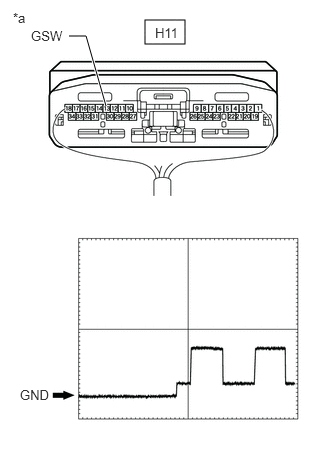
- CHECK DCM (TELEMATICS TRANSCEIVER) (GSW SIGNAL)
- Remove the DCM (telematics transceiver) but do not disconnect the connectors.
*a Component with harness connected
(DCM (Telematics Transceiver))Refer to REMOVAL [12/2019 - 10/2022] , or refer to REMOVAL [10/2022 - 11/2023] , or refer to REMOVAL [11/2023 - ]
- Check the input waveform.
- Check the signal waveform according to the condition(s) in the table below. (Check the waveform from the back of the wire harness connector of the DCM (telematics transceiver) while the airbag sensor assembly connectors are connected.)
Reference Waveform
Item Condition Tester connection H11-13 (GSW) - Body ground Tool setting 5.0 V/DIV., 20 ms/DIV. Vehicle condition Ignition switch on (IG) OK
The waveform is similar to that shown in the illustration.
Result
Proceed to OK NG - Check the signal waveform according to the condition(s) in the table below. (Check the waveform from the back of the wire harness connector of the DCM (telematics transceiver) while the airbag sensor assembly connectors are connected.)
Result:
NG
See step 5
Result:
OK
See step 4
- Remove the DCM (telematics transceiver) but do not disconnect the connectors.
- REPLACE DCM (TELEMATICS TRANSCEIVER)
- Replace the DCM (telematics transceiver).
Refer to REMOVAL [12/2019 - 10/2022] , or refer to REMOVAL [10/2022 - 11/2023] , or refer to REMOVAL [11/2023 - ]
NOTE:- The ignition switch must be off.
- Do not exchange the DCM (telematics transceiver) with one from another vehicle.
Result
Proceed to NEXT
Result:
NEXT
PERFORM DCM ACTIVATION. Refer to DCM ACTIVATION [12/2019 - ]
- Replace the DCM (telematics transceiver).
- CHECK HARNESS AND CONNECTOR (DCM (TELEMATICS TRANSCEIVER) - AIRBAG SENSOR ASSEMBLY)
- Disconnect the H11 DCM (telematics transceiver) connector.
- Disconnect the H58 airbag sensor assembly connector.
- Measure the resistance according to the value(s) in the table below.
Standard Resistance
Tester Connection Condition Specified Condition H11-13 (GSW) - H58-23 (GSW3) Always Below 1 Ω H11-13 (GSW) - Body ground Always 10 kΩ or higher Result
Proceed to OK NG
Result:
OK
REPLACE AIRBAG SENSOR ASSEMBLY. Refer to REMOVAL [12/2019 - 10/2022] , or refer to REMOVAL [10/2022 - 11/2023] , or refer to REMOVAL [11/2023 - ]
Result:
NG
REPAIR OR REPLACE HARNESS OR CONNECTOR