Registration [11/2024 - ]: Procedure
- BEFORE REGISTRATION NOTE:
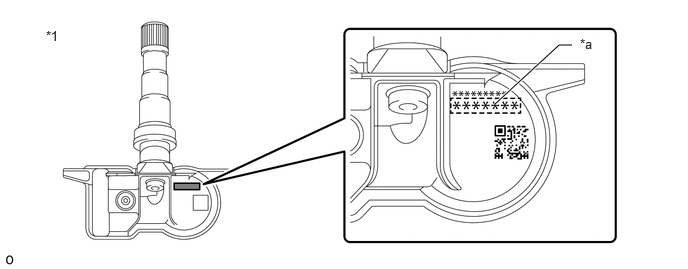
- The transmitter ID is written on the tire pressure warning valve and transmitter. It is not possible to read the transmitter ID after installing the tire onto the wheel. Therefore, make a note of the transmitter ID before installing the tire.
- Tire pressure warning ECU and receiver ID registration after replacement must be performed using the GTS.
- Be sure to check procedures or what work is required after replacing parts.
Refer to PRECAUTION [11/2023 - ]
- When replacing tire pressure warning ECU and receiver:
- Before replacing, use the GTS to read and record all of the current IDs and registered tires with transmitters (4 or 5 tires) of the tire pressure warning valve and transmitter registered to the tire pressure warning ECU and receiver.
- If reading the stored transmitter IDs is impossible due to malfunctions of components such as the tire pressure warning ECU and receiver, remove the tires from the wheels and check the IDs located on the tire pressure warning valve and transmitters.
- When replacing tire pressure warning valve and transmitter:
- REGISTER TRANSMITTER ID (USING GTS)
HINT:
If the ID registration step is not completed within 300 seconds, ID registration will be canceled.
- Set the tire pressure to the specified value.
Refer to INSPECTION [12/2019 - ]
- On the GTS screen, display "ID Registration/Tire Number Registration" of Utility.
Chassis > Tire Pressure Monitor > Utility
Tester Display ID Registration/Tire Number Registration - Perform the procedure displayed on the GTS.
HINT:
The number of tires with transmitters can be changed to 4 wheels only when the default value is set to 5 wheels. The number of tires is changed only when there is a special request from the customer. Normally, the default value for the number of tires is set.
- Set the tire pressure to the specified value.
- TIRE POSITION IDENTIFICATION (USING GTS)
- Set the tire pressure to the specified value.
Refer to INSPECTION [12/2019 - ]
- On the GTS screen, display the Data List.
- Refer to the table below to check the tire pressure with the Data List.
Chassis > Tire Pressure Monitor > Data List
Tester Display Measurement Item Range Normal Condition Diagnostic Note ID 1 Tire Inflation Pressure ID1 tire inflation pressure min.: Absolute pressure (abs) / 0 kPa (0 kgf/cm 2 , 0 psi), Relative pressure (Gauge) / 0 kPa (0 kgf/cm 2 , 0 psi)
max.: Absolute pressure (abs) / 480 kPa (4.9 kgf/cm 2 , 70 psi), Relative pressure (Gauge) / 380 kPa (3.9 kgf/cm 2 , 55 psi)Actual tire inflation pressure Not displayed, if data has not been received.* ID 2 Tire Inflation Pressure ID2 tire inflation pressure min.: Absolute pressure (abs) / 0 kPa (0 kgf/cm 2 , 0 psi), Relative pressure (Gauge) / 0 kPa (0 kgf/cm 2 , 0 psi)
max.: Absolute pressure (abs) / 480 kPa (4.9 kgf/cm 2 , 70 psi), Relative pressure (Gauge) / 380 kPa (3.9 kgf/cm 2 , 55 psi)Actual tire inflation pressure Not displayed, if data has not been received.* ID 3 Tire Inflation Pressure ID3 tire inflation pressure min.: Absolute pressure (abs) / 0 kPa (0 kgf/cm 2 , 0 psi), Relative pressure (Gauge) / 0 kPa (0 kgf/cm 2 , 0 psi)
max.: Absolute pressure (abs) / 480 kPa (4.9 kgf/cm 2 , 70 psi), Relative pressure (Gauge) / 380 kPa (3.9 kgf/cm 2 , 55 psi)Actual tire inflation pressure Not displayed, if data has not been received.* ID 4 Tire Inflation Pressure ID4 tire inflation pressure min.: Absolute pressure (abs) / 0 kPa (0 kgf/cm 2 , 0 psi), Relative pressure (Gauge) / 0 kPa (0 kgf/cm 2 , 0 psi)
max.: Absolute pressure (abs) / 480 kPa (4.9 kgf/cm 2 , 70 psi), Relative pressure (Gauge) / 380 kPa (3.9 kgf/cm 2 , 55 psi)Actual tire inflation pressure Not displayed, if data has not been received.* ID 5 Tire Inflation Pressure ID5 tire inflation pressure min.: Absolute pressure (abs) / 0 kPa (0 kgf/cm 2 , 0 psi), Relative pressure (Gauge) / 0 kPa (0 kgf/cm 2 , 0 psi)
max.: Absolute pressure (abs) / 480 kPa (4.9 kgf/cm 2 , 70 psi), Relative pressure (Gauge) / 380 kPa (3.9 kgf/cm 2 , 55 psi)Actual tire inflation pressure - Not displayed, if data has not been received.*
- w/ Full Size Spare Tire
HINT:
- *: It may take a few minutes until the values are displayed.
- The wheel position cannot be determined from ID1 through ID5 on the Data List.
Chassis > Tire Pressure Monitor > Data List
Tester Display ID 1 Tire Inflation Pressure ID 2 Tire Inflation Pressure ID 3 Tire Inflation Pressure ID 4 Tire Inflation Pressure ID 5 Tire Inflation Pressure - Rapidly reduce the tire pressure for each wheel at least 40 kPa (0.4 kgf/cm 2
, 5.8 psi) within 30 seconds.NOTE:
- It may take a few minutes until the values are displayed.
- When an "ID Tire Inflation Pressure" value has not changed, reset the tire pressure to the appropriate specified value and rotate the tire 90 to 270 degrees. Then rapidly release the tire pressure and recheck the value.
- Read the "ID Tire Inflation Pressure" value and identify the tire with reduced pressure, and record the corresponding tire pressure warning valve and transmitter (ID1 to ID5).
- Repeat for each tire.
- Set the tire pressure to the specified value.
Refer to INSPECTION [12/2019 - ]
- On the GTS screen, display "Tire Position Write" of Utility.
Chassis > Tire Pressure Monitor > Utility
Tester Display Tire Position Write - Perform the procedure displayed on the GTS.
- Set the tire pressure to the specified value.
- REGISTER TRANSMITTER ID (USING TPWS TRIGGER TOOL)
HINT:
TPWS is an abbreviation for Tire Pressure Warning System.
- Temporary registration:
- Adjust the tire pressure in all tires to the specified pressure.
Refer to INSPECTION [12/2019 - ]
- Set the TPWS trigger tool to the ID reading screen.
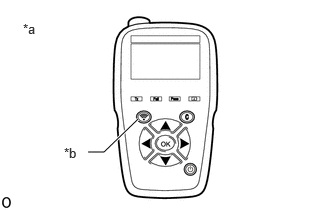
*a TPWS Trigger Tool (ATEQ VT35, VT36, VT55 or VT56) *b Read Button - Step "A":
Turn the ignition switch to ON.
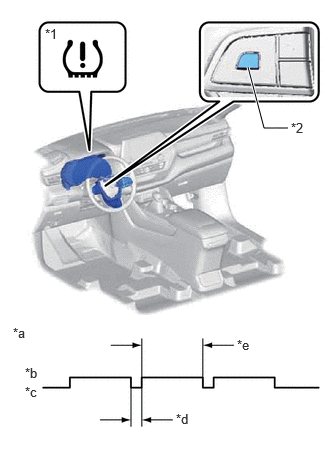
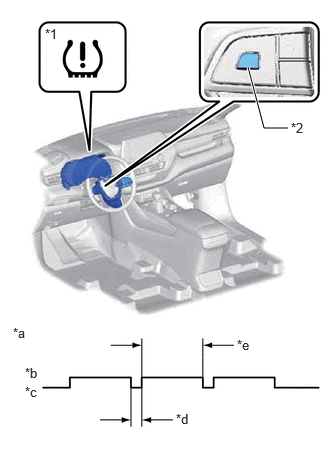
- Operate the steering pad switch assembly and select "Identifying Each Wheel & Position" on the multi-information display, then press and hold the "OK" switch (steering pad switch assembly) until the tire pressure warning light blinks, and perform Step "B" within 35 seconds.
HINT:
During registration, the tire pressure warning light illuminates after blinking for 1.0 minutes and the tire pressure on the multi-information display displays "---".
*1 Tire Pressure Warning Light *2 "OK" Switch (Steering Pad Switch Assembly) *a Tire Pressure Warning Light Output Pattern *b ON (Illuminated) *c OFF (Not Illuminated) *d 0.5 sec. *e 3 sec. - Step "B":
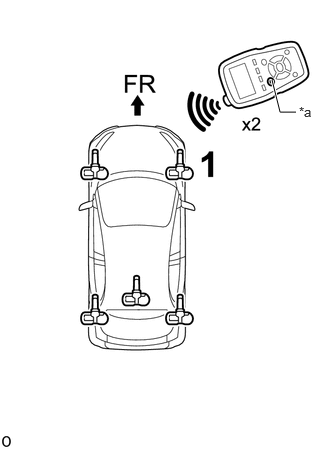
On the TPWS trigger tool, operate the read button at the location shown in the illustration 2 times* to read and temporarily register the ID code of the tire pressure warning valve and transmitter.
HINT:
*: Read Button Operation -> Tire Pressure Screen Display (1 time) -> Read Button Operation -> Tire Pressure Screen Display (2 times)
Sequence Position 1 Front Tire RH Step "B"
*a Read Button NOTE:Operate the TPWS trigger tool while facing and close to each tire pressure warning valve and transmitter.
HINT:
- During the registration procedure, the tire pressure warning light will blink continuously at 0.25 second intervals.
- If registration fails, the tire pressure warning light blinks for 1 minute before turning on and the tire pressure display in the multi-information display becomes "- - -", so perform the procedure from Step "A" again.
- When the temporary registration of each tire is completed, a buzzer sounds inside the vehicle after 3 seconds.
- If the buzzer does not sound, the tire pressure warning valve and transmitter ID of a different vehicle was mistakenly registered, or the electrical waves were not received. Change location, turn the ignition switch from off → ON, and perform the operation again.
- Step "C":
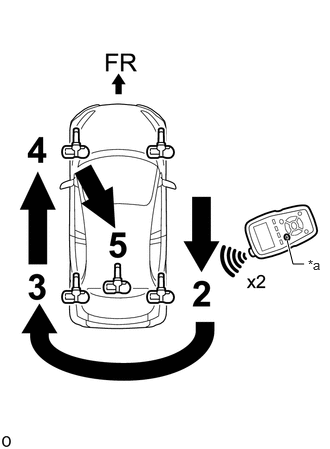
On the TPWS trigger tool, operate the read button at the location shown in the illustration 2 times* to read and temporarily register the ID code of the tire pressure warning valve and transmitter.
HINT:
*: Read Button Operation -> Tire Pressure Screen Display (1 time) -> Read Button Operation -> Tire Pressure Screen Display (2 times)
Step "C"
*a Read Button Sequence Position 2 Rear Tire RH 3 Rear Tire LH 4 Front Tire LH 5* Spare Tire *: w/ Full Size Spare Tire
NOTE:- Temporary registration will not be completed if the operation is performed in the incorrect order.
- Operate the TPWS trigger tool while facing and close to each tire pressure warning valve and transmitter.
HINT:
- During the registration procedure, the tire pressure warning light will blink continuously at 0.25 second intervals.
- If registration fails, the tire pressure warning light blinks for 1 minute before turning on and the tire pressure display in the multi-information display becomes "- - -", so perform the procedure from Step "A" again.
- When the temporary registration of each tire is completed, a buzzer sounds inside the vehicle after 3 seconds.
- Perform the operations from Step "B" to Step "C" within 60 seconds.
- If the buzzer does not sound, the tire pressure warning valve and transmitter ID of a different vehicle was mistakenly registered, or the electrical waves were not received. Change location, turn the ignition switch from off → ON, and perform the operation again
- Check that the tire pressure is "0" on the multi-information display.
HINT:
If the tire pressure is not "0", the temporary registration is not completed. Perform the procedure again from Step "A".
- Adjust the tire pressure in all tires to the specified pressure.
- Main registration and tire position registration:
- Step "D":
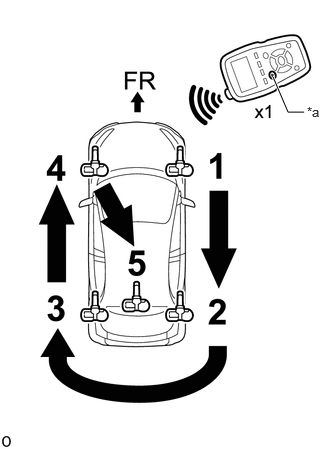
Following the sequence shown, on the TPWS trigger tool, operate the read button 1 time* at each location shown in the illustration to read and perform final registration for each tire pressure warning valve and transmitter ID and register the wheel position.
HINT:
*: Read Button Operation -> Tire Pressure Screen Display (1 time)
Step "D"
*a Read Button Sequence Position 1 Front Tire RH 2 Rear Tire RH 3 Rear Tire LH 4 Front Tire LH 5* Spare Tire *: w/ Full Size Spare Tire
NOTE:- If the order is incorrect, it will not be possible to complete final registration.
- Operate the TPWS trigger tool while facing and close to each tire pressure warning valve and transmitter.
HINT:
- During the registration procedure, the tire pressure warning light will blink continuously at 0.25 second intervals.
- If registration fails, the tire pressure warning light blinks for 1 minute before turning on and the tire pressure display in the multi-information display becomes "- - -", so perform the procedure from Step "A" again.
- When the main registration of each tire is completed, a buzzer sounds inside the vehicle after 3 seconds.
- Perform the operations in Step "D" within 60 seconds.
- If the buzzer does not sound, the tire pressure warning valve and transmitter ID of a different vehicle was mistakenly registered, or the electrical waves were not received. Change location, turn the ignition switch from off → ON, and perform the operation again.
- Check that the tire pressure is displayed on the multi-information display.
- Step "D":
- Rapidly decrease the tire pressure of each wheel to 40 kPa (0.4 kgf/cm 2
, 5.8 psi) or more within 30 seconds, and then check the tire pressure value on the multi-information display.
HINT:
- It may take a few minutes until the values are displayed.
- If the tire pressure data does not change, rotate the tire from 90° to 270°, and check it again.
- Repeat for each tire.
- Adjust the tire pressure in all tires to the specified pressure.
Refer to INSPECTION [12/2019 - ]
- Temporary registration:
- TIRE POSITION IDENTIFICATION (USING TPWS TRIGGER TOOL)
HINT:
TPWS is an abbreviation for Tire Pressure Warning System.
- Read tire pressure warning valve and transmitter ID codes and register wheel positions:
- Adjust the tire pressure in all tires to the specified pressure.
Refer to INSPECTION [12/2019 - ]
- Set the TPWS trigger tool to the ID reading screen.
*a TPWS Trigger Tool (ATEQ VT35, VT36, VT55 or VT56) *b Read Button - Turn the ignition switch to ON.
- Operate the steering pad switch assembly to select "Setting Pressure" on the multi-information display, and then press and hold the OK switch (steering pad switch assembly) until the tire pressure warning light blinks 3 times.
HINT:
During registration, the tire pressure on the multi-information display displays "---".
- Step "A":
Following the sequence shown, on the TPWS trigger tool, operate the read button 1 time* at each location shown in the illustration to read each tire pressure warning valve and transmitter ID and register the wheel position.
Step "A"
*a Read Button HINT:
*: Read Button Operation -> Tire Pressure Screen Display (1 time)
Sequence Position 1 Front Tire RH 2 Rear Tire RH 3 Rear Tire LH 4 Front Tire LH 5* Spare Tire *: w/ Full Size Spare Tire
NOTE:- If the order is incorrect, it will not be possible to complete final registration.
- Operate the TPWS trigger tool while facing and close to each tire pressure warning valve and transmitter.
HINT:
- When the wheel position registration of each tire is completed, a buzzer sounds inside the vehicle after 3 seconds.
- Perform the operations in Step "A" within 60 seconds.
- If the buzzer does not sound, the tire pressure warning valve and transmitter ID of a different vehicle was mistakenly registered, or the electrical waves were not received. Change location, turn the ignition switch from off → ON, and perform the operation again.
- Check that the tire pressure is displayed on the multi-information display.
- Adjust the tire pressure in all tires to the specified pressure.
- Rapidly decrease the tire pressure of each wheel to 40 kPa (0.4 kgf/cm 2
, 5.8 psi) or more within 30 seconds, and then check the tire pressure value on the multi-information display.
HINT:
- It may take a few minutes until the values are displayed.
- If the tire pressure data does not change, rotate the tire from 90° to 270°, and check it again.
- Repeat for each tire.
- Adjust the tire pressure in all tires to the specified pressure.
Refer to INSPECTION [12/2019 - ]
- Read tire pressure warning valve and transmitter ID codes and register wheel positions:
- REGISTER TRANSMITTER ID (USING AUTOMATIC ID REGISTRATION FUNCTION) NOTE:
- If the transmitter IDs have not been registered, Vehicle Control History (RoB) X20FA is stored in the tire pressure warning ECU and receiver after 3 minutes or more.
- If normal pressure values are displayed, the transmitter IDs have been registered correctly.
- If another tire pressure warning valve and transmitter belonging to the same system is installed to a tire other than the one transmitter registration is being performed on, automatic ID registration does not complete.
HINT:
- If the ECU Data List is displayed using the GTS while work is being performed, the registration mode will be canceled.
- If the ignition switch is turned off before starting to drive while performing work, registration mode will be canceled.
- Adjust the tire pressure in all tires to the specified pressure.
Refer to INSPECTION [12/2019 - ]
- Turn the ignition switch off and stop the vehicle for 15 minutes or more.
HINT:
After stopping the vehicle for 15 minutes or more, the frequency of electrical wave signals sent by the tire pressure warning valve and transmitters increases for the first few minutes of driving (8 times the normal frequency).
- Select "Identifying Each Wheel & Position" on the multi-information display and press and hold the "OK" switch (steering pad switch assembly) until the tire pressure warning light blinks 3 times.
HINT:
During registration, the tire pressure warning light blinks for 1 minute before turning on, the multi-information display tire pressure displays as "---" and "Identifying Each Wheel & Position" is displayed.
- Drive at approximately 40 km/h (25 mph) for approximately 10 to 30 minutes during 1 trip.
- During the procedure, make 2 or more right or left turns.
HINT:
Do not drive the vehicle in reverse during registration.
If the vehicle is driven in reverse during registration, the information may be reset before registration completes, and registration may take longer than normal to complete.
- When registration is completed, the tire pressure warning light turns off, the normal tire pressure is displayed on the multi-information display.
HINT:
- Registration may take longer than normal in the following driving environments.
- Vehicle is often stopped
- Vehicle is stopped for long period of time
- Vehicle is driven in reverse
- Vehicle is driven parallel to another vehicle with the same type of tire pressure warning valve and transmitter installed for a long duration of time
- Vehicle was not stopped for 15 minutes or more before registration
- Vehicle was driven at 40 km/h (25 mph) or less for a long duration of time
- The ignition switch is turned from ON to off during ID registration
- Registration may take longer than normal in the following driving environments.
- TIRE POSITION IDENTIFICATION (NOT USING GTS)
- Set the tire pressure to the specified value.
Refer to INSPECTION [12/2019 - ]
- Perform initialization to clear the existing tire position information, then drive the vehicle at 40 km/h (25 mph) or more for 10 to 30 minutes in 1 trip until each tire position is automatically identified.
HINT:
- Do not drive the vehicle in reverse gear while performing Tire Position Identification. If the vehicle is driven in reverse gear while performing Tire Position Identification, identification information will be discarded and Tire Position Identification may take longer than usual.
- When the vehicle is driven under the following conditions, Tire Position Identification may take longer than usual.
- The vehicle is stopped frequently.
- The vehicle is stopped for a long period of time.
- The vehicle is driven in reverse gear.
- The vehicle is driven on rough roads or uneven surfaces.
- Set the tire pressure to the specified value.
- METHOD TO SWITCH ID NOTE:
- If there is a malfunction in the tire pressure warning system, perform troubleshooting before switching IDs.
- To use the ID switching function, a tire and wheel set for which the IDs have already been registered is needed.
- Install the tire and wheel set for which the IDs have already been registered.
- Turn the ignition switch to ON.
- Select "Identifying Each Wheel & Position" on the multi-information display and press and hold the "OK" switch (steering pad switch assembly) until the tire pressure warning light blinks 3 times.
HINT:
During registration, the tire pressure warning light blinks for 1 minute before turning on, the multi-information display tire pressure displays as "- - -" and "Identifying Each Wheel & Position" is displayed.
*1 Tire Pressure Warning Light *2 "OK" Switch (Steering Pad Switch Assembly) *a Tire Pressure Warning Light Output Pattern *b ON (Illuminated) *c OFF (Not Illuminated) *d 0.5 sec. *e 3 sec. - Stop the vehicle and wait for 2 minutes.NOTE:
Do not drive the vehicle during the ID switching procedure. Driving the vehicle will cause it to change to the automatic ID registration mode.
- When ID switching is complete, the tire pressure warning light turns off and the message "Identifying Each Wheel & Position" stops being displayed in the multi-information display.
- Perform tire position identification.
Identification using GTS: See step 3
Identification by driving vehicle: See step 6
Identification using TPWS trigger tool: See step 4
HINT:
- When wheel position identification is complete, the tire pressures are shown in the multi-information display.
- TPWS is an abbreviation for Tire Pressure Warning System.