Initialization [11/2023 - ]
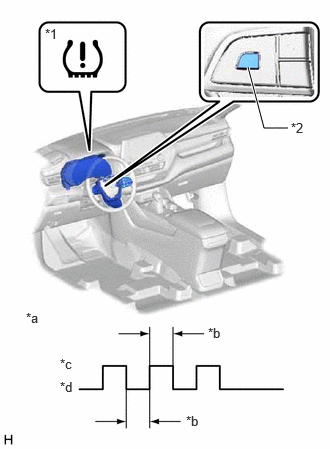
- Initialization can be confirmed through the tire pressure warning light.
- If the ignition switch is turned off during initialization, the tire pressure warning ECU and receiver memorizes that initialization was being performed. Therefore, it is not necessary to perform the initialization procedure again after turning the ignition switch to ON.
- The order in which the data is received is random.
- If the signals from all the tire pressure warning valve and transmitters are received, initialization is completed.
- Initialization is completed when the Data List "ID Tire Inflation Pressure" display shows the correct pressures.
Refer to DATA LIST / ACTIVE TEST [11/2023 - ]
- Initialization is normally completed within a few minutes. However, it may take 10 minutes or more until the tire pressure of the tire inflation pressure display function is shown.
- It may take a few minutes until the values are displayed. If the values are not displayed after a few minutes, perform troubleshooting according to the inspection procedure for DTCs C2141-87 to C2144-87 (C2145-87: w/ Full Size Spare Tire).
Refer to DTC C2141-87: Tire Pressure Monitor Transmitter ID 1 Missing Message; DTC C2142-87: Tire Pressure Monitor Transmitter ID 2 Missing Message; DTC C2143-87: Tire Pressure Monitor Transmitter ID 3 Missing Message; DTC C2144-87: Tire Pressure Monitor Transmitter ID 4 Missing Message; DTC C2145-87: Tire Pressure Monitor Transmitter ID 5 Missing Message [11/2023 - 11/2024] , or refer to DTC C2141-87: Tire Pressure Monitor Transmitter ID 1 Missing Message; DTC C2142-87: Tire Pressure Monitor Transmitter ID 2 Missing Message; DTC C2143-87: Tire Pressure Monitor Transmitter ID 3 Missing Message; DTC C2144-87: Tire Pressure Monitor Transmitter ID 4 Missing Message; DTC C2145-87: Tire Pressure Monitor Transmitter ID 5 Missing Message [11/2024 - ]
- If initialization has not been completed successfully, Vehicle Control History (RoB) X20FE is stored after a vehicle speed of 40 km/h (25 mph) or more continues for 20 minutes or more.
- If initialization is performed, the existing tire positions will be cleared, but will be automatically identified when the vehicle is driven at 40 km/h (25 mph) or more for 10 to 30 minutes.
- BEFORE INITIALIZATION
- Set the tire pressure to the specified value.NOTE:
Refer to the link as the procedure for adjusting the tire pressures differs depending on the temperature of the tires.
Refer to INSPECTION [12/2019 - ]
- Set the tire pressure to the specified value.
- INITIALIZATION PROCEDURE
HINT:
The tire pressure warning system illuminates the tire pressure warning light to warn the driver when any of the following conditions are met:
- The tire pressure drops to approximately 75% or less of the tire pressure set when system initialization was performed using the steering pad switch assembly.
- The tire pressure drastically decreases (approximately 25 kPa (0.25 kgf/cm 2
, 3.6 psi) or more within several minutes) to approximately 75% or less of the tire pressure* when the tires are warmed.
*: If initialization is performed and the vehicle is driven for a certain period of time, the tire pressure set during system initialization is adjusted and set to the tire pressure when the tires are warmed from the driving conditions.
NOTE:If the tire pressure is decreased approximately 25 kPa (0.25 kgf/cm 2 , 3.6 psi) or more in order to adjust the tire pressure, even if the adjusted tire pressure is 75% or more than the tire pressure set during system initialization, the tire pressure warning light may illuminate if the tire pressure drops below 75% of the tire pressure set when the tires are warmed. In this case, perform initialization again.
- Select "Setting Pressure" on the multi-information display and press and hold the "OK" switch (steering pad switch assembly) until the tire pressure warning light blinks 3 times.
*1 Tire Pressure Warning Light *2 "OK" Switch (Steering Pad Switch Assembly) *a Tire Pressure Warning Light Output Pattern *b 1 sec. *c ON *d OFF - Display the Data List items shown in the following table.
Chassis > Tire Pressure Monitor > Data List
Tester Display Measurement Item Range Normal Condition Diagnostic Note ID 1 Tire Inflation Pressure ID1 tire inflation pressure min.: Absolute pressure (abs) / 0 kPa (0 kgf/cm 2 , 0 psi), Relative pressure (Gauge) / 0 kPa (0 kgf/cm 2 , 0 psi)
max.: Absolute pressure (abs) / 480 kPa (4.9 kgf/cm 2 , 70 psi), Relative pressure (Gauge) / 380 kPa (3.9 kgf/cm 2 , 55 psi)Actual tire inflation pressure Not displayed, if data has not been received.* ID 2 Tire Inflation Pressure ID2 tire inflation pressure min.: Absolute pressure (abs) / 0 kPa (0 kgf/cm 2 , 0 psi), Relative pressure (Gauge) / 0 kPa (0 kgf/cm 2 , 0 psi)
max.: Absolute pressure (abs) / 480 kPa (4.9 kgf/cm 2 , 70 psi), Relative pressure (Gauge) / 380 kPa (3.9 kgf/cm 2 , 55 psi)Actual tire inflation pressure Not displayed, if data has not been received.* ID 3 Tire Inflation Pressure ID3 tire inflation pressure min.: Absolute pressure (abs) / 0 kPa (0 kgf/cm 2 , 0 psi), Relative pressure (Gauge) / 0 kPa (0 kgf/cm 2 , 0 psi)
max.: Absolute pressure (abs) / 480 kPa (4.9 kgf/cm 2 , 70 psi), Relative pressure (Gauge) / 380 kPa (3.9 kgf/cm 2 , 55 psi)Actual tire inflation pressure Not displayed, if data has not been received.* ID 4 Tire Inflation Pressure ID4 tire inflation pressure min.: Absolute pressure (abs) / 0 kPa (0 kgf/cm 2 , 0 psi), Relative pressure (Gauge) / 0 kPa (0 kgf/cm 2 , 0 psi)
max.: Absolute pressure (abs) / 480 kPa (4.9 kgf/cm 2 , 70 psi), Relative pressure (Gauge) / 380 kPa (3.9 kgf/cm 2 , 55 psi)Actual tire inflation pressure Not displayed, if data has not been received.* ID 5 Tire Inflation Pressure ID5 tire inflation pressure min.: Absolute pressure (abs) / 0 kPa (0 kgf/cm 2 , 0 psi), Relative pressure (Gauge) / 0 kPa (0 kgf/cm 2 , 0 psi)
max.: Absolute pressure (abs) / 480 kPa (4.9 kgf/cm 2 , 70 psi), Relative pressure (Gauge) / 380 kPa (3.9 kgf/cm 2 , 55 psi)Actual tire inflation pressure - Not displayed, if data has not been received.*
- w/ Full Size Spare Tire
HINT:
- *: It may take a few minutes until the values are displayed.
- The wheel position cannot be determined from ID1 through ID5 on the Data List.
Chassis > Tire Pressure Monitor > Data List
Tester Display ID 1 Tire Inflation Pressure ID 2 Tire Inflation Pressure ID 3 Tire Inflation Pressure ID 4 Tire Inflation Pressure ID 5 Tire Inflation Pressure - Check that initialization has been completed.
- Confirm that the tire pressure data of all tires is displayed on the GTS screen.