Calibration [11/2023 - ]
- ADJUST PANORAMIC VIEW MONITOR SYSTEM
- This panoramic view monitor system can be set from the diagnostic screen of the radio and display receiver assembly.
- If the following operations are performed, it is necessary to perform adjustments and checks on the diagnostic screen.
- Conduct the pre-work checks (Procedure 1) before performing screen adjustment.
Part Name Operation Adjustment Item Proceed to Parking assist ECU Replacement Parking assist ECU initialization Procedure 2 Procedure 7*1 Procedure 8*2 Procedure 9 Suspension, tires, etc. The vehicle height changes because of suspension or tire replacement Parking assist ECU initialization Procedure 2 Procedure 7*1 Procedure 8*2 Procedure 9 Rear television camera assembly - Replacement
- Installation angle of the rear television camera changes because of the removal and installation of the rear television camera, etc.
Rear television camera view adjustment Procedure 2 Procedure 4*1 Procedure 8*2 Procedure 9 - Front television camera assembly
- Front bumper assembly
- Radiator grille assembly
- Replacement
- Installation angle of the front television camera changes because of the removal and installation of the front television camera, etc.
Front television camera view adjustment Procedure 2 Procedure 3*1 Procedure 8*2 Procedure 9 - Side television camera assembly LH
- Outer rear view mirror assembly LH
- Replacement
- Installation angle of the side television camera changes because of the removal and installation of the side television camera, etc.
Side television camera view adjustment Procedure 2 Procedure 5*1 Procedure 8*2 Procedure 9 - Side television camera assembly RH
- Outer rear view mirror assembly RH
- Replacement
- Installation angle of the side television camera changes because of the removal and installation of the side television camera, etc.
Side television camera view adjustment Procedure 2 Procedure 6*1 Procedure 8*2 Procedure 9 - Front television camera assembly, radiator grille assembly or front bumper assembly
- Rear television camera assembly
- Side television camera assembly LH or outer rear view mirror assembly LH
- Side television camera assembly RH or outer rear view mirror assembly RH
Replacement or removal and installation of 2 or more parts Television camera view adjustment Procedure 2 Procedure 7*1 Procedure 8*2 Procedure 9 *1: At the time of SST (marker tool set) non-use*2: At the time of use SST (marker tool set)
- PROCEDURE 1: PRE-WORK CHECKS
- Preliminary checksNOTE:
- Provide shadow to prevent backlight from hitting the camera.
- Use string that does not stretch.
- Apply pieces of adhesive tape to serve as check markers. When placing the markers, make them 100 mm (3.94 in.) wide.
- SST may also be used for the recognition markers and the positioning and check markers used in optical axis adjustment.
- Perform the work in a wide, level location.
- Forward/rearward of the vehicle: Approximately 1.3 m each end
- Left/right of the vehicle: Approximately 1.2 m each side
- Park the vehicle on a flat surface with the steering wheel centered.NOTE:
Before stopping the vehicle, move the vehicle backward and forward to ensure that both the steering wheel and the tires point straight ahead.
- Adjust the tire pressure to the specified value(s).
- Remove all luggage from the vehicle and place the markers before starting work.
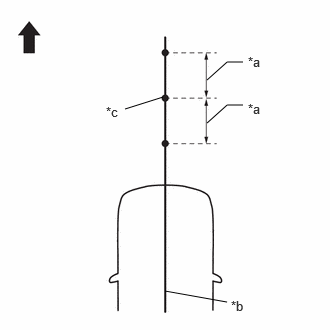
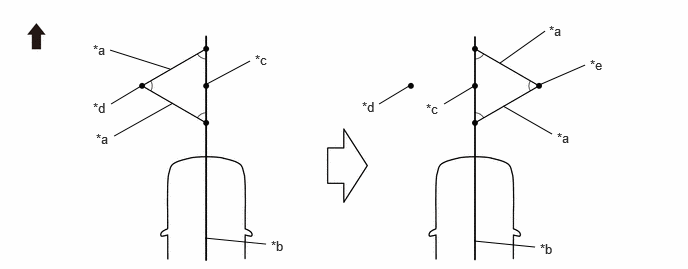
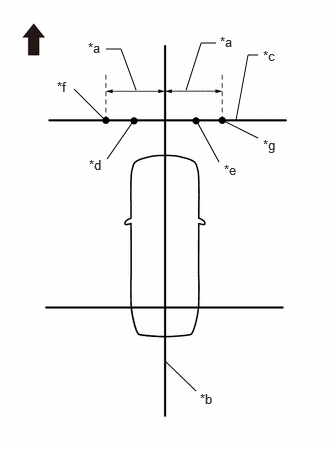
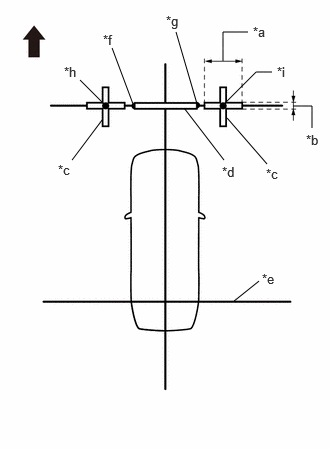
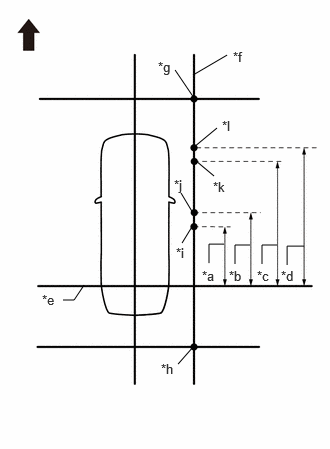
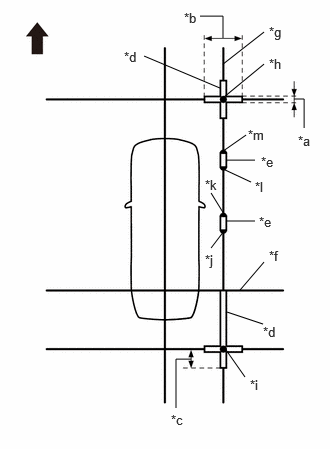
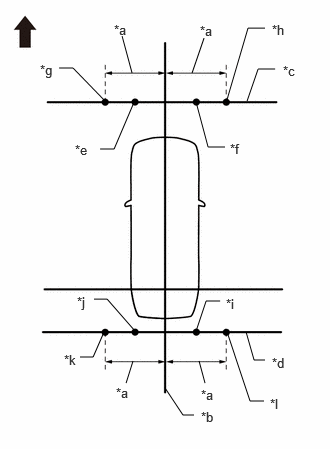
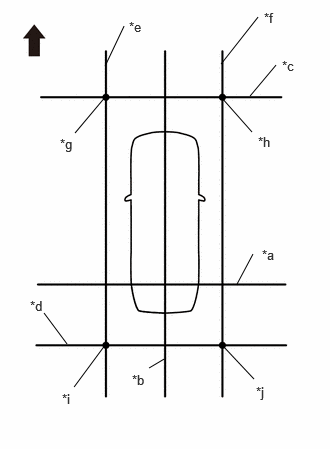
- Marker locations (check marker)
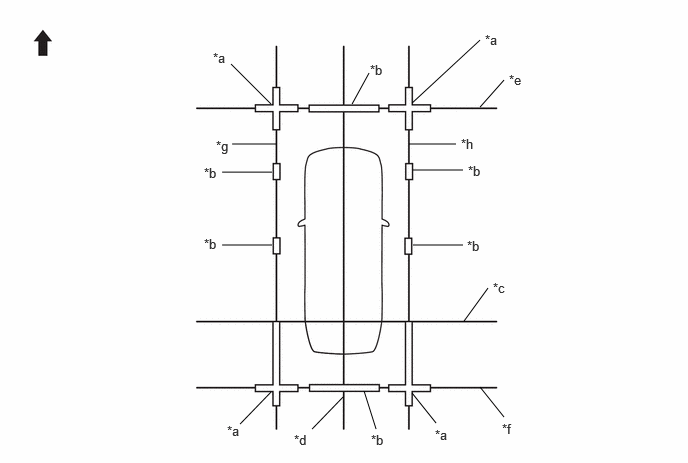
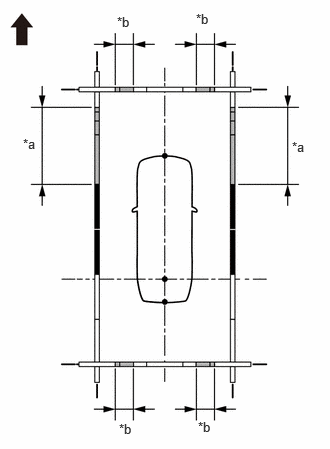
- Secure the string to the locations required to make the checks and set markers as shown in the illustration.
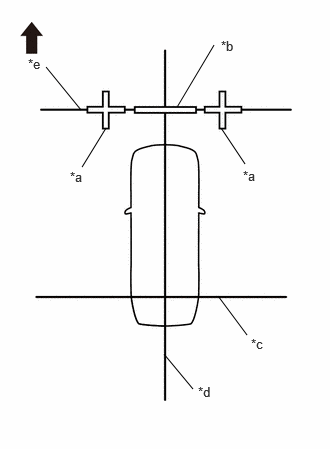
- Front camera adjustment only
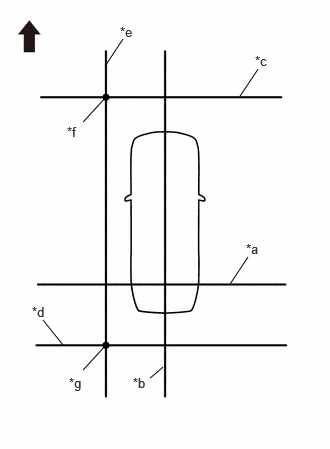
*a Cross Check Marker *b Check Marker *c String 1 *d String 2 *e String 3 
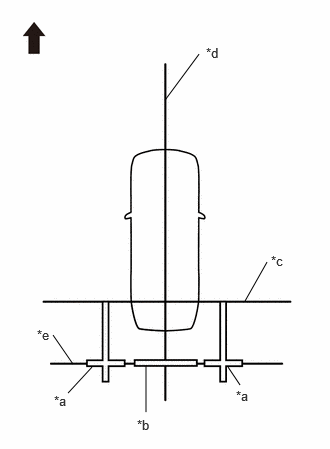
Front of Vehicle - Rear camera adjustment only
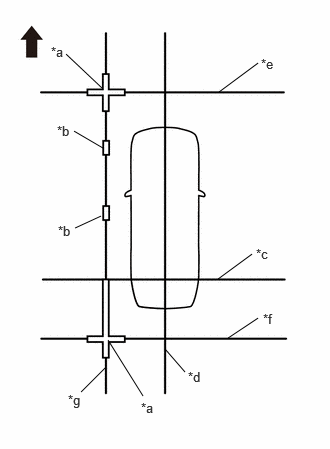
*a Cross Check Marker *b Check Marker *c String 1 *d String 2 *e String 4 Front of Vehicle - Left camera adjustment only
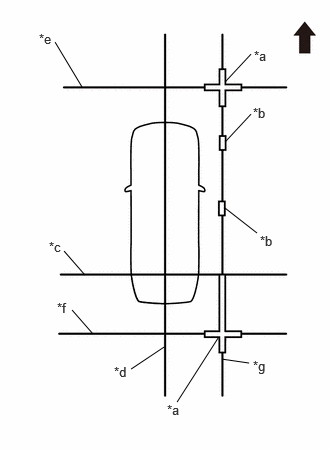
*a Cross Check Marker *b Check Marker *c String 1 *d String 2 *e String 3 *f String 4 *g String 5 Front of Vehicle - Right camera adjustment only
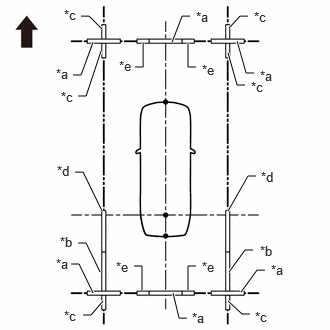
*a Cross Check Marker *b Check Marker *c String 1 *d String 2 *e String 3 *f String 4 *g String 6 Front of Vehicle - Adjustment of 4 cameras
*a Cross Check Marker *b Check Marker *c String 1 *d String 2 *e String 3 *f String 4 *g String 5 *h String 6 Front of Vehicle - -
- Front camera adjustment only
- Secure the string to the locations required to make the checks and set markers as shown in the illustration.
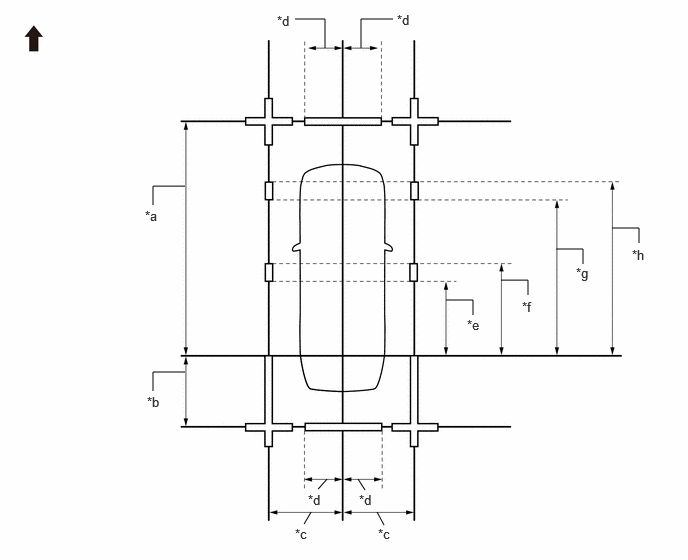
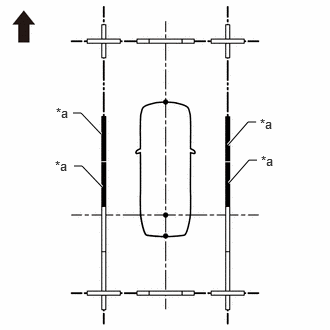
- Marker positions
- Preliminary checks
- PROCEDURE 2: SET DATUM POINTS
- Extend the datum line (string 1).
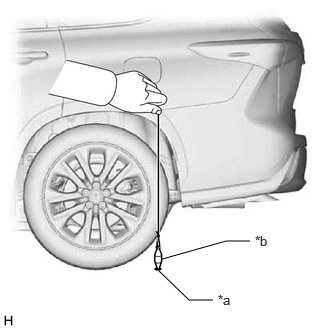
- Hang a weight with a pointed tip and accurately mark the center position on the road surface. (Mark A)NOTE:
Make sure that the weight hangs straight down from the string.
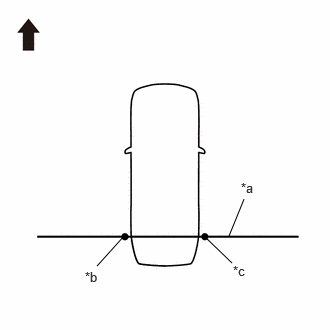
*a Mark A *b Weight - Repeat the procedure to mark the right side. (Mark B)
- Secure string 1 so that it passes through marks A and B on the left and right sides.
*a String 1 *b Mark A *c Mark B Front of Vehicle NOTE:When securing the string, check that there is no slack and the string is not twisted.
- Hang a weight with a pointed tip and accurately mark the center position on the road surface. (Mark A)
- Extend the vehicle center line (string 2).
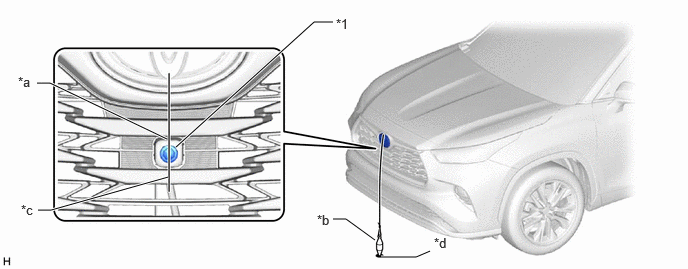
- Hang a weight with a pointed tip such that is passes through the center of the front television camera assembly and accurately mark the center position on the road surface. (Mark C)
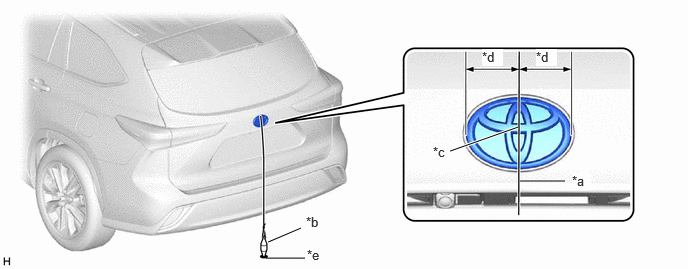
*1 Front Television Camera Assembly - - *a Center Point *b Weight *c String *d Mark C - Hang a weight with a pointed tip from the center of the rear emblem and accurately mark the center position on the road surface. (Mark D)
*a String *b Weight *c Center *d Bilateral Symmetry *e Mark D - - - Secure string 2 so that it passes through marks C and D at the front and rear of the vehicle.NOTE:
When securing string, check that there is no slack and the string is not twisted.
HINT:
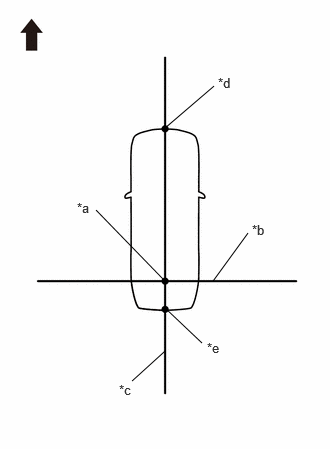
Set the point where strings 1 and 2 intersect as the datum point.
*a Datum Point *b String 1 *c String 2 *d Mark C *e Mark D Front of Vehicle
- Hang a weight with a pointed tip such that is passes through the center of the front television camera assembly and accurately mark the center position on the road surface. (Mark C)
- Extend the datum line (string 1).
- PROCEDURE 3: SET MARKERS (FRONT ADJUSTMENT)
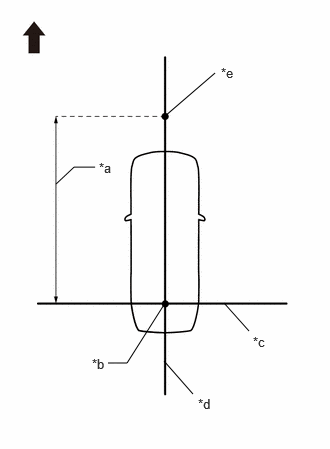
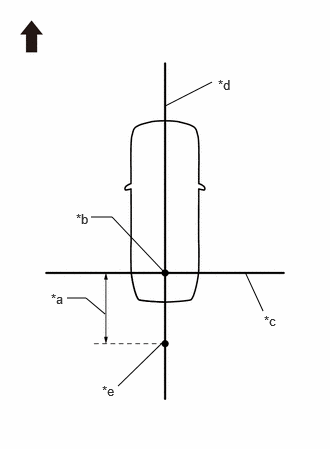
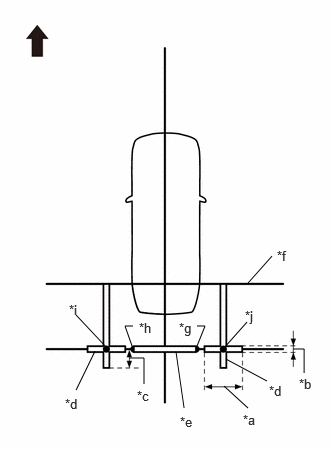
*a 5000 mm (16.40 ft.) *b Datum Point *c String 1 *d String 2 *e Mark E Front of Vehicle In front of the vehicle, extend string (3) perpendicular to the vehicle center line (string (2)), and place a marker.
- Mark the position on string 2 in front of the vehicle, 5000 mm (16.40 ft.) from the datum point. (Mark E)
- Fix the ends of 2 strings (800 mm [2.62 ft.] long) at 2 positions 400 mm (1.31 ft.) from mark E as shown in the illustration.
*a 400 mm (1.31 ft.) *b String 2 *c Mark E Front of Vehicle - Move the free ends of the 2 strings and mark the point where the ends meet. (Marks F and G)
*a 800 mm (2.62 ft.) String *b String 2 *c Mark E *d Mark F *e Mark G - - Front of Vehicle - - - Secure string (3) so that it passes through marks F and G as shown in the illustration.NOTE:
When securing the string, check that there is no slack and the string is not twisted.
*a 1600 mm (5.25 ft.) *b String 2 *c String 3 *d Mark F *e Mark G *f Mark H *g Mark I Front of Vehicle - Mark positions on string (3), 1600 mm (5.25 ft.) to the left and right of the vehicle center line (string 2). (Marks H and I).
- Place and secure the cross check markers, centered on marks H and I.
*a 800 mm (2.62 ft.) *b 100 mm (0.33 ft.) *c Cross Check Marker *d Check Marker *e String 1 *f Mark F *g Mark G *h Mark H *i Mark I Front of Vehicle NOTE:- Align the cross check markers perpendicular to the string.
- Make each arm of the cross check markers 800 mm (2.62 ft.) long and 100 mm (0.33 ft.) wide.
- Place the check marker between marks F and G.
- Perform camera view adjustment (calibration) (procedure 9).
- PROCEDURE 4: SET MARKERS (REAR ADJUSTMENT)
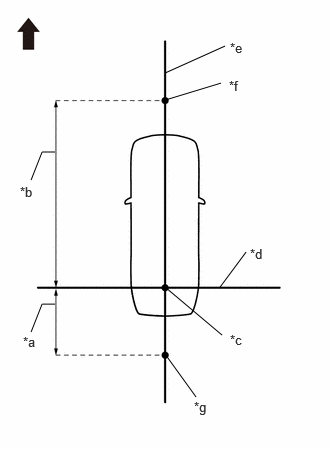
- To the rear of the vehicle, extend string (4) perpendicular to the vehicle center line (string (2)), and place a check marker.
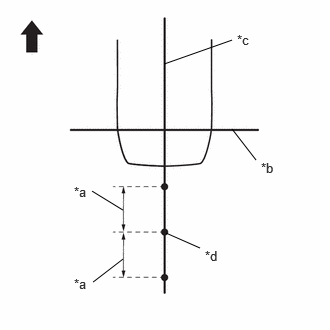
- Mark a position on string 2 to the rear of the vehicle, 1500 mm (4.92 ft.) from the datum point. (Mark J)
*a 1500 mm (4.92 ft.) *b Datum Point *c String 1 *d String 2 *e Mark J Front of Vehicle - Fix the ends of 2 strings (800 mm [2.62 ft.]) at 2 positions 400 mm (1.31 ft.) from mark J as shown in the illustration.
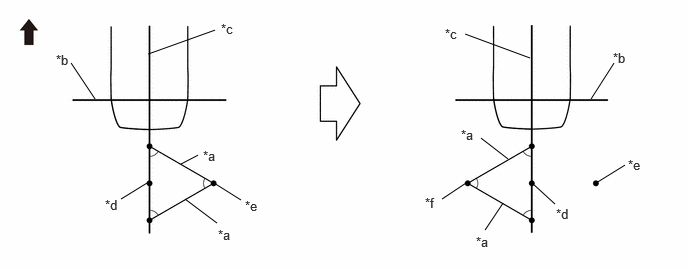
*a 400 mm (1.31 ft.) *b String 1 *c String 2 *d Mark J Front of Vehicle - Move the free ends of the 2 strings and mark the point where the ends meet. (Marks K and L)
*a 800 mm (2.62 ft.) String *b String 1 *c String 2 *d Mark J *e Mark K *f Mark L Front of Vehicle - - - Secure string (4) so that it passes through marks K and L as shown in the illustration.
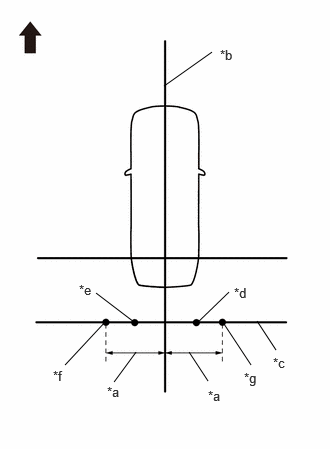
*a 1600 mm (5.25 ft.) *b String 2 *c String 4 *d Mark K *e Mark L *f Mark M *g Mark N Front of Vehicle NOTE:When securing the string, check that there is no slack and the string is not twisted.
- Mark positions on string (4), 1600 mm (5.25 ft.) to the left and right of the vehicle center line (string 2). (Marks M and N)
- Place and secure the cross check markers, centered on marks M and N.
*a 800 mm (2.62 ft.) *b 100 mm (0.33 ft.) *c 400 mm (1.31 ft.) *d Cross Check Marker *e Check Marker *f String 1 *g Mark K *h Mark L *i Mark M *j Mark N Front of Vehicle NOTE:- Align the cross check markers perpendicular to the string.
- Make each arm of the cross check markers 800 mm (2.62 ft.) long and 100 mm (0.33 ft.) wide.
- Extend the rear cross check markers to string 1.
- Place the check marker between marks K and L.
- Perform camera view adjustment (calibration) (procedure 9).
- Mark a position on string 2 to the rear of the vehicle, 1500 mm (4.92 ft.) from the datum point. (Mark J)
- To the rear of the vehicle, extend string (4) perpendicular to the vehicle center line (string (2)), and place a check marker.
- PROCEDURE 5: SET MARKERS (LEFT-SIDE ADJUSTMENT)
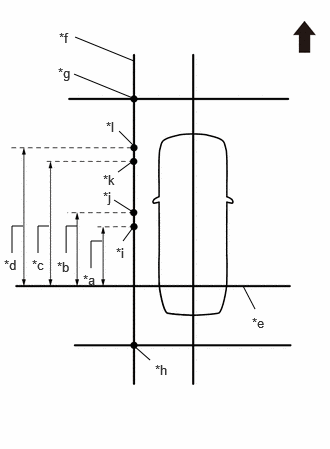
- At the left side of the vehicle, extend string (5) parallel to the vehicle center line (string (2)), and place a marker
- Mark the position on string (2) in front of the vehicle, 5000 mm (16.40 ft.) from the datum point. (Mark E)
*a 1500 mm (4.92 ft.) *b 5000 mm (16.40 ft.) *c Datum Point *d String 1 *e String 2 *f Mark E *g Mark J Front of Vehicle - Mark the position on string (2) to the rear of the vehicle, 1500 mm (4.92 ft.) from the datum point. (Mark J)
- Fix the ends of 2 strings (800 mm [2.62 ft.] long) at 2 positions 400 mm (1.31 ft.) from mark E as shown in the illustration.
*a 400 mm (1.31 ft.) *b String 2 *c Mark E Front of Vehicle - Move the free ends of the 2 strings and mark the point where the ends meet. (Marks F and G)
*a 800 mm (2.62 ft.) String *b String 2 *c Mark E *d Mark F *e Mark G - - Front of Vehicle - - - Fix the ends of 2 strings (800 mm [2.62 ft.]) at 2 positions 400 mm (1.31 ft.) from mark J as shown in the illustration.
*a 400 mm (1.31 ft.) *b String 1 *c String 2 *d Mark J Front of Vehicle - Move the free ends of the 2 strings and mark the point where the ends meet. (Marks K and L)
*a 800 mm (2.62 ft.) String *b String 1 *c String 2 *d Mark J *e Mark K *f Mark L Front of Vehicle - - - Secure strings (3) and (4) so that they pass through marks F and G, marks K and L as shown in the illustration.NOTE:
When securing the string, check that there is no slack and the string is not twisted.
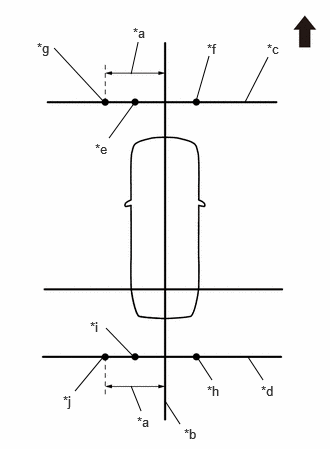
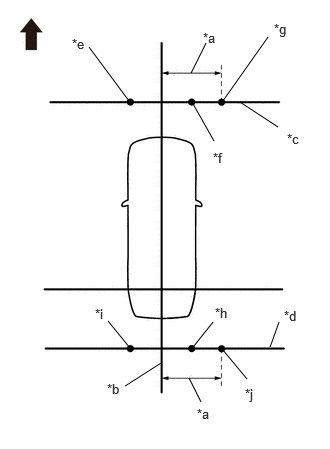
*a 1600 mm (5.25 ft.) *b String 2 *c String 3 *d String 4 *e Mark F *f Mark G *g Mark H *h Mark K *i Mark L *j Mark M Front of Vehicle - Mark strings (3) and (4), 1600 mm (5.25 ft.) to the left of the vehicle center line (string 2). (Marks H and M)
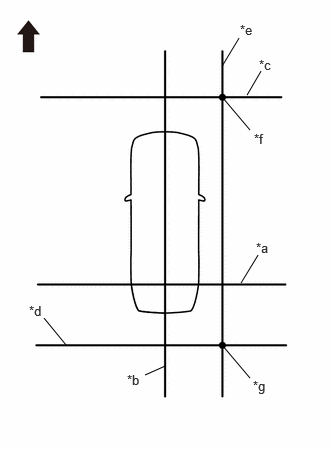
- Secure string (5) so that it passes through marks H and M as shown in the illustration.NOTE:
When securing the string, check that there is no slack and the string is not twisted.
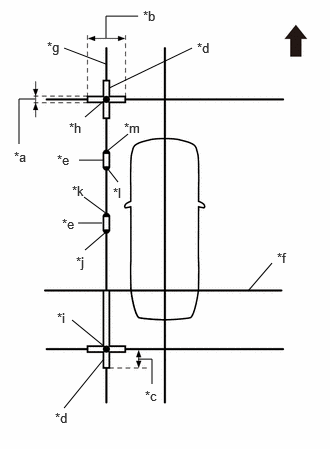
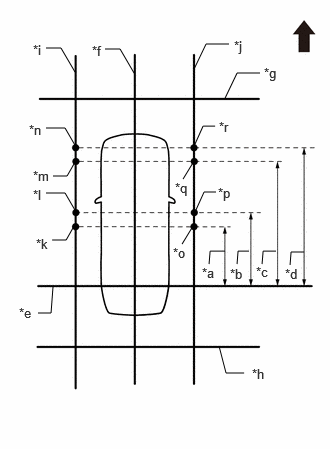
*a String 1 *b String 2 *c String 3 *d String 4 *e String 5 *f Mark H *g Mark M Front of Vehicle *a 1400 mm (4.59 ft.) *b 1600 mm (5.25 ft.) *c 3100 mm (10.17 ft.) *d 3300 mm (10.82 ft.) *e String 1 *f String 5 *g Mark H *h Mark M *i Mark O *j Mark P *k Mark Q *l Mark R Front of Vehicle Make marks on string (5) that are 1400 mm (4.59 ft.), 1600 mm (5.25 ft.), 3100 mm (10.17 ft.) and 3300 mm (10.82 ft.) from the datum line (string 1) as shown in the illustration. (Marks O, P, Q and R)
- Place and secure the cross check markers, centered on marks H and M.
*a 100 mm (0.33 ft.) *b 800 mm (2.62 ft.) *c 400 mm (1.31 ft.) *d Cross Check Marker *e Check Marker *f String 1 *g String 5 *h Mark H *i Mark M *j Mark O *k Mark P *l Mark Q *m Mark R Front of Vehicle NOTE:- Align the cross check markers perpendicular to the string.
- Make each arm of the cross check markers 800 mm (2.62 ft.) long and 100 mm (0.33 ft.) wide.
- Extend the rear cross check markers to string 1.
- Place check markers between marks O and P, and marks Q and R.
- Perform camera view adjustment (calibration) (procedure 9).
- Mark the position on string (2) in front of the vehicle, 5000 mm (16.40 ft.) from the datum point. (Mark E)
- At the left side of the vehicle, extend string (5) parallel to the vehicle center line (string (2)), and place a marker
- PROCEDURE 6: SET MARKERS (RIGHT-SIDE ADJUSTMENT)
- At the right side of the vehicle, extend string (6) parallel to the vehicle center line (string (2)), and place a marker.
- Mark the position on string (2) in front of the vehicle, 5000 mm (16.40 ft.) from the datum point. (Mark E)
*a 1500 mm (4.92 ft.) *b 5000 mm (16.40 ft.) *c Datum Point *d String 1 *e String 2 *f Mark E *g Mark J Front of Vehicle - Mark the position on string (2) to the rear of the vehicle, 1500 mm (4.92 ft.) from the datum point. (Mark J)
- Fix the ends of 2 strings (800 mm [2.62 ft.] long) at 2 positions 400 mm (1.31 ft.) from mark E as shown in the illustration.
*a 400 mm (1.31 ft.) *b String 2 *c Mark E Front of Vehicle - Move the free ends of the 2 strings and mark the point where the ends meet. (Marks F and G)
*a 800 mm (2.62 ft.) String *b String 2 *c Mark E *d Mark F *e Mark G - - Front of Vehicle - - - Fix the ends of 2 strings (800 mm [2.62 ft.]) at 2 positions 400 mm (1.31 ft.) from mark J as shown in the illustration.
*a 400 mm (1.31 ft.) *b String 1 *c String 2 *d Mark J Front of Vehicle - Move the free ends of the 2 strings and mark the point where the ends meet. (Marks K and L)
*a 800 mm (2.62 ft.) String *b String 1 *c String 2 *d Mark J *e Mark K *f Mark L Front of Vehicle - - - Secure strings (3) and (4) so that they pass through marks F and G and marks K and L as shown in the illustration.NOTE:
When securing the string, check that there is no slack and the string is not twisted.
*a 1600 mm (5.25 ft.) *b String 2 *c String 3 *d String 4 *e Mark F *f Mark G *g Mark I *h Mark K *i Mark L *j Mark N Front of Vehicle - Mark strings (3) and (4), 1600 mm (5.25 ft.) to the right of the vehicle center line (string 2). (Marks I and N)
- Secure string (6) so that it passes through marks I and N as shown in the illustration.NOTE:
When securing the string, check that there is no slack and the string is not twisted.
*a String 1 *b String 2 *c String 3 *d String 4 *e String 6 *f Mark I *g Mark N Front of Vehicle - Make marks on string (6) that are 1400 mm (4.59 ft.), 1600 mm (5.25 ft.), 3100 mm (10.17 ft.) and 3300 mm (10.82 ft.) from the datum line (string 1) as shown in the illustration. (Marks S, T, U and V)
*a 1400 mm (4.59 ft.) *b 1600 mm (5.25 ft.) *c 3100 mm (10.17 ft.) *d 3300 mm (10.82 ft.) *e String 1 *f String 6 *g Mark I *h Mark N *i Mark S *j Mark T *k Mark U *l Mark V Front of Vehicle - Place and secure the cross check markers, centered on marks I and N.
*a 100 mm (0.33 ft.) *b 800 mm (2.62 ft.) *c 400 mm (1.31 ft.) *d Cross Check Marker *e Check Marker *f String 1 *g String 6 *h Mark I *i Mark N *j Mark S *k Mark T *l Mark U *m Mark V Front of Vehicle NOTE:- Align the cross check markers perpendicular to the string.
- Make each arm of the cross check markers 800 mm (2.62 ft.) long and 100 mm (0.33 ft.) wide.
- Extend the rear cross check markers to string 1.
- Place check markers between marks S and T, and marks U and V.
- Perform camera view adjustment (calibration) (procedure 9).
- Mark the position on string (2) in front of the vehicle, 5000 mm (16.40 ft.) from the datum point. (Mark E)
- At the right side of the vehicle, extend string (6) parallel to the vehicle center line (string (2)), and place a marker.
- PROCEDURE 7: SET MARKERS (ADJUSTMENT OF ALL CAMERAS)
- At the right and left sides of the vehicle, extend strings (5) and (6) parallel to the vehicle center line (string 2), and place markers.
*a 1500 mm (4.92 ft.) *b 5000 mm (16.40 ft.) *c Datum Point *d String 1 *e String 2 *f Mark E *g Mark J Front of Vehicle Mark the position on string (2) in front of the vehicle, 5000 mm (16.40 ft.) from the datum point. (Mark E)
- Mark the position on string (2) to the rear of the vehicle, 1500 mm (4.92 ft.) from the datum point. (Mark J)
*a 400 mm (1.31 ft.) *b String 2 *c Mark E Front of Vehicle Fix the ends of 2 strings (800 mm [2.62 ft.] long) at 2 positions 400 mm (1.31 ft.) from mark E as shown in the illustration.
- Move the free ends of the 2 strings and mark the point where the ends meet. (Marks F and G)
*a 800 mm (2.62 ft.) String *b String 2 *c Mark E *d Mark F *e Mark G - - Front of Vehicle - - *a 400 mm (1.31 ft.) *b String 1 *c String 2 *d Mark J Front of Vehicle Fix the ends of 2 strings (800 mm [2.62 ft.]) at 2 positions 400 mm (1.31 ft.) from mark J as shown in the illustration.
- Move the free ends of the 2 strings and mark the point where the ends meet. (Marks K and L)
*a 800 mm (2.62 ft.) String *b String 1 *c String 2 *d Mark J *e Mark K *f Mark L Front of Vehicle - - - Secure strings (3) and (4) so that they pass through marks F, G, K and L as shown in the illustration.
*a 1600 mm (5.25 ft.) *b String 2 *c String 3 *d String 4 *e Mark F *f Mark G *g Mark H *h Mark I *i Mark K *j Mark L *k Mark M *l Mark N Front of Vehicle NOTE:When securing the string, check that there is no slack and the string is not twisted.
- Mark string (3), 1600 mm (5.25 ft.) to the left and right of the vehicle center line (string 2). (Marks H and I)
- Mark string (4), 1600 mm (5.25 ft.) to the left and right of the vehicle center line (string 2). (Marks M and N)
- Secure strings (5) and (6) so that they pass through marks H, M, I and N as shown in the illustration.NOTE:
When securing the string, check that there is no slack and the string is not twisted.
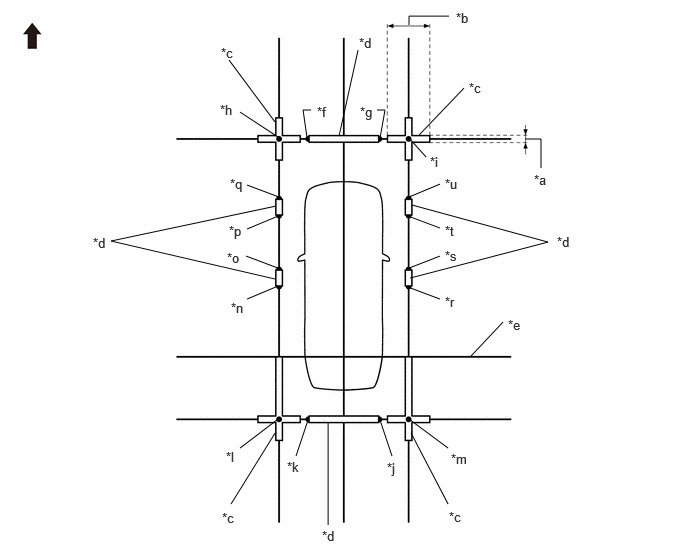
*a String 1 *b String 2 *c String 3 *d String 4 *e String 5 *f String 6 *g Mark H *h Mark I *i Mark M *j Mark N Front of Vehicle *a 1400 mm (4.59 ft.) *b 1600 mm (5.25 ft.) *c 3100 mm (10.17 ft.) *d 3300 mm (10.82 ft.) *e String 1 *f String 2 *g String 3 *h String 4 *i String 5 *j String 6 *k Mark O *l Mark P *m Mark Q *n Mark R *o Mark S *p Mark T *q Mark U *r Mark V Front of Vehicle Make marks on string (5) that are 1400 mm (4.59 ft.), 1600 mm (5.25 ft.), 3100 mm (10.17 ft.) and 3300 mm (10.82 ft.) from the datum line (string 1) as shown in the illustration. (Marks O, P, Q and R)
- Make marks on string (6) that are 1400 mm (4.59 ft.), 1600 mm (5.25 ft.), 3100 mm (10.17 ft.) and 3300 mm (10.82 ft.) from the datum line (string 1) as shown in the illustration. (Marks S, T, U and V)
- Place and secure the cross check markers, centered on marks H, I, M and N.NOTE:
- Align the cross check markers perpendicular to the string.
- Make each arm of the cross check markers 800 mm (2.62 ft.) long and 100 mm (0.33 ft.) wide.
- Extend the rear cross check markers to string 1.
*a 100 mm (0.33 ft.) *b 800 mm (2.62 ft.) *c Cross Check Marker *d Check Marker *e String 1 *f Mark F *g Mark G *h Mark H *i Mark I *j Mark K *k Mark L *l Mark M *m Mark N *n Mark O *o Mark P *p Mark Q *q Mark R *r Mark S *s Mark T *t Mark U *u Mark V - - Front of Vehicle - - - Place check markers between marks F and G, marks K and L, marks O and P, marks Q and R, marks S and T, and marks U and V.
- Perform camera view adjustment (calibration) (procedure 9).
- At the right and left sides of the vehicle, extend strings (5) and (6) parallel to the vehicle center line (string 2), and place markers.
- PROCEDURE 8: SET MARKERS (SST ADJUSTMENT)
- Using SST (marker tool set), place the markers.
- SST: 09870-30010
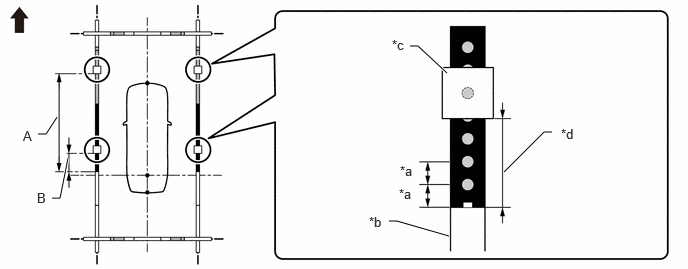
MARKERS AND SPACERS USEDPart Name Color Length Qty Marker A White 800 mm (31.5 in.) 6 Marker B White 950 mm (37.4 in.) 2 Marker E White 350 mm (13.8 in.) 6 Marker F White 1000 mm (39.4 in.) 2 Marker G White 293 mm (11.5 in.) 4 Marker H White 200 mm (7.87 in.) 4 Spacer J Black 1000 mm (39.4 in.) 8 Spacer M Black 307 mm (12.1 in.) 4 Spacer N Black 200 mm (7.87 in.) 4 Spacer O Black 100 mm (3.94 in.) 2 - Set the marker A, marker B, marker E, marker F and marker G so as to surround the vehicle as shown in the illustration.
*a Marker A *b Marker B *c Marker E *d Marker F *e Marker G Front of Vehicle Part Name Color Length Qty Marker A White 800 mm (31.5 in.) 6 Marker B White 950 mm (37.4 in.) 2 Marker E White 350 mm (13.8 in.) 6 Marker F White 1000 mm (39.4 in.) 2 Marker G White 293 mm (11.5 in.) 4 - Set the spacer J as shown in the illustration.
*a Spacer J Front of Vehicle Part Name Color Length Qty Spacer J Black 1000 mm (39.4 in.) 4 - Combine with spacers and set at positions A and B to assemble the marker tool set.
*a A *b B Front of Vehicle APart Name Color Length Qty Spacer J Black 1000 mm (39.4 in.) 2 Spacer O Black 100 mm (3.94 in.) 1 HINT:
Create 2 sets and combine together.
BPart Name Color Length Qty Spacer M Black 307 mm (12.1 in.) 1 Spacer N Black 200 mm (7.87 in.) 1 HINT:
Create 4 sets and combine together.
- Set the marker H.
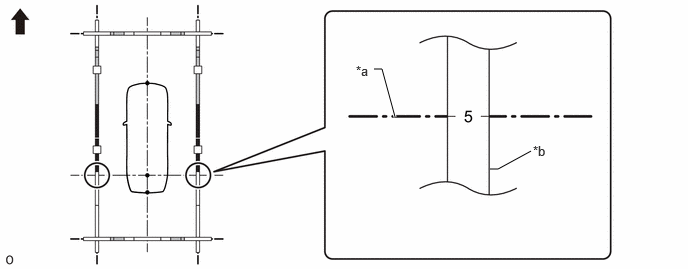
*a 100 mm (3.94 in.) *b Marker F *c Marker H *d Distance from the front end of the marker F to the rear end of the marker H Front of Vehicle - - Marker H Setting Positions Distance from the front end of the marker B to the rear end of the marker H A 2600 mm (8.53 ft.) B 900 mm (2.95 ft.) - Align the position number on the marker F with the datum line as shown in the illustration.NOTE:
When aligning the marker F with the datum line, check that the string used for the datum line is not twisted or bent.
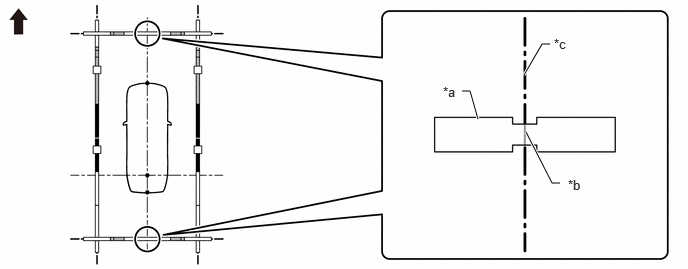
*a Datum line *b Marker F Front of Vehicle - - Marker F Position 5 - Align the mark-off line of the marker A set at the front and back with the vehicle center line as shown in the illustration.NOTE:
When aligning the marker A with the vehicle center line, check that the string used for the vehicle center line is not twisted or bent.
*a Marker A *b Mark-off line *c Vehicle center line - - Front of Vehicle - - - Check that the entire marker tool set is not distorted after the setting is completed. If there is any distortion, perform corrections so that it is straightened.
Front of Vehicle - - - Perform camera view adjustment (calibration) (procedure 9).
- Using SST (marker tool set), place the markers.
- PROCEDURE 9: CAMERA VIEW ADJUSTMENT (CALIBRATION)
- Enter diagnostic mode.
Refer to DIAGNOSIS SYSTEM [10/2022 - ]
WARNING:The check must be performed with the ignition switch to ON. Therefore, apply the parking brake, depress the brake pedal and move the shift position to P to ensure that the vehicle does not begin moving unexpectedly.
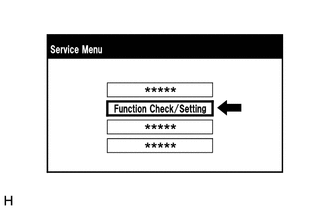
- Select "Function Check/Setting" from the "Service Menu" screen.
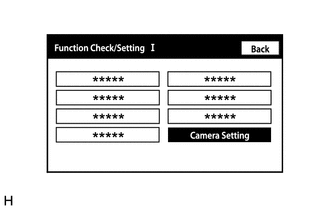
- Select "Camera Setting" on the "Function Check/Setting I" screen.NOTE:
If the "Camera Setting" selection screen is not displayed, turn the ignition switch off and enter the diagnosis screen after turning the ignition switch to ON once again.
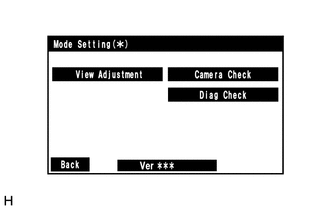
- Select "View Adjustment" on the "Mode Setting (*)" screen to display the adjustment screen.
HINT:
To select a grayed out item, select and hold the item for 2 seconds or more.
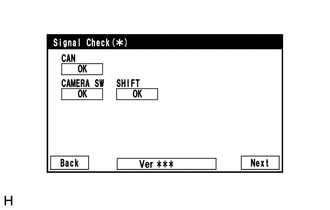
- After checking the screen, press the "Next" button on the "Signal Check (*)" screen.
HINT:
- When "CHK" (red) is displayed, perform the inspections.
- If performing the adjustment after proceeding to the next screen, confirm that all items display "OK" (blue) before selecting "Next".
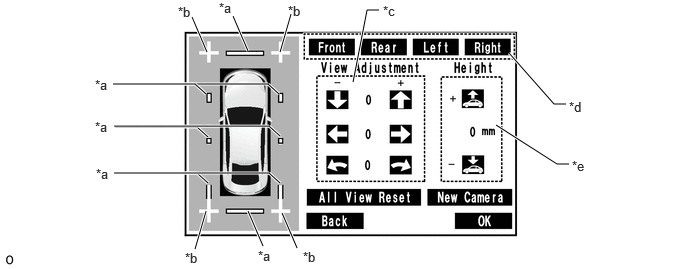
- Perform the view adjustment.
*a Red Line *b Cross Check Marker *c Adjustment Button *d Camera Select Button *e Height Control Button - - NOTE:If replacing a camera, select the repaired camera and press "New Camera".
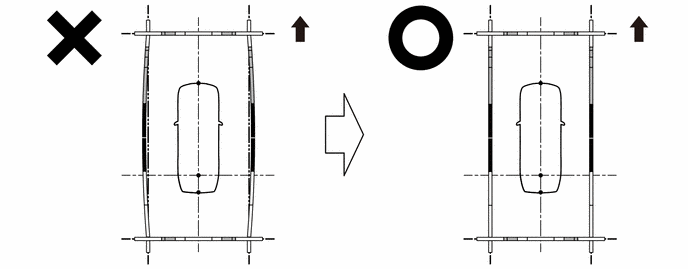
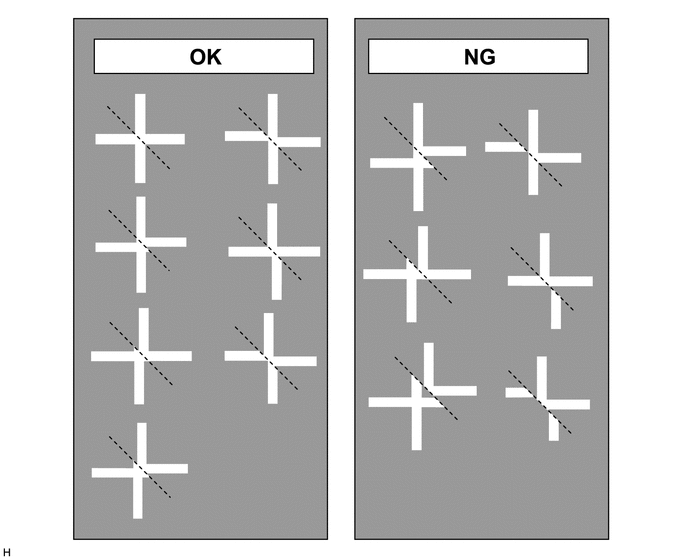
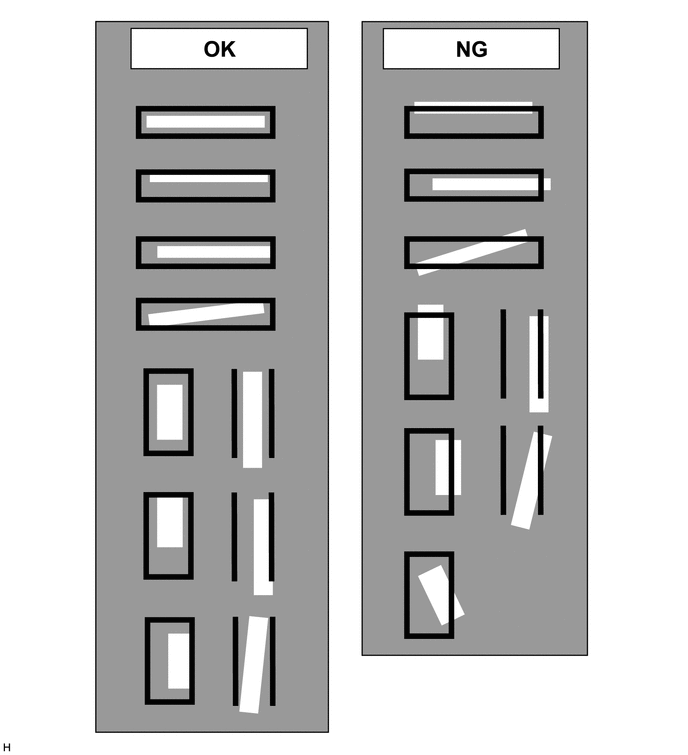
- Check that the cross check markers displayed on the adjustment screen appear connected.NOTE:
- Before checking the adjustment screen, ensure that the check markers have been placed correctly.
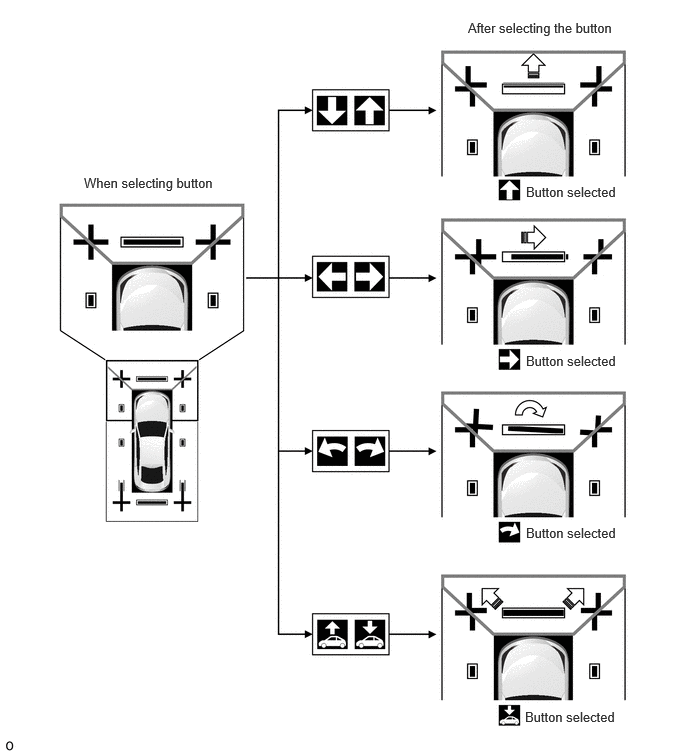
- If a cross check marker appears displaced on the adjustment screen, use the camera select buttons to select the corresponding camera, and then use the adjustment buttons or vehicle height adjustment buttons to adjust the screen.
HINT:
If adjustment is needed, select "All View Reset" button and reset all adjustment values.
- Confirm the check marker is in the adjustment screen.NOTE:
- Before checking the adjustment screen, ensure that the check markers have been placed correctly.
- If a check marker appears displaced on the adjustment screen, use the camera select buttons to select the corresponding camera, and then use the adjustment buttons or vehicle height adjustment buttons to adjust the screen.
HINT:
If performing adjustment again, select "All View Reset" to initialize the adjustment status.
- Check that the cross check markers displayed on the adjustment screen appear connected.
- When all adjustments are completed, press "OK".
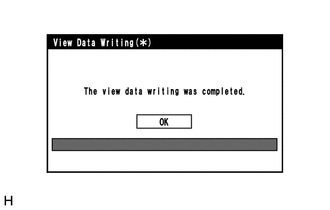
- If data writing ends normally, "The view data writing was completed." is displayed.
- Press "OK".
- Finish diagnostic mode.
Refer to DIAGNOSIS SYSTEM [10/2022 - ]
- Enter diagnostic mode.