Caution / Notice / Hint
The necessary procedures (adjustment, calibration, initialization or registration) that must be performed after parts are removed and installed, or replaced during HV battery removal/installation are shown below.
| Replaced Part or Performed Procedure | Necessary Procedure | Effect/Inoperative Function when Necessary Procedure not Performed | Link |
|---|---|---|---|
| Auxiliary battery terminal is disconnected/reconnected | Perform steering sensor zero point calibration | Lane control system | Refer to INITIALIZATION [12/2019 - ] |
| Parking Support Brake System*1 | |||
| Pre-collision System | |||
| Lighting System (EXT) (w/ AFS) | |||
| Initialize back door lock | Power Door Lock Control System | Refer to INITIALIZATION [12/2019 - 11/2023] | |
| Reset back door close position | Power Back Door System | Refer to INITIALIZATION [12/2019 - 11/2023] | |
| Replacement of HV battery | Battery status info update | HV battery status information cannot be updated | for 2WD: Refer to UTILITY [12/2019 - 11/2023] for AWD: Refer to UTILITY [12/2019 - 11/2023] |
| Replacement of hybrid battery terminal block | High voltage fuse accumulated load history reset | DTCs are stored |
*1: Learning can also be performed using the GTS.
- Orange wire harnesses and connectors indicate high-voltage circuits. To prevent electric shock, always follow the procedure described in the repair information.
for 2WD: Refer to PRECAUTION [10/2022 - 11/2023]
for AWD: Refer to PRECAUTION [10/2022 - 11/2023]
- To prevent electric shock, wear insulated gloves when working on wire harnesses and components of the high voltage system.
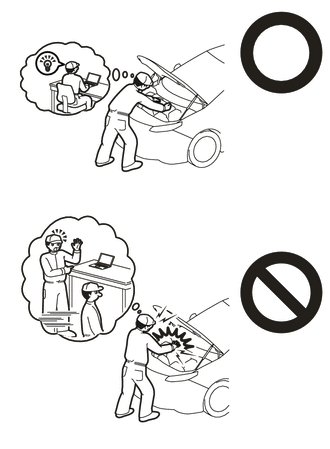
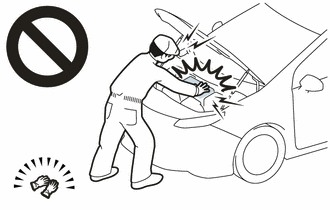
- After the ignition switch is turned off, the radio and display receiver assembly or the radio receiver assembly records various types of memory and settings. As a result, after turning the ignition switch off, make sure to wait at least 120 seconds before disconnecting the cable from the negative (-) auxiliary battery terminal.
- After the power switch is turned off, the radio and display receiver assembly records various types of memory and settings. As a result, after turning the power switch off, make sure to wait at least 85 seconds before disconnecting the cable from the negative (-) auxiliary battery terminal. (for Navigation System)
- If the HV battery has been struck or dropped, replace it.
- When connecting a connector to the HV battery, confirm that the connector is securely connected through the following:
- Push the connector until a click sound is heard.
- Visually check and confirm that the connector is securely connected by pulling on it.
- Make sure to insulate the high-voltage connectors and terminals of the HV battery with insulating tape after removing it.
If the HV battery is stored without insulating the connectors and terminals, electric shock or fire may result.
- When performing repairs around the HV battery, such as using a tap, do not allow metal shavings to enter the HV battery.
- Do not touch any high voltage wire harnesses, connectors or parts with bare hands.
- Hold the areas shown in the illustration and lift the HV battery.
- Do not allow foreign matter, such as grease or oil, to adhere to the bolts or nuts of the HV battery.
- Do not put your hands into the openings of the HV battery.
*a Opening - When removing/installing/moving the HV battery, make sure not to tilt it more than 80°.
- Do not climb on top of or stand on the HV battery.
- Do not allow any foreign matter or water to enter the HV battery.
- If any bolts, nuts or clips are dropped into the HV battery, make sure to remove them.
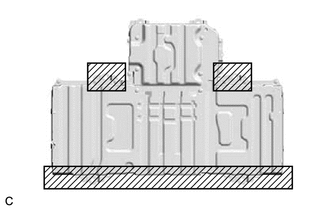
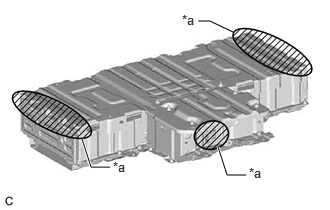
HINT:
When disposing of an HV battery, make sure to return it through an authorized collection agent who is capable of handling it safely. If the HV battery is returned via the manufacturer specified route, it will be returned properly and in a safe manner by an authorized collection agent.