USB Audio System Recognition/Play Error [10/2022 - ]: Procedure
- CHECK USB STORAGE DEVICE OR "iPod"
- Disconnect the USB storage device or "iPod" from the No. 1 stereo jack adapter assembly.
- Check that playable files exist in the USB storage device or "iPod".
- Check that the USB storage device or "iPod" being used by the customer is a compatible version and format.
Result
Result Proceed to The format of the USB storage device is compatible
The version of the "iPod" is compatibleA Playable files do not exist
The format of the USB storage device is not compatible
The version of the "iPod" is not compatibleB
Result:
B
END
Result:
A
See step 2
- CHECK HARNESS AND CONNECTOR (NO. 1 STEREO JACK ADAPTER ASSEMBLY - RADIO AND DISPLAY RECEIVER ASSEMBLY)
- Disconnect the H130 No. 1 stereo jack adapter assembly.
- Disconnect the H120 radio and display receiver assembly connector.
- Measure the resistance according to the value(s) in the table below.
Standard Resistance
Tester Connection Condition Specified Condition H120-1 (USV1) - H130-1 (UPI) Always Below 1 Ω H120-2 (US1-) - H130-2 (UDO-) Always Below 1 Ω H120-3 (US1+) - H130-3 (UDO+) Always Below 1 Ω H120-4 (UGD1) - H130-4 (UJSG) Always Below 1 Ω H120-5 (USG1) - H130-5 (UJSS) Always Below 1 Ω H120-1 (USV1) or H130-1 (UPI) - Body ground Always 10 kΩ or higher H120-2 (US1-) or H130-2 (UDO-) - Body ground Always 10 kΩ or higher H120-3 (US1+) or H130-3 (UDO+) - Body ground Always 10 kΩ or higher H120-4 (UGD1) or H130-4 (UJSG) - Body ground Always 10 kΩ or higher H120-5 (USG1) or H130-5 (UJSS) - Body ground Always 10 kΩ or higher Result
Proceed to OK NG
Result:
NG
REPAIR OR REPLACE HARNESS OR CONNECTOR
Result:
OK
See step 3
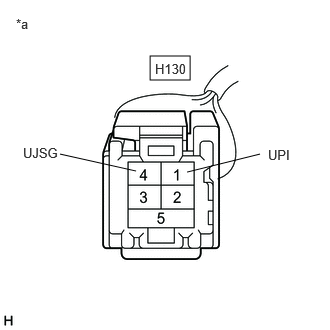
- INSPECT RADIO AND DISPLAY RECEIVER ASSEMBLY (NO. 1 STEREO JACK ADAPTER ASSEMBLY POWER SOURCE)
- Disconnect the H130 No. 1 stereo jack adapter assembly connector.
- Measure the voltage according to the value(s) in the table below.
*a Front view of wire harness connector
(to No. 1 Stereo Jack Adapter Assembly)Standard Voltage
Tester Connection Condition Specified Condition H130-1 (UPI) - H130-4 (UJSG) Ignition switch ACC 5 V Result
Proceed to OK NG
Result:
NG
REPLACE RADIO AND DISPLAY RECEIVER ASSEMBLY. Refer to REMOVAL [10/2022 - 11/2023] , or refer to REMOVAL [11/2023 - ]
Result:
OK
See step 4
- FORMAT USB DEVICE OR INITIALIZE "iPod" AND RECHECK
- Format the USB storage device or initialize the "iPod" to delete the audio files.NOTE:
When formatting the USB storage device or initializing the "iPod", all audio files stored in the device will be deleted. Make sure to back up the audio files before performing this procedure.
- Restore the data and check if the problem can be reproduced.
Result
Result Proceed to Malfunction disappears A Malfunction occurs. B
Result:
A
END
Result:
B
See step 5
- Format the USB storage device or initialize the "iPod" to delete the audio files.
- CHECK USB STORAGE DEVICE OR "iPod'"
- Disconnect the USB storage device or "iPod" from the No. 1 stereo jack adapter assembly.
- Turn the ignition switch from off to ON
HINT:
If another USB storage device or "iPod" is to be connected, it is necessary to turn the ignition switch off in order for the device to be detected.
- Connect a known good USB storage device or "iPod" to the No. 1 stereo jack adapter assembly.
HINT:
- When a USB storage device is used, replace it with another device and perform the inspection.
- When an "iPod" is used, replace it with another device and perform the inspection.
- Perform the operation again and check if the problem symptom recurs.
Result
Result Proceed to Malfunction disappears A Malfunction occurs B
Result:
A
END
Result:
B
See step 6
- CHECK NO. 1 STEREO JACK ADAPTER ASSEMBLY
- Replace the No. 1 stereo jack adapter assembly with a new or known good one.
Refer to REMOVAL [10/2022 - ]
- Check if the problem symptom recurs.
Result
Result Proceed to Malfunction disappears A Malfunction occurs B
Result:
A
END (NO. 1 STEREO JACK ADAPTER ASSEMBLY MALFUNCTION)
Result:
B
REPLACE RADIO AND DISPLAY RECEIVER ASSEMBLY. Refer to REMOVAL [10/2022 - 11/2023] , or refer to REMOVAL [11/2023 - ]
- Replace the No. 1 stereo jack adapter assembly with a new or known good one.