Microphone Circuit [10/2022 - ]: Procedure
- CHECK MODEL
Result
Result Proceed to w/ DCM (Telematics Transceiver) A w/o DCM (Telematics Transceiver B Result:
B
See step 15
Result:
A
See step 2
- CHECK MICROPHONE
- Enter diagnostic mode.
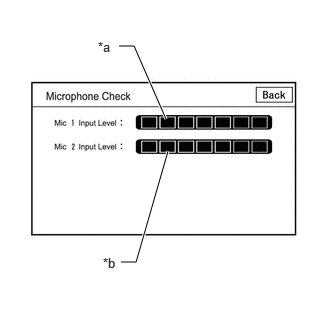
*a Mic 1 Input Level *b Mic 2 Input Level Refer to DIAGNOSIS SYSTEM [10/2022 - ]
- Select "Function Check/Setting" from the "Service Menu" screen.
- Select "Microphone Check" from the "Function Check/Setting I" screen.
- Speak into each microphone assembly and check the microphone input level gauge display.
OK
The microphone input levels of the gauge change in accordance with the voice.
Result
Result Proceed to Microphone input levels change for microphone 1 and 2 A Microphone input level does not change for microphone 1 B Microphone input level does not change for microphone 2 C
Result:
A
REPLACE RADIO AND DISPLAY RECEIVER ASSEMBLY
Refer to REMOVAL [10/2022 - 11/2023] , or refer to REMOVAL [11/2023 - ]
Result:
C
See step 12
Result:
B
See step 3
- Enter diagnostic mode.
- CHECK DCM (TELEMATICS TRANSCEIVER) (MICROPHONE POWER SOURCE AND BODY GROUND)
HINT:
Measure the connector of the DCM (telematics transceiver) while it is connected.
- Measure the resistance according to the value(s) in the table below.
Standard Resistance
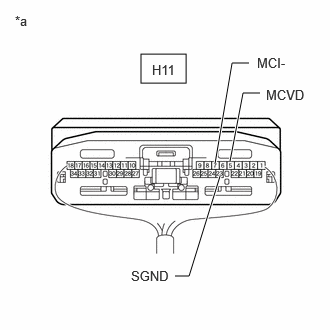
Tester Connection Condition Specified Condition H11-7 (MCI-) - Body ground Always Below 1 Ω H11-23 (SGND) - Body ground Always Below 1 Ω *a Component with harness connected
(DCM (Telematics transceiver)) - Measure the voltage according to the value(s) in the table below.
Standard Voltage
Tester Connection Condition Specified Condition H11-5 (MCVD) - Body ground IG ON 7.5 to 8.5 V Result
Proceed to OK NG
Result:
NG
See step 10
Result:
OK
See step 4
- Measure the resistance according to the value(s) in the table below.
- CHECK DCM (TELEMATICS TRANSCEIVER) (OUTPUT TO RADIO AND DISPLAY RECEIVER ASSEMBLY)
HINT:
Measure the connector of the DCM (telematics transceiver) while it is connected.
- Using an oscilloscope, measure the waveform according to the condition(s) in the table below.
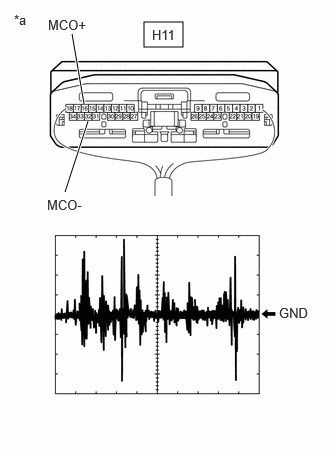
Item Condition Tester Connection H11-16 (MCO+) - H11-32 (MCO-) Tool setting 50 mV/DIV, 500 ms/DIV Vehicle condition - Turn the ignition switch to ON
- Sound is input to the telephone microphone assembly when the user is closer than 125 mm from the microphone case LH sound holes.
*a Component with harness connected
(DCM (Telematics transceiver))OK
The waveform is similar to that shown in the illustration.
HINT:
- The oscilloscope waveform shown in the illustration is an example for reference only.
- In order to ensure that a consistent sound level is input to the microphone, use a digital voice recorder, etc., to play back sound in the same location with respect to the microphone.
Result
Result Proceed to A waveform synchronized with voice signals is output A A waveform synchronized with voice signals is not output B
Result:
B
See step 6
Result:
A
See step 5
- Using an oscilloscope, measure the waveform according to the condition(s) in the table below.
- CHECK HARNESS AND CONNECTOR (RADIO AND DISPLAY RECEIVER ASSEMBLY - DCM (TELEMATICS TRANSCEIVER))
- Disconnect the H108 radio and display receiver assembly connector.
- Disconnect the H11 DCM (Telematics transceiver) connector.
- Measure the resistance according to the value(s) in the table below.
Standard Resistance
Tester Connection Condition Specified Condition H108-21 (MIN+) - H11-16 (MCO+) Always Below 1 Ω H108-22 (MIN-) - H11-32 (MCO-) Always Below 1 Ω H108-21 (MIN+) or H11-16 (MCO+) - Body ground Always 10 kΩ or higher H108-22 (MIN-) or H11-32 (MCO-) - Body ground Always 10 kΩ or higher Result
Proceed to OK NG
Result:
OK
REPLACE RADIO AND DISPLAY RECEIVER ASSEMBLY
Refer to REMOVAL [10/2022 - 11/2023] , or refer to REMOVAL [11/2023 - ]
Result:
NG
REPAIR OR REPLACE HARNESS OR CONNECTOR
- CHECK HARNESS AND CONNECTOR (RADIO AND DISPLAY RECEIVER ASSEMBLY - DCM (TELEMATICS TRANSCEIVER))
- Disconnect the H108 radio and display receiver assembly connector.
- Disconnect the H11 DCM (Telematics transceiver) connector.
- Measure the resistance according to the value(s) in the table below.
Standard Resistance
Tester Connection Condition Specified Condition H108-21 (MIN+) - H11-16 (MCO+) Always Below 1 Ω H108-22 (MIN-) - H11-32 (MCO-) Always Below 1 Ω H108-21 (MIN+) or H11-16 (MCO+) - Body ground Always 10 kΩ or higher H108-22 (MIN-) or H11-32 (MCO-) - Body ground Always 10 kΩ or higher Result
Proceed to OK NG
Result:
NG
REPAIR OR REPLACE HARNESS OR CONNECTOR
Result:
OK
See step 7
- CHECK HARNESS AND CONNECTOR (DCM (TELEMATICS TRANSCEIVER) - TELEPHONE MICROPHONE ASSEMBLY LH)
- Disconnect the H11 DCM (Telematics transceiver) connector.
- Disconnect the R25 telephone microphone assembly LH connector.
- Measure the resistance according to the value(s) in the table below.
Standard Resistance
Tester Connection Condition Specified Condition H11-5 (MCVD) - R25-1 (MAC1) Always Below 1 Ω H11-6 (MCI+) - R25-2 (MO1+) Always Below 1 Ω H11-7 (MCI-) - R25-4 (MO1-) Always Below 1 Ω H11-5 (MCVD) or R25-1 (MAC1) - Body ground Always 10 kΩ or higher H11-6 (MCI+) or R25-2 (MO1+) - Body ground Always 10 kΩ or higher H11-7 (MCI-) or R25-4 (MO1-) - Body ground Always 10 kΩ or higher Result
Proceed to OK NG
Result:
NG
REPAIR OR REPLACE HARNESS OR CONNECTOR
Result:
OK
See step 8
- CHECK HARNESS AND CONNECTOR (RADIO AND DISPLAY RECEIVER ASSEMBLY - TELEPHONE MICROPHONE ASSEMBLY LH)
- Disconnect the H108 radio and display receiver assembly connector.
- Disconnect the R25 telephone microphone assembly LH connector.
- Measure the resistance according to the value(s) in the table below.
Standard Resistance
Tester Connection Condition Specified Condition H108-25 (SNS) - R25-5 (SNS1) Always Below 1 Ω H108-25 (SNS) or R25-5 (SNS1) - Body ground Always 10 kΩ or higher Result
Proceed to OK NG
Result:
NG
REPAIR OR REPLACE HARNESS OR CONNECTOR
Result:
OK
See step 9
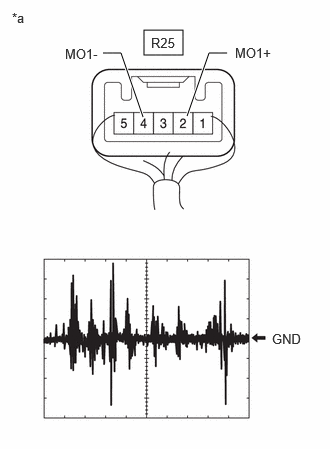
- CHECK TELEPHONE MICROPHONE ASSEMBLY LH (OUTPUT TO DCM (TELEMATICS TRANSCEIVER))
- Using an oscilloscope, measure the waveform according to the condition(s) in the table below.
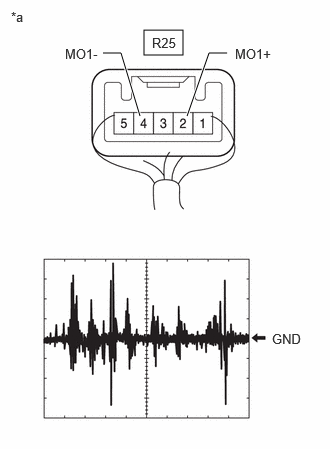
Item Condition Tester Connection R25-2 (MO1+) - R25-4 (MO1-) Tool setting 50 mV/DIV, 500 ms/DIV Vehicle condition - Turn the ignition switch to ON
- Sound is input to the telephone microphone assembly when the user is closer than 125 mm from the microphone case LH sound holes.
*a Component with harness connected
(Telephone microphone assembly LH)OK
The waveform is similar to that shown in the illustration.
HINT:
- The oscilloscope waveform shown in the illustration is an example for reference only.
- In order to ensure that a consistent sound level is input to the microphone, use a digital voice recorder, etc., to play back sound in the same location with respect to the microphone.
Result
Result Proceed to A waveform synchronized with voice signals is output A A waveform synchronized with voice signals is not output B
Result:
A
REPLACE DCM (TELEMATICS TRANSCEIVER)
Refer to REMOVAL [10/2022 - 11/2023] , or refer to REMOVAL [11/2023 - ]
Result:
B
REPLACE TELEPHONE MICROPHONE ASSEMBLY LH
Refer to REMOVAL [10/2022 - ]
- Using an oscilloscope, measure the waveform according to the condition(s) in the table below.
- CHECK HARNESS AND CONNECTOR (DCM (TELEMATICS TRANSCEIVER) - TELEPHONE MICROPHONE ASSEMBLY LH)
- Disconnect the H11 DCM (Telematics transceiver) connector.
- Disconnect the R25 telephone microphone assembly LH connector.
- Measure the resistance according to the value(s) in the table below.
Standard Resistance
Tester Connection Condition Specified Condition H11-5 (MCVD) - R25-1 (MAC1) Always Below 1 Ω H11-6 (MCI+) - R25-2 (MO1+) Always Below 1 Ω H11-7 (MCI-) - R25-4 (MO1-) Always Below 1 Ω H11-5 (MCVD) or R25-1 (MAC1) - Body ground Always 10 kΩ or higher H11-6 (MCI+) or R25-2 (MO1+) - Body ground Always 10 kΩ or higher H11-7 (MCI-) or R25-4 (MO1-) - Body ground Always 10 kΩ or higher Result
Proceed to OK NG
Result:
NG
REPAIR OR REPLACE HARNESS OR CONNECTOR
Result:
OK
See step 11
- CHECK HARNESS AND CONNECTOR (RADIO AND DISPLAY RECEIVER ASSEMBLY - DCM (TELEMATICS TRANSCEIVER))
- Disconnect the H108 radio and display receiver assembly connector.
- Disconnect the H11 DCM (telematics transceiver) connector.
- Measure the resistance according to the value(s) in the table below.
Standard Resistance
Tester Connection Condition Specified Condition H108-21 (MIN+) - H11-16 (MCO+) Always Below 1 Ω H108-22 (MIN-) - H11-32 (MCO-) Always Below 1 Ω H108-21 (MIN+) or H11-16 (MCO+) - Body ground Always 10 kΩ or higher H108-22 (MIN-) or H11-32 (MCO-) - Body ground Always 10 kΩ or higher Result
Proceed to OK NG
Result:
OK
REPLACE DCM (TELEMATICS TRANSCEIVER)
Refer to REMOVAL [10/2022 - 11/2023] , or refer to REMOVAL [11/2023 - ]
Result:
NG
REPAIR OR REPLACE HARNESS OR CONNECTOR
- CHECK HARNESS AND CONNECTOR (RADIO AND DISPLAY RECEIVER ASSEMBLY - TELEPHONE MICROPHONE ASSEMBLY RH)
- Disconnect the H109 radio and display receiver assembly connector.
- Disconnect the R26 telephone microphone assembly RH connector
- Measure the resistance according to the value(s) in the table below.
Standard Resistance
Tester Connection Condition Specified Condition H109-17 (MI2+) - R26-2 (MO2+) Always Below 1 Ω H109-18 (MI2-) - R26-4 (MO2-) Always Below 1 Ω H109-20 (MAC2) - R26-1 (MAC2) Always Below 1 Ω H109-21 (SNS2) - R26-5 (SNS2) Always Below 1 Ω H109-17 (MI2+) or R26-2 (MO2+) - Body ground Always 10 kΩ or higher H109-18 (MI2-) or R26-4 (MO2-) - Body ground Always 10 kΩ or higher H109-20 (MAC2) or R26-1 (MAC2) - Body ground Always 10 kΩ or higher H109-21 (SNS2) or R26-5 (SNS2) - Body ground Always 10 kΩ or higher Result
Proceed to OK NG
Result:
NG
REPAIR OR REPLACE HARNESS OR CONNECTOR
Result:
OK
See step 13
- CHECK RADIO AND DISPLAY RECEIVER ASSEMBLY (MAC2, MI2-)
- With the H109 radio and display receiver assembly connector connected, disconnect the R26 telephone microphone assembly RH connector.
- Measure the resistance according to the value(s) in the table below.
Standard Resistance
Tester Connection Condition Specified Condition R26-4 (MO2-) - Body ground Always Below 1 Ω - Measure the voltage according to the value(s) in the table below.
Standard Voltage
Tester Connection Condition Specified Condition R26-1 (MAC2) - Body ground IG ON 7.5 to 8.5 V Result
Proceed to OK NG
Result:
NG
REPLACE RADIO AND DISPLAY RECEIVER ASSEMBLY
Refer to REMOVAL [10/2022 - 11/2023] , or refer to REMOVAL [11/2023 - ]
Result:
OK
See step 14
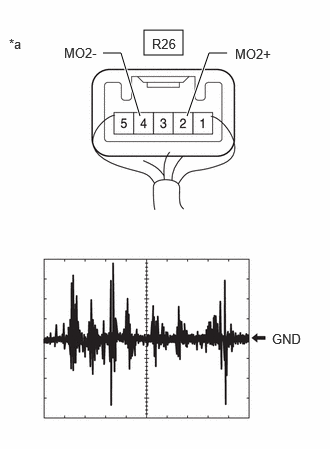
- CHECK TELEPHONE MICROPHONE ASSEMBLY RH (OUTPUT TO RADIO AND DISPLAY RECEIVER ASSEMBLY)
- Using an oscilloscope, measure the waveform according to the condition(s) in the table below.
Item Condition Tester Connection R26-2 (MO2+) - R26-4 (MO2-) Tool setting 50 mV/DIV., 500 ms/DIV. Vehicle condition - Turn the ignition switch to ON
- Sound is input to the telephone microphone assembly when the user is closer than 125 mm from the microphone case RH sound holes.
*a Component with harness connected
(Telephone microphone assembly RH)OK
The waveform is similar to that shown in the illustration.
HINT:
- The oscilloscope waveform shown in the illustration is an example for reference only.
- In order to ensure that a consistent sound level is input to the microphone, use a digital voice recorder, etc., to play back sound in the same location with respect to the microphone.
Result
Result Proceed to A waveform synchronized with voice signals is output A A waveform synchronized with voice signals is not output B
Result:
A
REPLACE RADIO AND DISPLAY RECEIVER ASSEMBLY
Refer to REMOVAL [10/2022 - 11/2023] , or refer to REMOVAL [11/2023 - ]
Result:
B
REPLACE TELEPHONE MICROPHONE ASSEMBLY RH
Refer to REMOVAL [10/2022 - ]
- Using an oscilloscope, measure the waveform according to the condition(s) in the table below.
- CHECK MICROPHONE
- Enter diagnostic mode.
*a Mic 1 Input Level *b Mic 2 Input Level Refer to DIAGNOSIS SYSTEM [10/2022 - ]
- Select "Function Check/Setting" from the "Service Menu" screen.
- Select "Microphone Check" from the "Function Check/Setting I" screen.
- Speak into each microphone assembly and check the microphone input level gauge display.
OK
The microphone input levels of the gauge change in accordance with the voice.
Result
Result Proceed to Microphone input levels change for microphone 1 and 2 A Microphone input level does not change for microphone 1 B Microphone input level does not change for microphone 2 C
Result:
A
REPLACE RADIO AND DISPLAY RECEIVER ASSEMBLY
Refer to REMOVAL [10/2022 - 11/2023] , or refer to REMOVAL [11/2023 - ]
Result:
C
See step 19
Result:
B
See step 16
- Enter diagnostic mode.
- CHECK HARNESS AND CONNECTOR (RADIO AND DISPLAY RECEIVER ASSEMBLY - TELEPHONE MICROPHONE ASSEMBLY LH)
- Disconnect the H108 radio and display receiver assembly connector.
- Disconnect the R25 telephone microphone assembly LH connector.
- Measure the resistance according to the value(s) in the table below.
Standard Resistance
Tester Connection Condition Specified Condition H108-21 (MIN+) - R25-2 (MO1+) Always Below 1 Ω H108-22 (MIN-) - R25-4 (MO1-) Always Below 1 Ω H108-23 (MACC) - R25-1 (MAC1) Always Below 1 Ω H108-25 (SNS) - R25-5 (SNS1) Always Below 1 Ω H108-21 (MIN+) or R25-2 (MO1+) - Body ground Always 10 kΩ or higher H108-22 (MIN-) or R25-4 (MO1-) - Body ground Always 10 kΩ or higher H108-23 (MACC) or R25-1 (MAC1) - Body ground Always 10 kΩ or higher H108-25 (SNS) or R25-5 (SNS1) - Body ground Always 10 kΩ or higher Result
Proceed to OK NG
Result:
NG
REPAIR OR REPLACE HARNESS OR CONNECTOR
Result:
OK
See step 17
- INSPECT RADIO AND DISPLAY RECEIVER ASSEMBLY (MACC, MIN-)
- With the H108 radio and display receiver assembly connector connected, disconnect the R25 telephone microphone assembly LH connector.
- Measure the resistance according to the value(s) in the table below.
Standard Resistance
Tester Connection Condition Specified Condition R25-4 (MO1-) - Body ground Always Below 1 Ω - Measure the voltage according to the value(s) in the table below.
Standard Voltage
Tester Connection Condition Specified Condition R25-1 (MAC1) - Body ground IG ON 7.5 to 8.5 V Result
Proceed to OK NG
Result:
NG
REPLACE RADIO AND DISPLAY RECEIVER ASSEMBLY
Refer to REMOVAL [10/2022 - 11/2023] , or refer to REMOVAL [11/2023 - ]
Result:
OK
See step 18
- INSPECT TELEPHONE MICROPHONE ASSEMBLY LH (OUTPUT TO RADIO AND DISPLAY RECEIVER ASSEMBLY)
- Using an oscilloscope, measure the waveform according to the condition(s) in the table below.
Item Condition Tester Connection R25-2 (MO1+) - R25-4 (MO1-) Tool setting 50 mV/DIV., 500 ms/DIV. Vehicle condition - Turn the ignition switch to ON
- Sound is input to the telephone microphone assembly when the user is closer than 125 mm from the microphone case LH sound holes.
*a Component with harness connected
(Telephone microphone assembly LH)OK
The waveform is similar to that shown in the illustration.
HINT:
- The oscilloscope waveform shown in the illustration is an example for reference only.
- In order to ensure that a consistent sound level is input to the microphone, use a digital voice recorder, etc., to play back sound in the same location with respect to the microphone.
Result
Result Proceed to A waveform synchronized with voice signals is output A A waveform synchronized with voice signals is not output B
Result:
A
REPLACE RADIO AND DISPLAY RECEIVER ASSEMBLY
Refer to REMOVAL [10/2022 - 11/2023] , or refer to REMOVAL [11/2023 - ]
Result:
B
REPLACE TELEPHONE MICROPHONE ASSEMBLY LH
Refer to REMOVAL [10/2022 - ]
- Using an oscilloscope, measure the waveform according to the condition(s) in the table below.
- CHECK HARNESS AND CONNECTOR (RADIO AND DISPLAY RECEIVER ASSEMBLY - TELEPHONE MICROPHONE ASSEMBLY RH)
- Disconnect the H109 radio and display receiver assembly connector.
- Disconnect the R26 telephone microphone assembly RH connector.
- Measure the resistance according to the value(s) in the table below.
Standard Resistance
Tester Connection Condition Specified Condition H109-17 (MI2+) - R26-2 (MO2+) Always Below 1 Ω H109-18 (MI2-) - R26-4 (MO2-) Always Below 1 Ω H109-20 (MAC2) - R26-1 (MAC2) Always Below 1 Ω H109-21 (SNS2) - R26-5 (SNS2) Always Below 1 Ω H109-17 (MI2+) or R26-2 (MO2+) - Body ground Always 10 kΩ or higher H109-18 (MI2-) or R26-4 (MO2-) - Body ground Always 10 kΩ or higher H109-20 (MAC2) or R26-1 (MAC2) - Body ground Always 10 kΩ or higher H109-21 (SNS2) or R26-5 (SNS2) - Body ground Always 10 kΩ or higher Result
Proceed to OK NG
Result:
NG
REPAIR OR REPLACE HARNESS OR CONNECTOR
Result:
OK
See step 20
- INSPECT RADIO AND DISPLAY RECEIVER ASSEMBLY (MO2, MI2-)
- With the H109 radio and display receiver assembly connector connected, disconnect the R26 telephone microphone assembly RH connector.
- Measure the resistance according to the value(s) in the table below.
Standard Resistance
Tester Connection Condition Specified Condition R26-4 (MO2-) - Body ground Always Below 1 Ω - Measure the voltage according to the value(s) in the table below.
Standard Voltage
Tester Connection Condition Specified Condition R26-1 (MAC2) - Body ground IG ON 7.5 to 8.5 V Result
Proceed to OK NG
Result:
NG
REPLACE RADIO AND DISPLAY RECEIVER ASSEMBLY
Refer to REMOVAL [10/2022 - 11/2023] , or refer to REMOVAL [11/2023 - ]
Result:
OK
See step 21
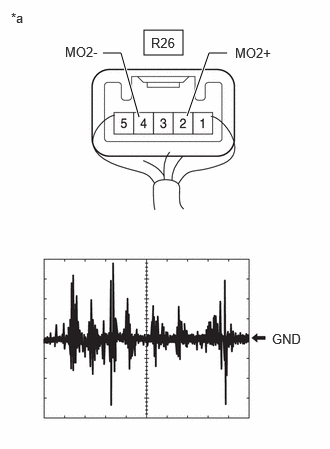
- INSPECT TELEPHONE MICROPHONE ASSEMBLY RH (OUTPUT TO RADIO AND DISPLAY RECEIVER ASSEMBLY)
- Using an oscilloscope, measure the waveform according to the condition(s) in the table below.
Item Condition Tester Connection R26-2 (MO2+) - R26-4 (MO2-) Tool setting 50 mV/DIV., 500 ms/DIV. Vehicle condition - Turn the ignition switch to ON
- Sound is input to the telephone microphone assembly when the user is closer than 125 mm from the microphone case RH sound holes.
*a Component with harness connected
(Telephone microphone assembly RH)OK
The waveform is similar to that shown in the illustration.
HINT:
- The oscilloscope waveform shown in the illustration is an example for reference only.
- In order to ensure that a consistent sound level is input to the microphone, use a digital voice recorder, etc., to play back sound in the same location with respect to the microphone.
Result
Result Proceed to A waveform synchronized with voice signals is output A A waveform synchronized with voice signals is not output B
Result:
A
REPLACE RADIO AND DISPLAY RECEIVER ASSEMBLY
Refer to REMOVAL [10/2022 - 11/2023] , or refer to REMOVAL [11/2023 - ]
Result:
B
REPLACE TELEPHONE MICROPHONE ASSEMBLY RH
Refer to REMOVAL [10/2022 - ]
- Using an oscilloscope, measure the waveform according to the condition(s) in the table below.