Even though Headlights are Turned on Head-unit does not Dim the Display [10/2022 - ]: Procedure
- CHECK IMAGE QUALITY SETTING
- Select settings icon from the screen.
- Select "Display" from the "Settings" menu screen.
- Select "Screen" to display the settings screen.
- Turn the light control switch to the tail or head position.
- Check that the "Automatic" setting on the display adjustment screen is set to on.
Result
Result Proceed to "Automatic" setting is set to off. A "Automatic" setting is set to on. B
Result:
A
CHANGE "Automatic" SCREEN SETTING TO ON
Result:
B
See step 2
- CHECK RHEOSTAT SETTING
- Check the rheostat setting.
Result
Result Proceed to Set to maximum brightness A Set to other than the maximum brightness B
Result:
A
SET RHEOSTAT SETTING TO OTHER THAN MAXIMUM BRIGHTNESS
Result:
B
See step 3
- Check the rheostat setting.
- CHECK VEHICLE SIGNAL (OPERATION CHECK)
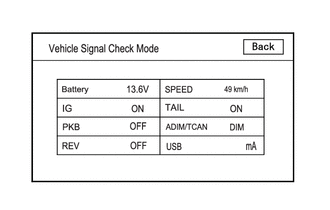
- Enter diagnostic mode.
Refer to DIAGNOSIS SYSTEM [10/2022 - ]
- Select "Function Check/Setting" from the "Service Menu" screen.
- Select "System Sensors Check" from the "Function Check/Setting I" screen.
- Operate the light control switch and check that the display changes between ON and OFF accordingly.
OK
TAILCondition Display Light control switch OFF OFF Light control switch TAIL or HEAD ON ADIM/TCANCondition Display Ignition switch ON, Light control switch TAIL or HEAD, Automatic light control sensor is covered by hand Dimmed Ignition switch ON, Light control switch TAIL or HEAD, Automatic light control sensor is not covered by hand Not dimmed HINT:
This display is updated once per second.
Result
Result Proceed to Normal A TAIL signal malfunction B ADIM/TCAN signal malfunction C
Result:
A
REPLACE RADIO AND DISPLAY RECEIVER ASSEMBLY. Refer to REMOVAL [10/2022 - 11/2023] , or refer to REMOVAL [11/2023 - ]
Result:
C
GO TO CAN COMMUNICATION SYSTEM
For Gasoline Model: Refer to HOW TO PROCEED WITH TROUBLESHOOTING [10/2022 - 11/2023] , or refer to HOW TO PROCEED WITH TROUBLESHOOTING [11/2023 - ]
For HV Model: Refer to HOW TO PROCEED WITH TROUBLESHOOTING [10/2022 - 11/2023] , or refer to HOW TO PROCEED WITH TROUBLESHOOTING [11/2023 - ]
Result:
B
See step 4
- Enter diagnostic mode.
- CHECK HARNESS AND CONNECTOR (ILL+ CIRCUIT)
- Disconnect the H107 radio and display receiver assembly connector.
- Measure the voltage according to the value(s) in the table below.
Standard Voltage
Tester Connection Condition Specified Condition H107-25 (ILL+) - Body ground Ignition switch ON, Light control switch TAIL or HEAD 11 to 14 V Result
Proceed to OK NG
Result:
NG
REPLACE OR REPLACE HARNESS OR CONNECTOR
Result:
OK
See step 5
- CHECK HARNESS AND CONNECTOR (RADIO AND RECEIVER ASSEMBLY - COMBINATION METER ASSEMBLY)
- Disconnect the H107 radio and display receiver assembly connector.
- Disconnect the H112*1, H21*2 combination meter assembly connector.
- Measure the resistance according to the value(s) in the table below.
Standard Resistance
Tester Connection Condition Specified Condition H107-24 (ILL-) - H112-23 (ILL-)*1 Always Below 1 Ω H107-24 (ILL-) - H21-1 (ILL-)*2 Always Below 1 Ω - *1: for 12.3 Inch Display
*2: except 12.3 Inch Display
Result
Proceed to OK NG - *1: for 12.3 Inch Display
Result:
OK
REPLACE RADIO AND DISPLAY RECEIVER ASSEMBLY. Refer to REMOVAL [10/2022 - 11/2023] , or refer to REMOVAL [11/2023 - ]
Result:
NG
REPAIR OR REPLACE HARNESS OR CONNECTOR