DTC B1549-13: Voice Recognition Microphone2 Circuit Open [10/2022 - ]: Procedure
- CHECK HARNESS AND CONNECTOR (RADIO AND DISPLAY RECEIVER ASSEMBLY - TELEPHONE MICROPHONE ASSEMBLY RH)
- Disconnect the H109 radio and display receiver assembly connector.
- Disconnect the R26 telephone microphone assembly RH connector.
- Measure the resistance according to the value(s) in the table below.
Standard Resistance
Tester Connection Condition Specified Condition H109-21 (SNS2) - R26-5 (SNS2) Always Below 1 Ω H109-18 (MI2-) - R26-4 (MO2-) Always Below 1 Ω H109-21 (SNS2) or R26-5 (SNS2) - Body ground Always 10 kΩ or higher H109-18 (MI2-) or R26-4 (MO2-) - Body ground Always 10 kΩ or higher Result
Proceed to OK NG
Result:
NG
REPAIR OR REPLACE HARNESS OR CONNECTOR
Result:
OK
See step 2
- INSPECT RADIO AND DISPLAY RECEIVER ASSEMBLY (MI2-)
- With the radio and display receiver assembly connectors connected, disconnect the R26 telephone microphone assembly RH connector.
- Measure the resistance according to the value(s) in the table below.
Standard Resistance
Tester Connection Condition Specified Condition R26-4 (MO2-) - Body ground Always Below 1 Ω Result
Proceed to OK NG
Result:
NG
REPLACE RADIO AND DISPLAY RECEIVER ASSEMBLY
Refer to REMOVAL [10/2022 - 11/2023] , or refer to REMOVAL [11/2023 - ]
Result:
OK
See step 3
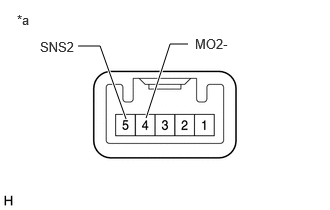
- INSPECT TELEPHONE MICROPHONE ASSEMBLY RH (SNS2, MO2-)
- Remove the telephone microphone assembly RH.
*a Component without harness connected
(Telephone microphone assembly RH) - Measure the resistance according to the value(s) in the table below.
Standard Resistance
Tester Connection Condition Specified Condition 5 (SNS2) - 4 (MO2-) Always Below 1 Ω Result
Proceed to OK NG
Result:
OK
REPLACE RADIO AND DISPLAY RECEIVER ASSEMBLY
Refer to REMOVAL [10/2022 - 11/2023] , or refer to REMOVAL [11/2023 - ]
Result:
NG
REPLACE TELEPHONE MICROPHONE ASSEMBLY RH
Refer to REMOVAL [10/2022 - ]
- Remove the telephone microphone assembly RH.