Sound from Wireless Headphones is Difficult to Hear, cannot be Heard, or Quality is Poor [12/2019 - 10/2022]: Procedure
- CHECK WIRELESS HEADPHONE BATTERY
- Check that the dry-cell battery of the wireless headphone is not depleted.
OK
Battery is not depleted.
Result
Proceed to OK NG
Result:
NG
REPLACE WIRELESS HEADPHONE BATTERY
Result:
OK
See step 2
- Check that the dry-cell battery of the wireless headphone is not depleted.
- CHECK WIRELESS HEADPHONE SETTING
- Check the wireless headphone settings.
- Check that the volume is not set to "0".
- Check that mute is off.
OK
The volume is not set to "0" and mute is off.
Result
Proceed to OK NG
Result:
NG
SET VOLUME TO HIGH OR TURN MUTE OFF
Result:
OK
See step 3
- Check the wireless headphone settings.
- CLEAN INFRARED RAY RECEIVING PORTION
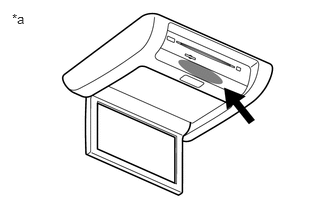
- Clean the infrared ray receiving portion on the television display assembly.
*a Example - Check if the malfunction recurs.
OK
The wireless headphone returns to normal.
Result
Proceed to OK NG
Result:
OK
END
Result:
NG
See step 4
- Clean the infrared ray receiving portion on the television display assembly.
- REPLACE WIRELESS HEADPHONE
- Replace the wireless headphone with a new or known good one and check if the malfunction recurs.
OK
The wireless headphone operates normally.
Result
Proceed to OK NG
Result:
OK
END (WIRELESS HEADPHONE WAS DEFECTIVE)
Result:
NG
PROCEED TO NEXT SUSPECTED AREA SHOWN IN PROBLEM SYMPTOMS TABLE. Refer to PROBLEM SYMPTOMS TABLE [12/2019 - 10/2022]
- Replace the wireless headphone with a new or known good one and check if the malfunction recurs.