Audio Head Unit Software Update (DENSO-Ten) (T-SB-0019-21 REV2)
Reference number: T-SB-0019-21 REV2
Supersedes refnos: T-SB-0019-21, T-SB-0019-21 REV1
AUDIO HEAD UNIT SOFTWARE UPDATE (DENSO-TEN)
TECHNICAL SERVICE BULLETIN
| TOYOTA: | 2020-2022 Highlander, Highlander HV, RAV4, RAV4 HV; 2021-2022 Prius, Prius Prime, RAV4 Prime, Sienna HV, Venza HV; 2020-2021 Tundra |
| SERVICE CATEGORY: | Audio/Visual/Telematics |
| SECTION: | Navigation/Multi Info Display |
| MARKET: | USA |
| COPYRIGHT: | © 2021 Toyota, USA License Agreement TMS1002 |
APPLICABILITY
| YEAR(S) | MODEL(S) | ADDITIONAL INFORMATION |
|---|---|---|
| 2020 - 2022 | Highlander, Highlander HV, RAV4, RAV4 HV | |
| 2021 - 2022 | Prius, Prius Prime, RAV4 Prime, Sienna HV, Venza HV | |
| 2020 - 2021 | Tundra |
REVISION NOTICE
November 12, 2021 Rev2:
- Applicability has been updated to include 2022 model year vehicles except for the Tundra.
Any previous printed versions of this bulletin should be discarded.
REVISION NOTICE
July 09, 2021 Rev1:
- The Introduction, Warranty Information, Software Update Information, and Software Update Procedure sections have been updated.
Any previous printed versions of this bulletin should be discarded.
SUPERSESSION NOTICE
The information contained in this bulletin supersedes Service Bulletin No. T-SB-0146-19.
- Applicability has been updated to include 2021 model year Prius, Prius Prime, RAV4 Prime, Siena HV, and Venza HV vehicles.
- The Introduction, Warranty, Software Update Information, and Software Update Procedure sections have been updated.
Service Bulletin No. T-SB-0146-19 is obsolete and any printed versions should be discarded.
INTRODUCTION
Some 2020 model year vehicles equipped with Audio Plus (version 1186) or earlier may exhibit one or more of the following conditions:
- WiFi intermittently inoperative.
- DTC (Diagnostic Trouble Code) B15DB present.
- Changing the Auto Relock Timer setting also changes the Remote 2-Press unlock setting.
Some 2020 - 2021 model year vehicles equipped with Audio Plus (version 1210), or Premium Audio (version 1196) or earlier may exhibit one or more of the following conditions:
- Intermittent screen flashing.
- Intermittent "Destination Assist Unavailable" pop-up message.
- Intermittent blank screen.
- Bluetooth® intermittently disconnects.
- Abnormal radio playback after Destination Assist Call.
- "There is no playable data" pop-up message when using USB Audio.
- Unable to answer phone calls when using Apple CarPlay®.
- Clock displays the incorrect time.
- Intermittent rebooting.
- "The software version doesn't correspond" pop-up is intermittently displayed.
- Intermittent black screen when using projection navigation.
- Abnormal noise after ACC OFF/ON when using AM mode and high volume.
- "Please connect USB" pop-up message when USB is already connected.
Some 2020 - 2021 model year vehicles equipped with Audio Plus (version 1256), or Premium Audio (version 1256) or earlier may exhibit one or more of the following conditions:
- Navigation intermittently reverses its travel.
- Android Auto™ inoperative.
- Audio mode is set to "Off" after disconnecting USB while using Apple CarPlay®.
- Intermittent black screen flash when connecting Bluetooth®.
- When the MAP button is pressed, a "Navi app is not installed" pop-up is displayed.
- Intermittent black map screen on home screen.
- Bluetooth® intermittently disconnects.
- No outgoing voice when using Bluetooth® Handsfree for phone call.
- Bluetooth® Now Playing List song selection is slow.
- Unable to transfer phone contacts when using Bluetooth®.
- Incorrect names for phone contacts when using Bluetooth®.
- RAV4 Prime has "Start" displayed incorrectly in the timer setting screen.
- Fuel consumption is incorrectly displayed when in EV mode.
- Intermittent rebooting.
- No sound after USB audio playback.
- Intermittent white or black screen.
- Intermittently inoperative Voice Prompts.
- Streaming audio intermittently inoperative.
- Intermittently delayed audio after Voice Prompts.
- Plug-in Hybrid features missing from Prime vehicles.
- Unable to make calls or download data via the Data Communication Module (DCM).
- Volume levels are not mode dependent.
- Temperature intermittently changes units.
- Handset not connecting when plugged in immediately after being unplugged via USB.
- Volume inoperative when using Apple CarPlay®.
- Intermittent RCTA failure displayed on meter (DTC: C1ABE).
- Intermittent B15DB DTC.
- Tune knob is disabled on specific audio sources.
- Unable to launch Projection Mode after the vehicle apps update.
- "Playing" is displayed when Apple CarPlay® audio is turned off.
- "Calling" is displayed on the meter instead of the other party's information.
- Abnormal noise when using Apple CarPlay® audio.
- Compass is displayed on the meter.
- Abnormal charging icon operation on the charging screen.
- Audio Information is not displayed on the meter's "Audio" tab.
- Delay when turning off "AUTO" for the HVAC from the multimedia screen.
- HVAC settings are displayed differently since last ACC-OFF.
- HVAC blower motor operation is not displayed when in "AUTO."
- Intermittent DTCs: U1110, U0100, U0129, U0198, U0265, U0164.
- Bluetooth® does not reconnect after Android Auto phone call.
- Bluetooth® audio plays after connecting and disconnecting Android Auto.
Some 2020 - 2022 model year Highlander, Highlander Hybrid, RAV4, and RAV4 Hybrid, and 2021 - 2022 model year RAV4 Prime vehicles equipped with Premium Audio (version 1383) may experience the following condition:
- Continuous rebooting after a battery reset or software update.
A software update is now available to address these conditions. Follow the Software Update Procedure in this bulletin to update the software.
WARRANTY INFORMATION
| OP CODE | DESCRIPTION | TIME | OFP | T1 | T2 | ||
|---|---|---|---|---|---|---|---|
| EL1916 | Software Update | 0.3 | 86140-#####(1) | 87 | 74 | ||
|
|||||||
APPLICABLE WARRANTY
- This repair is covered under the Toyota Basic Warranty. This warranty is in effect for 36 months or 36, 000 miles, whichever occurs first, from the vehicle's in-service date.
- Warranty application is limited to occurrence of the specified condition described in this bulletin.
SOFTWARE UPDATE INFORMATION
| MODEL | HEAD UNIT | CALIBRATION ID |
|---|---|---|
| Highlander, Highlander HV, Prius, Prius Prime, RAV4, RAV4 HV, RAV4 Prime, Sienna HV, Tundra, Venza HV | Audio Plus | 17TDT1NA-CA31_1383.kwi |
| Highlander, Highlander HV, RAV4, RAV4 HV, RAV4 Prime | Premium Audio | 17TDT2NA-CA31_1391.kwi |
| 17TMT2NA-DA50_0041.kwi |
MULTIMEDIA SOFTWARE FILE DOWNLOAD
The multimedia software update file may be downloaded directly from this Service Bulletin by clicking on the file name in the table above. Once downloaded, the file may be extracted (unzipped) from the zip file and saved to a blank USB flash drive.
For USB flash drive requirements and download instructions, refer to TIS - Diagnostics - Reprogramming - Reference Documents - Multimedia Software Download Instructions.
SOFTWARE UPDATE PROCEDURE
- Turn the ignition to IG-ON/Ready-OFF.
- Is the vehicle currently being updated a 2020 - 2022 model year Highlander, Highlander HV, RAV4 and RAV4 HV, or 2021- 2022 model year RAV4 Prime equipped with Premium Audio?
- YES - Continue to step 3.
- NO - Go to step 8.
- Is the radio experiencing a continuously rebooting condition?
- YES - Continue to step 4.
- NO - Go to step 8.
- Apply the parking brake.
- Shift the gear selector to Reverse.
- Leave the vehicle in Reverse for a minimum of five minutes.
- After the five minutes have elapsed, shift the gear selector back to Park. The radio will now boot up normally.
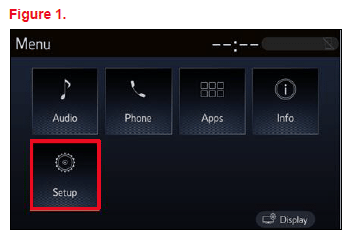
- Press the Menu button on the radio faceplate, then select Setup.
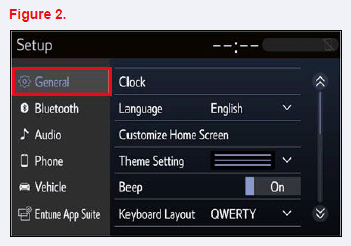
- Select General on the Setup screen.
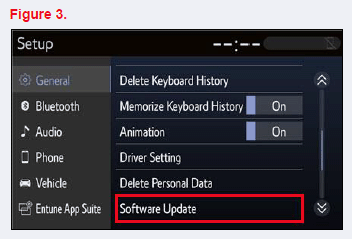
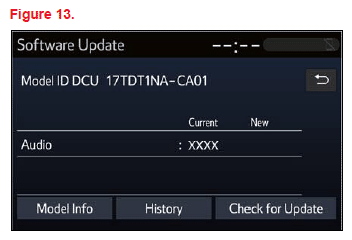
- Scroll down and select Software Update.
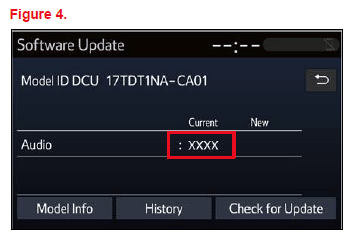
- Verify that the software version is the same or earlier than indicated in the Introduction.
- If the software needs to be updated, download the software from the Software Update Information section onto an empty USB flash drive.
- Insert the prepared USB flash drive into the vehicle's USB port.
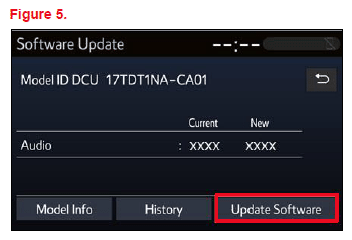
- Verify that the NEW software is up to date on the Software Update screen.TABLE 1. SOFTWARE VERSION INFORMATION
TYPE AUDIO PLUS PREMIUM AUDIO CURRENT NEW CURRENT NEW Audio <1382 1383 <1390 1391 Navigation - - <1009 1110 - Select the Update Software button in the lower right-hand corner.
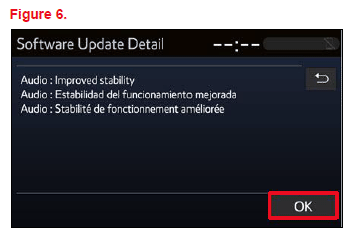
- Select OK on the Software Update Detail screen.
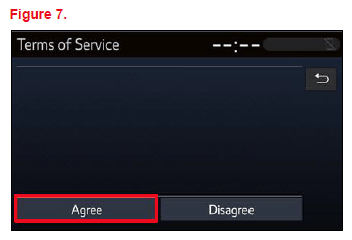
- Select Agree on the Terms of Service screen.
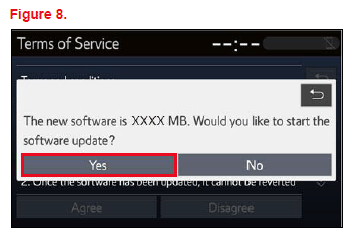
- Select Yes on the "Would you like to start the software update?" pop-up.
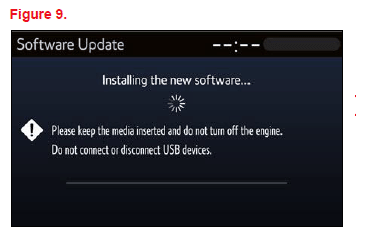
- Once the head unit begins installation, the update will take approximately 10 minutes.NOTE:
- Do NOT turn OFF the ignition or ACC BEFORE the software is ready for updating.
- Do NOT remove the USB flash drive until instructed in step 23.
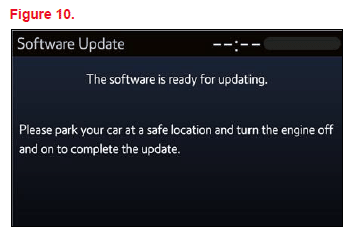
- When the "The software is ready for updating" screen appears, turn OFF the ignition.
- Turn the ignition ON to complete the software update.
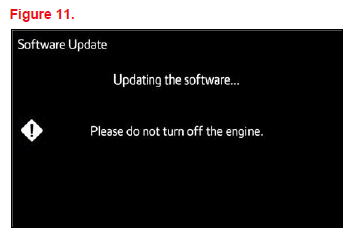
- AFTER turning the ignition ON, the Software Update screen will appear. Do NOT turn OFF the ignition or remove the USB flash drive. The head unit will reboot during this time.
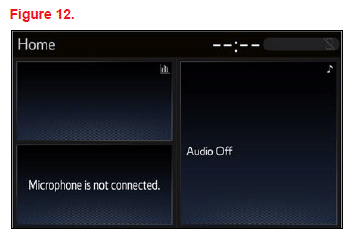
- Once the software update is complete and the Home screen appears, remove the USB flash drive.
- Perform steps 9 - 12 to verify the software version matches the current software version information table below.TABLE 2. SOFTWARE VERSION INFORMATION
TYPE AUDIO PLUS PREMIUM AUDIO CURRENT NEW CURRENT NEW Audio 1383 - 1391 - Navigation - - 1110 -