Customize Parameters [11/2023 - ]
- CUSTOMIZE LIGHTING SYSTEM (EXT) (w/o AFS) NOTE:
- When the customer requests a change in a function, first make sure that the function can be customized.
- Be sure to make a note of the current settings before customizing.
- When troubleshooting a function, first make sure that the function is set to the default setting.
HINT:
The following items can be customized.
- Customizing with the GTS
- Select the setting by referring to the table below.
Light Control
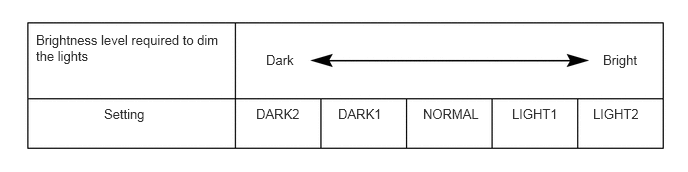
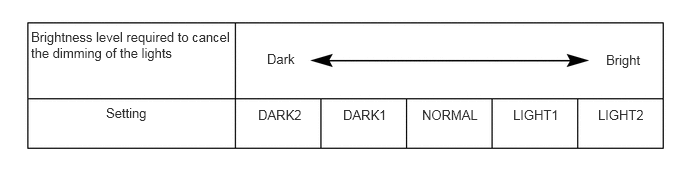
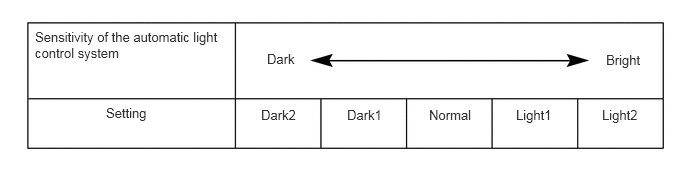
Tester Display Description Default Setting ECU Tail Remind Buzzer Function Sounds a buzzer when the driver door is opened with the light control switch in the TAIL or HEAD position. Enable $00:Disable, $01:Enable Main Body ECU (Multiplex Network Body ECU) Headlight ON in Conjunction with Wiper Function Turns the low beam headlights on/off according to wiper operation. Enable $00:Disable, $01:Enable Main Body ECU (Multiplex Network Body ECU) Light up Clearance Lights at Door Unlock Function Turns on the parking lights and radiator grille (or front panel) emblem for 15 seconds when the doors are unlocked by the smart key or the wireless key. Enable $00:Disable, $01:Enable Main Body ECU (Multiplex Network Body ECU) Brightness Level Adjust (Lowering) Changes the ambient brightness level required to dim the lights such as the indicator lights of the combination meter, A/C indicator light and clock.*A Normal $00:Normal, $01:Dark2, $02:Dark1, $03:Light1, $04:Light2 Main Body ECU (Multiplex Network Body ECU) Brightness Level Adjust (Canceling) Changes the ambient brightness level required to cancel the dimming of the lights such as the indicator lights of the combination meter, A/C indicator light and clock.*B Normal $00:Normal, $01:Dark2, $02:Dark1, $03:Light1, $04:Light2 Main Body ECU (Multiplex Network Body ECU) Sensitivity Adjust Adjusts the sensitivity of the automatic light control system.*C, *1 Normal $01:Dark2, $02:Dark1, $00:Normal, $03:Light1, $04:Light2 Main Body ECU (Multiplex Network Body ECU) Light Auto OFF Delay Setting Keeps the headlights on for a certain period of time after turning the ignition switch off and closing all of doors with the low beam headlights on. 30sec $00:OFF, $01:30sec, $02:60sec, $03:90sec Main Body ECU (Multiplex Network Body ECU) DRL Function Turns the DRL function on/off.*2 Enable $00:Disable, $01:Enable Main Body ECU (Multiplex Network Body ECU) - *1: Customize settings may not be able to be selected from "Light Control" if the vehicle recognizes driver 1, 2 or 3 with the My Settings function. In that case, change the settings from "My Settings".
Refer to CUSTOMIZE PARAMETERS [11/2023 - ]
*2: for vehicles with customize setting "DRL Function"
HINT:
The sensitivity adjustment may be difficult to confirm. Check by driving the vehicle.
Warning
Tester Display Description Default Setting ECU Lane Change Flashing Times Adjust Function to change the lane change flashing times. 3 $00:OFF, $01:3, $02:4, $03:5, $04:6, $05:7 Combination Meter Assembly Illuminated Entry
Tester Display Description Default Setting ECU Exterior Lights ON when Approached Function Lights up the outer rear view mirror foot lights when a key enters any actuation area around the doors.* Enable $00:Disable, $01:Enable Main Body ECU (Multiplex Network Body ECU) Exterior Lights ON when Door Unlocked Function Lights up outer rear view mirror foot lights when doors are unlocked using a mechanical key or door control transmitter.* Enable $00:Disable, $01:Enable Main Body ECU (Multiplex Network Body ECU) Exterior Lights Lighting Timer Setting Changes the lighting time of the outer rear view mirror foot lights.* Normal $00:Normal, $01:Short, $02:Long Main Body ECU (Multiplex Network Body ECU) Exterior Lights ON Function Changes the outer rear view mirror foot light control.* Enable $00:Disable, $01:Enable Main Body ECU (Multiplex Network Body ECU) - *: w/ Door Mirror Foot Light
- *1: Customize settings may not be able to be selected from "Light Control" if the vehicle recognizes driver 1, 2 or 3 with the My Settings function. In that case, change the settings from "My Settings".
- Select the setting by referring to the table below.
- Customizing with the multi-display
- Turn the ignition switch to ON.
- Enter the following menus: Settings / Vehicle customize / Lights.
- Select the setting by referring to the table below.
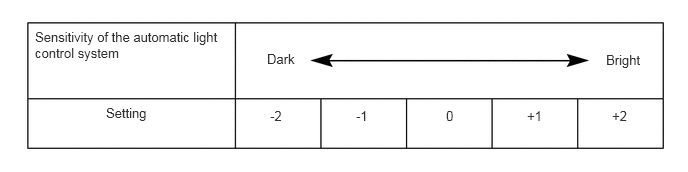
Display Default Content Setting Relevant ECU Headlights Auto-on Sensitivity Normal Adjusts the sensitivity of the automatic light control system.*A Normal, Dark, Darker, Bright or Brighter Main Body ECU (Multiplex Network Body ECU) Headlights Auto-off Timer 30 sec. Keeps the headlights on for a certain period of time after turning the ignition switch off and closing all of doors with the low beam headlights on. Off, 30 sec., 60 sec. or 90 sec. Main Body ECU (Multiplex Network Body ECU) Daytime Running Lights*1 On Turns the DRL function on/off. On or Off Main Body ECU (Multiplex Network Body ECU) Exterior Lights Off Timer*2 15 sec. Changes the lighting time of the door mirror foot lights. Off, 7.5 sec., 15 sec. or 30 sec. Main Body ECU (Multiplex Network Body ECU) - *1: for vehicles with customize setting "Daytime Running Lights"
- *2: w/ Door Mirror Foot Light
HINT:
The sensitivity adjustment may be difficult to confirm. Check by driving the vehicle.