Automatic High Beam System does not Operate or Operation Indicator does not Illuminate [12/2019 - 09/2020]: Procedure
- CHECK VEHICLE CONTROL HISTORY*
- Using the GTS, check for Vehicle Control History (RoB).
Body Electrical > Front Recognition Camera (Front Lighting Control) > Utility
Tester Display Vehicle Control History (RoB) Result
Result Proceed to Vehicle Control History X204E is not output A Vehicle Control History X204E is output B
Result:
B
GO TO VEHICLE CONTROL HISTORY. Refer to VEHICLE CONTROL HISTORY [12/2019 - 09/2020]
Result:
A
See step 2
- Using the GTS, check for Vehicle Control History (RoB).
- READ VALUE USING GTS
- Read the Data List according to the display on the GTS.
Chassis > Front Recognition Camera > Data List
Tester Display Measurement Item Range Normal Condition Diagnostic Note Front Recognition Camera High Temperature 2 Forward recognition camera condition Not High Temperature or High Temperature Not High Temperature: 65°C (149°F) or lower
High Temperature: 65°C (149°F) or higherWhen "High Temperature" is displayed, the automatic high beam system is temporarily suspended. Chassis > Front Recognition Camera > Data List
Tester Display Front Recognition Camera High Temperature 2 OK
"Not High Temperature" is displayed on the GTS.
HINT:
If "High Temperature" is displayed, move the vehicle to a cool place and allow the temperature of the forward recognition camera to decrease before continuing with troubleshooting.
Result
Proceed to OK NG
Result:
NG
END (TEMPORARY SUSPENSION OF AUTOMATIC HIGH BEAM SYSTEM DUE TO HIGH FORWARD RECOGNITION CAMERA TEMPERATURE)
Result:
OK
See step 3
- Read the Data List according to the display on the GTS.
- CHECK AUTOMATIC HIGH BEAM INDICATOR LIGHT
- Check the operation of the automatic high beam indicator light.
- Turn the ignition switch to ON.
- Turn the light control switch to the AUTO or head position.
- Cover the automatic light control sensor to turn the low beam headlights on.
- Move the dimmer switch to the high position.
- Press the auto high beam switch.
Result
Result Proceed to OK (The automatic high beam indicator light and the auto high beam switch indicator illuminate) A NG (Automatic high beam indicator light does not illuminate) B NG (Auto high beam switch indicator does not illuminate) C NG (Automatic high beam indicator light and auto high beam switch indicator do not operate) D
Result:
B
See step 6
Result:
C
GO TO OTHER PROBLEM (Proceed to Automatic High Beam Switch Indicator does not Come ON). Refer to Automatic High Beam Switch Indicator does not Come ON [12/2019 - 11/2023]
Result:
D
See step 7
Result:
A
See step 4
- Check the operation of the automatic high beam indicator light.
- READ VALUE USING GTS
*1 Forward Recognition Camera
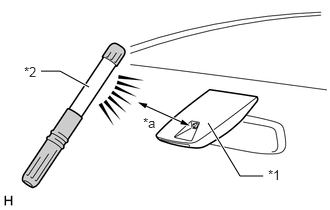
(Automatic High Beam Sensor)*2 Work Light or Equivalent *a 100 mm or less - Shine a light on the automatic high beam sensor.
HINT:
If troubleshooting is being performed in a bright area, such as outside on a sunny day, it will not be necessary to perform this step.
- Read the Data List according to the display on the GTS.
HINT:
As it may take time for the values in the Data List to change, wait at least 10 seconds before reading the Data List.
Body Electrical > Main Body > Data List
Tester Display Measurement Item Range Normal Condition Diagnostic Note Auto H Beam STS0 Automatic high beam sensor current state Undetec, CAM NA, No sens, Hlight, Taillgt, Speed, Daytime, Village, Malfunc, Delay, Aim Lmt, SAE Mod, Undefin or LIN Err Condition can be displayed - Body Electrical > Main Body > Data List
Tester Display Auto H Beam STS0 OK
"Daytime" is displayed on the GTS.
Result
Proceed to OK NG
Result:
NG
REPLACE FORWARD RECOGNITION CAMERA. Refer to REMOVAL [12/2019 - 09/2020]
Result:
OK
See step 5
- Shine a light on the automatic high beam sensor.
- READ VALUE USING GTS
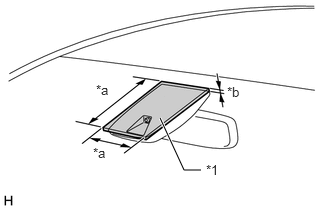
*1 Cardboard or Equivalent Object *a 150 mm or more *b 3 mm or more - Cover the automatic high beam sensor with an opaque object, such as cardboard.NOTE:
- Make sure that there is no clearance between the cardboard or equivalent object and the area of the windshield glass in front of the automatic high beam sensor.
- If there is any clearance, light may shine on the automatic high beam sensor and the value of the Data List will not change.
- Read the Data List according to the display on the GTS.
HINT:
As it may take time for the values in the Data List to change, wait at least 10 seconds before reading the Data List.
Body Electrical > Main Body > Data List
Tester Display Measurement Item Range Normal Condition Diagnostic Note Auto H Beam STS0 Automatic high beam sensor current state Undetec, CAM NA, No sens, Hlight, Taillgt, Speed, Daytime, Village, Malfunc, Delay, Aim Lmt, SAE Mod, Undefin or LIN Err Condition can be displayed - Body Electrical > Main Body > Data List
Tester Display Auto H Beam STS0 OK
"Speed" is displayed on the GTS.
Result
Proceed to OK NG
Result:
OK
USE SIMULATION METHOD TO CHECK. Refer to HOW TO PROCEED WITH TROUBLESHOOTING [12/2019 - ]
Result:
NG
REPLACE FORWARD RECOGNITION CAMERA. Refer to REMOVAL [12/2019 - 09/2020]
- Cover the automatic high beam sensor with an opaque object, such as cardboard.
- PERFORM ACTIVE TEST USING GTS
- Perform the Active Test according to the display on the GTS.
Body Electrical > Combination Meter > Active Test
Tester Display Measurement Item Control Range Diagnostic Note Multi Display All (White) Multi-information display (White display) OFF or ON - Body Electrical > Combination Meter > Active Test
Tester Display Multi Display All (White) OK
The multi-information display in the combination meter assembly turns on according to the operation of the Active Test.
Result
Proceed to OK NG
Result:
OK
REPLACE MAIN BODY ECU (MULTIPLEX NETWORK BODY ECU). Refer to REMOVAL [12/2019 - 10/2022]
Result:
NG
REPLACE COMBINATION METER ASSEMBLY. Refer to REMOVAL [12/2019 - ]
- Perform the Active Test according to the display on the GTS.
- READ VALUE USING GTS
- Read the Data List according to the display on the GTS.
Body Electrical > Main Body > Data List
Tester Display Measurement Item Range Normal Condition Diagnostic Note Auto High Beam Main Switch Auto high beam switch signal OFF or ON OFF: Auto high beam switch not pressed
ON: Auto high beam switch pressed- Body Electrical > Main Body > Data List
Tester Display Auto High Beam Main Switch OK
Normal conditions listed above are displayed.
Result
Proceed to OK NG
Result:
NG
See step 9
Result:
OK
See step 8
- Read the Data List according to the display on the GTS.
- READ VALUE USING GTS
- Read the Data List according to the display on the GTS.
Body Electrical > Main Body > Data List
Tester Display Measurement Item Range Normal Condition Diagnostic Note Auto H Beam STS0 Automatic high beam sensor current state Undetec, CAM NA, No sens, Hlight, Taillgt, Speed, Daytime, Village, Malfunc, Delay, Aim Lmt, SAE Mod, Undefin or LIN Err Condition can be displayed - Body Electrical > Main Body > Data List
Tester Display Auto H Beam STS0 OK
"Daytime" or "Speed" is displayed on the GTS.
Result
Proceed to OK NG
Result:
OK
REPLACE MAIN BODY ECU (MULTIPLEX NETWORK BODY ECU). Refer to REMOVAL [12/2019 - 10/2022]
Result:
NG
REPLACE FORWARD RECOGNITION CAMERA. Refer to REMOVAL [12/2019 - 09/2020]
- Read the Data List according to the display on the GTS.
- INSPECT AUTO HIGH BEAM SWITCH
- Remove the auto high beam switch.
Refer to REMOVAL [12/2019 - ]
- Inspect the auto high beam switch.
Refer to INSPECTION [12/2019 - ]
Result
Proceed to OK NG
Result:
NG
REPLACE AUTO HIGH BEAM SWITCH. Refer to REMOVAL [12/2019 - ]
Result:
OK
See step 10
- Remove the auto high beam switch.
- CHECK HARNESS AND CONNECTOR (AUTO HIGH BEAM SWITCH - MAIN BODY ECU (MULTIPLEX NETWORK BODY ECU) AND BODY GROUND)
- Disconnect the H43 main body ECU (multiplex network body ECU) connector.
- Measure the resistance according to the value(s) in the table below.
Standard Resistance
Tester Connection Condition Specified Condition H41-5 (+B) - H43-26 (AHBI) Always Below 1 Ω H41-5 (+B) or H43-26 (AHBI) - Body ground Always 10 kΩ or higher H41-2 (E) - Body ground Always Below 1 Ω Result
Proceed to OK NG
Result:
OK
REPLACE MAIN BODY ECU (MULTIPLEX NETWORK BODY ECU). Refer to REMOVAL [12/2019 - 10/2022]
Result:
NG
REPAIR OR REPLACE HARNESS OR CONNECTOR