Customize Parameters [11/2023 - ]
- CUSTOMIZE WIRELESS DOOR LOCK CONTROL SYSTEM
Refer to CUSTOMIZE PARAMETERS [11/2023 - ]
- CUSTOMIZE POWER BACK DOOR SYSTEM (w/ Power Back Door System)
Refer to CUSTOMIZE PARAMETERS [11/2023 - ]
- CUSTOMIZE SMART KEY SYSTEM (for Entry Function)
HINT:
The following items can be customized.
NOTE:- When the customer requests a change in a function, first make sure that the function can be customized.
- Record the current settings before customizing.
- Customizing with the GTS
- Connect the GTS to the DLC3.
- Turn the ignition switch to ON.
- Turn the GTS on.
- Enter the following menus: Customize Setting / Smart Key/Access.
- Select the setting by referring to the table below.
Smart Key / Access
Tester Display Description Default Setting ECU Auto Entry Cancel 2 Setting Function that only prevents unlocking of the doors. OFF $00:OFF, $04:ON Certification ECU (Smart key ECU assembly) Ignition Available Area Setting (Back Door Type) Function that sets the area that the electrical key transmitter sub-assembly must be in before the power switch*1 or engine switch*2 can be operated. Fr+Rr+BD $00:Fr+Rr, $01:Fr+Rr+BD Certification ECU (Smart key ECU assembly) Park Wait Time Adjust Function that sets the period of time (lock confirmation time) that the door is prevented from being unlocked by operating the door outside handle after an entry lock operation is performed. 2.5s $00:0.5sec, $01:1.5sec, $02:2.5sec, $03:5sec Certification ECU (Smart key ECU assembly) Door Unlock Sensor Touch Time Adjust Function that sets the length of time the unlock sensor on the door outside handle assembly (for driver door) must be touched to unlock all of the doors.*3 Middle $00:OFF, $01:Short, $02:Middle, $03:Long Certification ECU (Smart key ECU assembly) Key Low Battery Warning Function Enables or disables the sounding of the buzzer when the transmitter battery is low and the ignition switch is turned off after being ON for 20 minutes or more. ON $00:OFF, $01:ON Certification ECU (Smart key ECU assembly) Key Left in Vehicle Alarm Function Enables or disables the sounding of the buzzer when entry lock is performed with the electrical key transmitter sub-assembly inside the vehicle. ON $00:OFF, $01:ON Certification ECU (Smart key ECU assembly) Forget to Turn IG OFF Alarm Function Enables or disables lock sensor warning function when shift position is in P with ignition switch ON (If this value is "ON", a warning will activate when the lock sensor is touched). ON $00:OFF, $01:ON Certification ECU (Smart key ECU assembly) Start Indicator Function Function that turns the entry warning light on the combination meter assembly on or off. ON $00:OFF, $01:ON Certification ECU (Smart key ECU assembly) Touch Activation Over Threshold Function that limits the number of times the entry lock function can be operated consecutively. When set to "Not Active" entry lock function can be operated an unlimited number of times consecutively. Active $00:Active, $01:Not Active Certification ECU (Smart key ECU assembly) Start Switch Light Function Function that sets whether the power switch*1 or engine switch*2 light blinks. ON $00:OFF, $01:ON Certification ECU (Smart key ECU assembly) Entry Unlock Twice Function Function that unlocks only the driver door when performing the entry unlock operation.*4 Enable $00:Disable, $01:Enable Main body ECU (Multiplex network body ECU) - *1: for HV Model
- *2: for Gasoline Model
- *3: When the following conditions are met, a short touch unlocks only the driver door, while a long touch unlocks all of doors.
- "Door Unlock Sensor Touch Time Adjust" is set to other than "OFF"
- "Entry Unlock Twice Function" is set to "Enable"*4
- *4: Customize settings cannot be selected from "Smart Key / Access" if the vehicle recognizes driver 1, 2 or 3 with the My Settings function. In that case, change the settings from "My Settings".
Refer to CUSTOMIZE PARAMETERS [11/2023 - ]
- CUSTOMIZING WITH THE MULTI-DISPLAY
- Customizing with the multi-display
- Turn the ignition switch ON.
- Enter the following menus: [Settings] → [Vehicle customize] → [Door control]
Display Description Default Setting Relevant ECU Feedback lights Function that flashes the hazard warning lights once when the doors are locked by entry operation and twice when the doors are unlocked by entry operation. ON ON or OFF Main body ECU (Multiplex network body ECU) Feedback tone Function that adjusts the wireless buzzer volume 5 Off, 1, 2, 3, 4, 5, 6 or 7 Main body ECU (Multiplex network body ECU) Unlock Function that sets which doors are unlocked when performing the entry unlock operation. Driver door only All doors or Driver door only Main body ECU (Multiplex network body ECU)
- Customizing with the multi-display
- ENTRY UNLOCK MODE CHANGE FUNCTION
- Entry unlock mode change function (manual operation)
- The following entry unlock modes can be selected when using the entry unlock mode change function.
- All door unlock mode: When the unlock sensor of a door outside handle is touched, all of the doors are unlocked simultaneously.
- Driver door unlock mode: When the unlock sensor of the front door outside handle assembly (for driver door) is touched, only the driver door is unlocked. If any other door door outside handle assembly is touched, all of the doors are unlocked simultaneously.
- When customizing through manual operation:
- Turn the ignition switch off.
- Check that the LED of the electrical key transmitter sub-assembly is not illuminated, and then press and hold the lock and unlock switches of the electrical key transmitter sub-assembly for 5 seconds or more while the electrical key transmitter sub-assembly is in the exterior detection area.
- Check the current setting.
HINT:
- The mode changes from all door unlock mode to driver door unlock mode and then back to all door unlock mode.
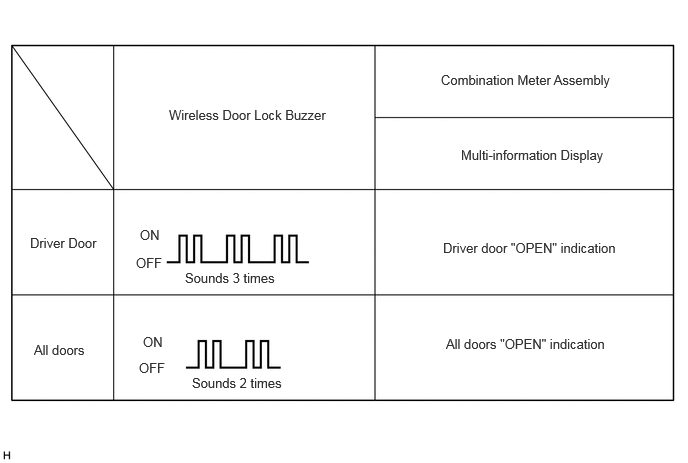
- The answer-back (wireless buzzer) operation for each mode is indicated in the table below.
Currently Selected Mode Answer-back (Wireless Buzzer) All door unlock mode Buzzer sounds twice (short beeps) Driver door unlock mode Buzzer sounds 3 times (short beeps)
- Release the lock and unlock switches of the electrical key transmitter sub-assembly.
- Check that the LED of the electrical key transmitter sub-assembly is not illuminated, and then press and hold the lock and unlock switches of the electrical key transmitter sub-assembly for 5 seconds or more to change the mode.
HINT:
Repeat the procedure as necessary to select the desired mode.
- Unlock the doors using the wireless function, and then open any door.
- The following entry unlock modes can be selected when using the entry unlock mode change function.
- Entry unlock mode change function (manual operation)