Immobilizer And Smart Key Reset (T-SB-0057-18 REV2)
Reference number: T-SB-0057-18 REV2
Supersedes refnos: T-SB-0057-18, T-SB-0057-18 REV1
IMMOBILIZER AND SMART KEY RESET
TECHNICAL SERVICE BULLETIN
| TOYOTA: | 1999 - 2021 4Runner; 2017 - 2021 86, Prius Prime, Yaris THAI-Prod; 2013 - 2018 Avalon HV; 1998 - 2018 Avalon; 2017 - 2022 C-HR; 2007 - 2023 Camry HV; 1998 - 2023 Camry; 2005 - 2019 Corolla; 2008 - 2014 FJ Cruiser; 2006 - 2020 Highlander HV; 2001 - 2020 Highlander; 2000 - 2005 MR2 Spyder; 2005 - 2014 Matrix; 2016 - 2020 Mirai; 2012 - 2020 Prius C; 2010, 2012 - 2015 Prius PHV; 2012 - 2018 Prius V; 2001 - 2021 Prius, Sequoia; 2001 - 2003, 2012 - 2014 RAV4 EV; 2016 - 2018 RAV4 HV; 2004 - 2018 RAV4; 1999 - 2020 Sienna; 1999 - 2008 Solara; 2005 - 2023 Tacoma; 2007 - 2021 Tundra, Yaris; 2009 - 2016 Venza; 2016 - 2020 Yaris R, Yaris SD MEX-Prod; 2017 - 2018 iA, iM |
| SERVICE CATEGORY: | Vehicle Interior |
| SECTION: | Theft Deterrent/Keyless Entry |
| MARKET: | USA |
| COPYRIGHT: | © 2023 Toyota, USA License Agreement TMS1002 |
APPLICABILITY
| YEAR(S) | MODEL(S) | ADDITIONAL INFORMATION |
|---|---|---|
| 1999 - 2021 | 4Runner | |
| 2017 - 2021 | 86, Prius Prime, Yaris THAI-Prod | |
| 2013 - 2018 | Avalon HV | |
| 1998 - 2018 | Avalon | |
| 2017 - 2022 | C-HR | |
| 2007 - 2023 | Camry HV | |
| 1998 - 2023 | Camry | |
| 2005 - 2019 | Corolla | |
| 2008 - 2014 | FJ Cruiser | |
| 2006 - 2020 | Highlander HV | |
| 2001 - 2020 | Highlander | |
| 2000 - 2005 | MR2 Spyder | |
| 2005 - 2014 | Matrix | |
| 2016 - 2020 | Mirai | |
| 2012 - 2020 | Prius C | |
| 2010, 2012 - 2015 | Prius PHV | |
| 2012 - 2018 | Prius V | |
| 2001 - 2021 | Prius, Sequoia | |
| 2001 - 2003, 2012 - 2014 | RAV4 EV | |
| 2016 - 2018 | RAV4 HV | |
| 2004 - 2018 | RAV4 | |
| 1999 - 2020 | Sienna | |
| 1999 - 2008 | Solara | |
| 2005 - 2023 | Tacoma | |
| 2007 - 2021 | Tundra, Yaris | |
| 2009 - 2016 | Venza | |
| 2016 - 2020 | Yaris R, Yaris SD MEX-Prod | |
| 2017 - 2018 | iA, iM |
*Not all 1998 - 2004 model year Land Cruiser, Avalon, Camry, 4Runner, Solara, Sienna, and Highlander vehicles apply. Reference PANT Bulletin 2014-050.
REVISION NOTICE
May 30, 2023 Rev2:
- Applicability has been updated to include 2022 model year C-HR and 2022 - 2023 Camry, Camry Hybrid, and Tacoma vehicles.
- Instructions have been updated to include GTS+ software.
April 01, 2021 Rev1:
- Applicability has been updated to include 2019 - 2021 model year Toyota vehicles.
Any previous printed versions of this bulletin should be discarded.
SUPERSESSION NOTICE
The information contained in this bulletin supersedes Service Bulletin No. T-SB-0043-14.
- Applicability has been updated to include 2017 - 2018 model year Toyota vehicles.
Service Bulletin No. T-SB-0043-14 is obsolete and any printed versions should be discarded.
INTRODUCTION
The Immobilizer and Smart Key Reset is a feature that allows the registration of new keys when all master keys are lost. Once the system is reset, all previously registered keys will be erased. Follow the procedures in this bulletin to reset a vehicle Immobilizer or Smart Key system.
WARRANTY INFORMATION
| OP CODE | DESCRIPTION | TIME | OFP | T1 | T2 |
|---|---|---|---|---|---|
| N/A | Not Applicable to Warranty | - | - | - | - |
REQUIRED TOOLS & EQUIPMENT
| REQUIRED EQUIPMENT | SUPPLIER | PART NUMBER | QTY | ||
|---|---|---|---|---|---|
| Techstream ADVi(1) | ADE | TSADVUNIT | 1 | ||
| Techstream 2.0 | TS2UNIT | ||||
| Techstream Lite | TSLITEPDLR01 | ||||
| Techstream Lite (Green Cable) | TSLP2DLR01 | ||||
|
|||||
- Only ONE of the Techstream units listed above is required.
- GTS+ software version 2023.02.001.02 or later is required.
- Additional Techstream units may be ordered by calling Approved Dealer Equipment (ADE) at 1-800-368-6787.
- Additional SSTs may be ordered by calling 1-800-933-8335.
| SPECIAL SERVICE TOOLS (SST) | PART NUMBER | QTY | ||
|---|---|---|---|---|
| Jumper Wire(1) | 09843-18020 | 1 | ||
|
||||
SERVICE BULLETIN OVERVIEW
- Review the vehicle application chart in TIS to verify the vehicle is capable of being reset.
Refer to the Toyota/Scion Vehicle Support chart located on TIS - Diagnostics -Immobilizer Reset - Reference Documents.
- Review the NEW security authorization process and choose the option that best supports your dealer situation.
- Follow the GTS+ and TIS screenshots to obtain the passcode needed to open registration for Immobilizer and Smart Key programming.NOTE: Some early ECM-based Immobilizers CANNOT be reset using GTS+. For these vehicles, perform the following:
- Identify the vehicle using the Toyota/Scion Vehicle Support chart noted above.
- Refer to the most recent PANT bulletin for instructions.
PREPARATION FOR 2001 MODEL YEAR MR2 AND RAV4
BEFORE beginning the Key Code Reset function on 2001 model year MR2 and RAV4 vehicles, it is necessary to short terminals TC to E1 at the ECM connector, using SST No. 09843-18020.
With ECU connectors in place, back-probe and short terminals TC to E1 (pin 17 to pin 5).
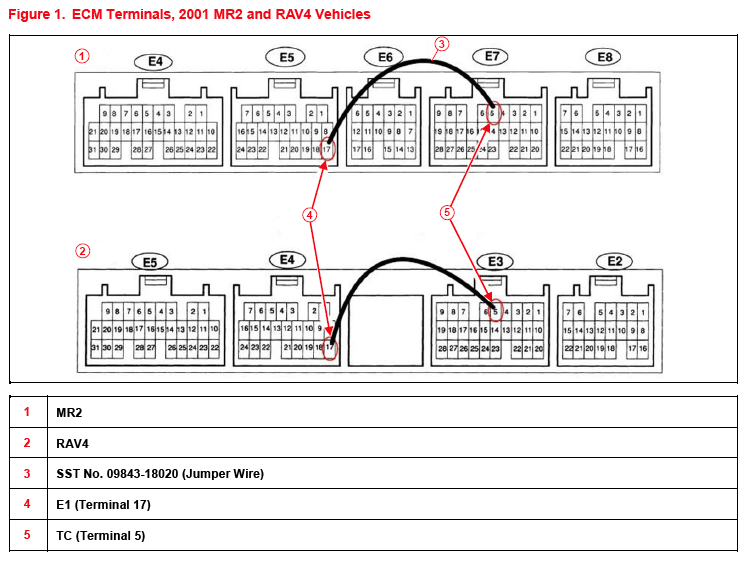
- With the key ON and the engine OFF, the SRS, Cruise and ABS lights will flash on the instrument panel when terminals TC to E1 are shorted together correctly.
- Leave the SST No. 09843-18020 in place for the entire Key Code Reset procedure.
SECTION 1: SECURITY AUTHORIZATION FOR THE RESET PASSCODE
An improved security measure is implemented in TIS that requires a secondary approval by dealer management each time an Immobilizer or Smart Key Reset request is submitted. Please review the following flowchart and become familiar with the options outlined prior to attempting a vehicle reset.
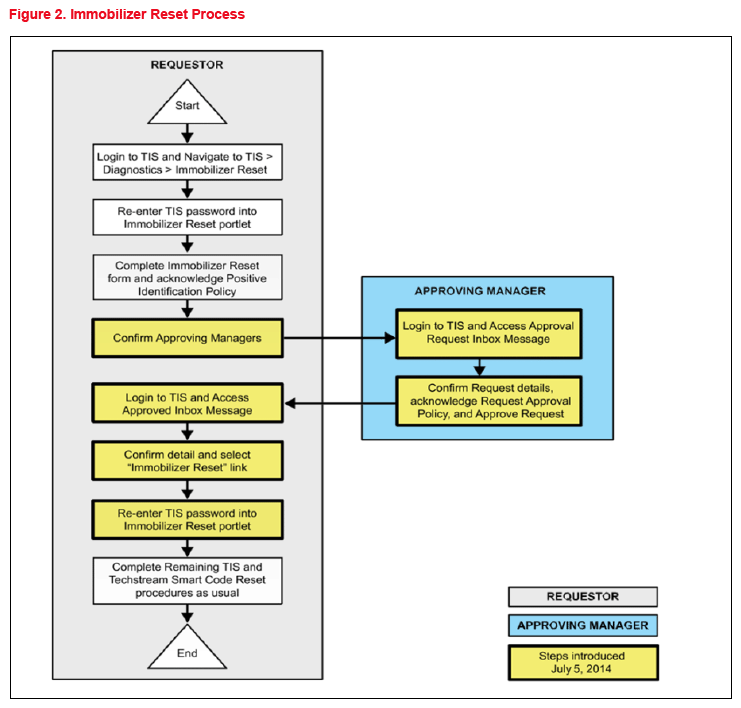
Key Points:
- The reset request can be submitted from the GTS+ in the vehicle or on TIS before the vehicle is available.
- A single management approval can be used multiple times for the same VIN as needed until the vehicle repair is completed.
- Each reset attempt for the same VIN will generate a NEW seed number and a unique passcode.
- The request and approval hand-off between the technician and management is done on the TIS home page inbox, accessed at each individual's location (Techstream, office, etc.).
Main Steps:
- Obtain Authorization
- Technician Reset Approval Request
- Manager Access TIS Inbox Message and Approve
- Perform Reset With Techstream
- Access Approval Inbox Message
- Perform Reset at Vehicle
Variations:
- Pre-approval BEFORE vehicle is accessed (per Main Steps above)
- Request and receive approval from Techstream AFTER entering the reset utility
- Repeated reset attempts with Techstream by accessing the single approval file
Approving Managers:
Once the passcode request form is completed, an approval request will be sent to ALL approving managers. Dealership personnel with the following job titles in "Staffmaster" are granted passcode approval capability.
Dealer Principal, General Manager, Service Manager, Service Director, Service/Parts Director, Parts Manager, Parts Director, Customer Relations Manager, Customer Satisfaction Manager, Shop Foreman, Diagnostic Specialist, or Team Leader.
Each dealer MUST have AT LEAST two enrolled managers to access ANY passcodes.
- Once a reset is completed, it may be necessary to enter an Immobilizer Key Registration or a Smart Key Code Registration utility to program the new keys.
- Early Immobilizer systems may be ready to accept keys immediately after the reset if the security light flashes a two-digit code (such as 21 or 22). Refer to the applicable Repair Manual for details.
Please review the GTS+ and TIS screenshots in this bulletin to become familiar with the new management authorization process flow.
SECTION 2: RESET APPROVAL REQUEST (TIS PRE-APPROVAL)
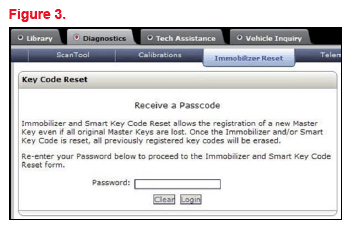
- Open TIS and enter the Diagnostics and Immobilizer Reset tabs.
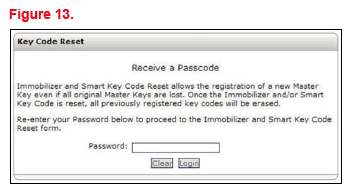
- Log in using your password.
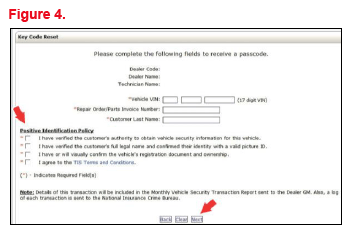
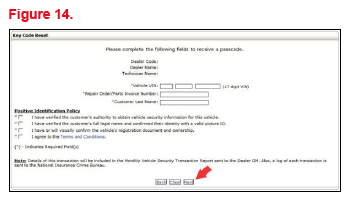
- Enter the information requested, check all four boxes below Positive Identification Policy, then click Next.
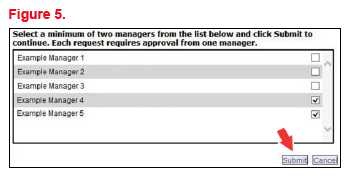
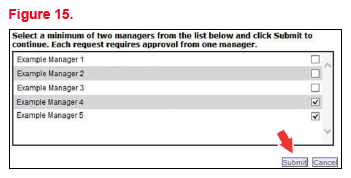
- A minimum of two managers is required to be selected. Once two or more managers are selected, click Submit to continue.
Each request requires approval from one manager. Once manager approval is received, continue to Section 5: Receipt of Passcode.
SECTION 3: GTS+ RESET UTILITY (WITH REQUEST)
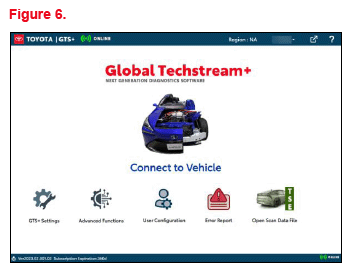
- Connect GTS+ to the vehicle.
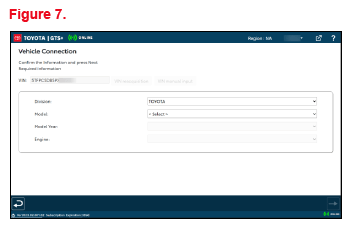
- Choose the appropriate vehicle model and year if the ignition cannot be turned on and the information does not automatically populate.
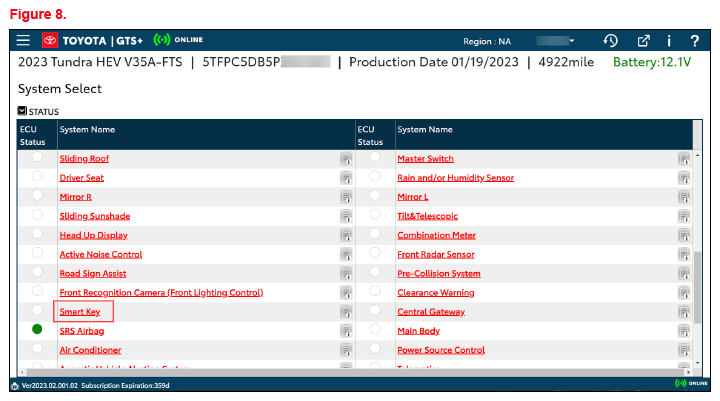
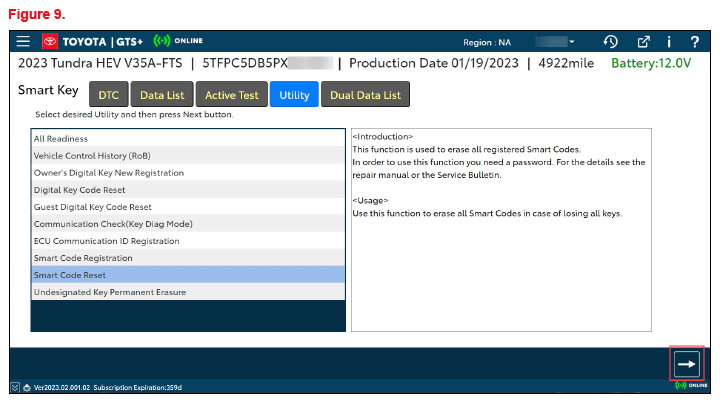
- Choose the Immobilizer or Smart Key system as needed.
- Choose the Immobilizer or Smart Code Reset utility.
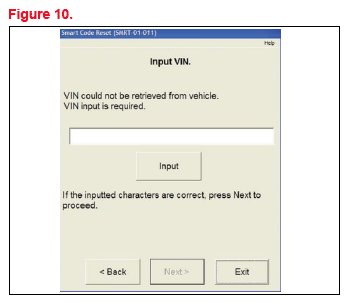
- Enter the VIN if prompted.
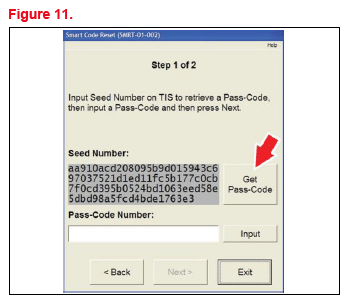
- GTS+ will generate a seed number. Click Get Pass-Code.
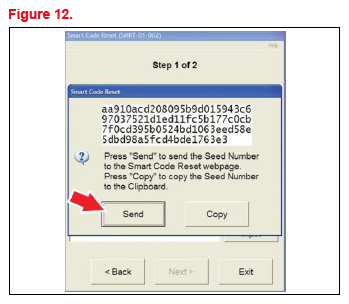
- Click Send to connect to TIS.NOTE:
- If there is already a management approval file for this VIN, do NOT follow the next three steps to resubmit a request. Open the approval file in your TIS inbox, enter the most recent seed number to get the passcode (as outlined in Section 5: Receipt of Passcode). Then, go to Section 6: Techstream Reset Utility (Reset Initiated).
- For repeated reset attempts AFTER the approval is completed, follow Section 3: GTS+ Reset Utility (With Request) and Section 6: GTS+ Reset Utility (Reset Initiated), using the same management approval file.
- When the TIS window opens, enter your password to log in.
- Fill in the required information and click Next.
- It is required to select a minimum of two managers. Once two or more managers are selected, click Submit to continue.
Each request MUST be approved by one manager. Once manager approval is received, continue to Section 5: Receipt of Passcode.
SECTION 4: MANAGER APPROVAL (TIS)
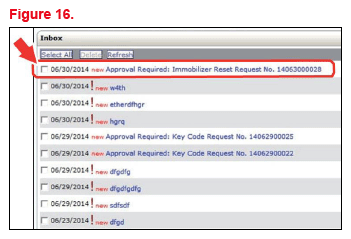
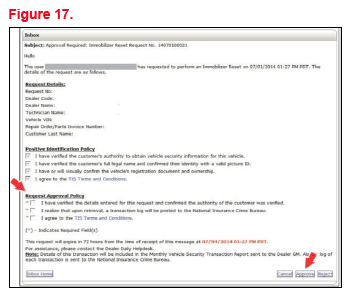
- Once the request is submitted, one of the authorized dealer managers will locate the technician's request in the TIS home page inbox.
The manager will click the title to open the request.
- The manager checks the three boxes under Request Approval Policy, then clicks Approve to send the approval to the technician.
SECTION 5: RECEIPT OF PASSCODE (TIS)
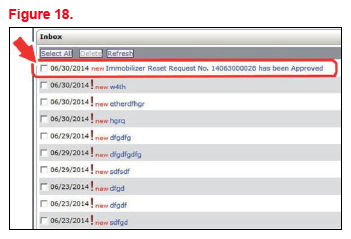
- Once approved by management, the technician will open the TIS inbox and locate the reset request. The technician will click the title to open the approval.NOTE:
- It is recommended to retrieve the passcode from the Techstream connected to the vehicle as the seed number and passcode work together.
- Once approved by management, multiple resets can be performed for a single VIN. Each attempt will create a new seed number and resultant passcode.
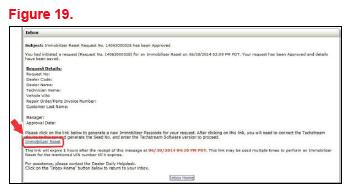
- Once opened, the technician will click the Immobilizer Reset link to continue.
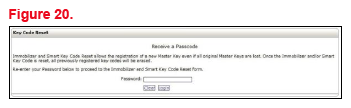
- At this step, the technician MUST re-enter the password to log in again.
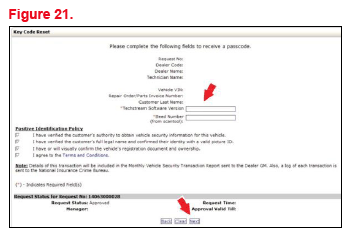
- The technician MUST enter the Techstream software version and paste in the seed number from GTS+.
- Click Next.
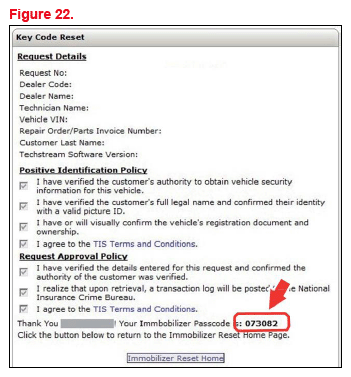
- The passcode will be provided as shown. Continue to Section 6: Techstream Reset Utility (Reset Initiated), for instructions on entering the passcode to initiate the reset.
SECTION 6: GTS+ RESET UTILITY (RESET INITIATED)
The reset can be initiated once the management approval reply is available in the TIS home page inbox. With this approval file, multiple seed numbers can be used for as many attempts as needed to repair the vehicle.
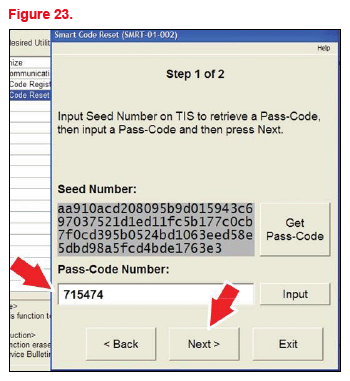
- After retrieving the passcode from the manager approval process in Section 4: Manager Approval and Section 5: Receipt of Passcode, enter the passcode in GTS+ and click Next.
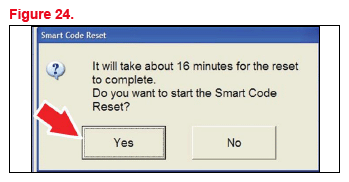
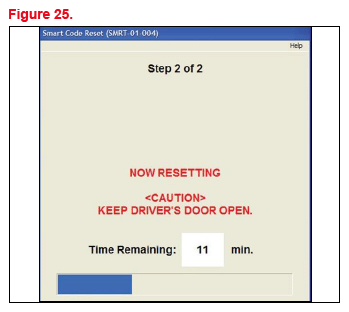
- Click Yes to start the process.
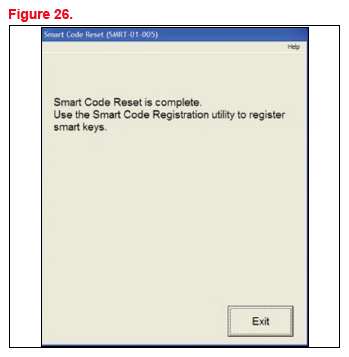
- Once completed, it may be necessary to enter either the Immobilizer Key Registration or Smart Code Registration utility to program keys.NOTE: Some early Immobilizer systems go directly into programming mode. This can be confirmed by the security light blinking a two-digit code. Refer to the applicable Repair Manual for details.