ENTUNE 3.0 App Suite Connect (T-SB-0039-20 REV2)
Reference number: T-SB-0039-20 REV2
Supersedes refnos: T-SB-0039-20, T-SB-0039-20 REV1
ENTUNE 3.0 APP SUITE CONNECT
TECHNICAL SERVICE BULLETIN
| TOYOTA: | 2021 4Runner, Avalon, Avalon HV, C-HR, Camry, Camry HV, Corolla, Corolla Hatchback, Corolla HV, Highlander, Highlander HV, Mirai, Prius, Prius Prime, RAV4, RAV4 HV, RAV4 Prime, Sequoia, Sienna HV, Tacoma, Tundra, Venza HV |
| SERVICE CATEGORY: | General |
| SECTION: | Pre-Delivery Service |
| MARKET: | USA |
| COPYRIGHT: | © 2020 Toyota, USA License Agreement TMS1002 |
APPLICABILITY
| YEAR(S) | MODEL(S) | ADDITIONAL INFORMATION |
|---|---|---|
| 2021 | 4Runner, Avalon, Avalon HV, C-HR, Camry, Camry HV, Corolla, Corolla Hatchback, Corolla HV, Highlander, Highlander HV, Mirai, Prius, Prius Prime, RAV4, RAV4 HV, RAV4 Prime, Sequoia, Sienna HV, Tacoma, Tundra, Venza HV |
REVISION NOTICE
October 22, 2020 Rev 2:
- Applicability has been updated to include 2021 model year Sienna Hybrid vehicles.
July 27, 2020 Rev 1:
- Applicability has been updated to include 2021 model year Venza Hybrid vehicles.
Any previous printed versions of this bulletin should be discarded.
INTRODUCTION
An initialization procedure is required to activate the Entune™ 3.0 App Suite Connect for Audio, Audio Plus, and Premium Audio head units before they are used for the first time on new vehicles. The initialization procedure may also be performed under other circumstances, such as following a head unit replacement or after the customer's personal settings are erased.
The initialization procedure requires between 3 and 15 minutes to complete, depending on file size, cellular connection speed, and other factors. Following the initialization procedure, individual Entune™ 3.0 apps may periodically update through an over-the-air update system. Updates are either optional or mandatory. The update procedure will take approximately 1 minute for each app requiring an update. Follow the Initialization/Update Procedure in this bulletin to perform the initialization and app updates.
WARRANTY INFORMATION
| OP CODE | DESCRIPTION | TIME | OFP | T1 | T2 |
|---|---|---|---|---|---|
| N/A | Not Applicable to Warranty | - | - | - | - |
INITIALIZATION/UPDATE PROCEDURE
- Press the Apps button on the head unit.
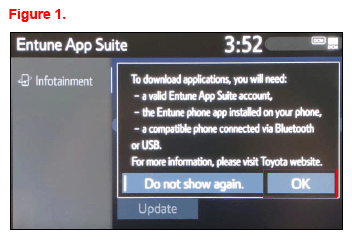
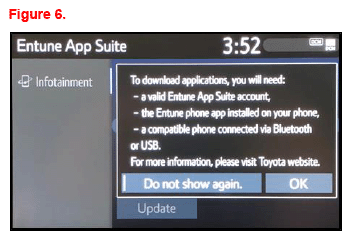
- Select OK when the "To download applications, you will need..." pop-up displays.
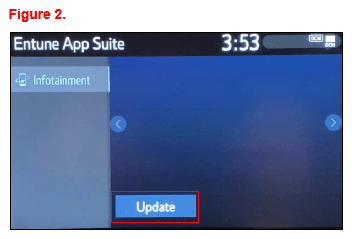
- Select Update.
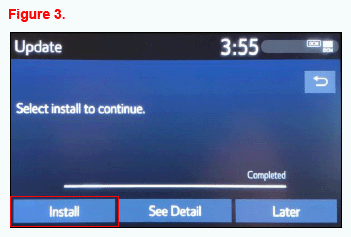
- Select Install when the download has been completed.
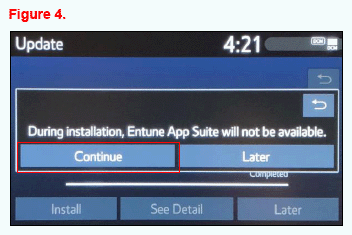
- Select Continue when the "During installation..." pop-up displays.
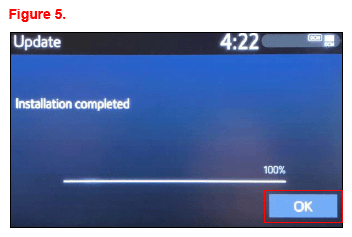
- Select OK once the installation has been completed.
- Confirm that the installation was successful by pressing the Apps button on the head unit. The installation is ONLY complete if the pop-up message shown is NOT displayed.NOTE:
- Entune App Suite content varies by model. Some models may have very few Apps or only support Alexa.
- Alexa MUST be installed separately via the Toyota + Alexa smartphone app (not included in this procedure).