Audio Head Unit Software Update (PANASONIC) (T-SB-0043-21 REV2)
Reference number: T-SB-0043-21 REV2
Supersedes refnos: T-SB-0043-21, T-SB-0043-21 REV1
AUDIO HEAD UNIT SOFTWARE UPDATE (PANASONIC)
TECHNICAL SERVICE BULLETIN
| TOYOTA: | 2020 - 2022 4Runner, Camry, Camry HV, Highlander, Highlander HV, Sequoia; 2021 - 2022 Mirai, Sienna HV, Venza HV; 2020 - 2021 Tundra |
| SERVICE CATEGORY: | Audio/Visual/Telematics |
| SECTION: | Navigation/Multi Info Display |
| MARKET: | USA |
| COPYRIGHT: | © 2022 Toyota, USA License Agreement TMS1002 |
APPLICABILITY
| YEAR(S) | MODEL(S) | ADDITIONAL INFORMATION |
|---|---|---|
| 2020 - 2022 | 4Runner, Camry, Camry HV, Highlander, Highlander HV, Sequoia | |
| 2021 - 2022 | Mirai, Sienna HV, Venza HV | |
| 2020 - 2021 | Tundra |
REVISION NOTICE
July 14, 2022 Rev2:
- Applicability has been updated to include 2021 - 2022 model year Mirai vehicles.
- The Introduction, Software Update Information, and Software Update Procedure sections have been updated.
January 07, 2022 Rev1:
- Applicability has been updated to include 2022 model year 4Runner, Camry, Camry Hybrid, Highlander, Highlander Hybrid, Sequoia, Sienna Hybrid, and Venza Hybrid vehicles.
Any previous printed versions of this bulletin should be discarded.
SUPERSESSION NOTICE
The information contained in this bulletin supersedes Service Bulletin No. T-SB-0066-20.
- The entire bulletin has been updated.
Service Bulletin No. T-SB-0066-20 is obsolete and any printed versions should be discarded.
INTRODUCTION
Some 2020 model year vehicles equipped with Audio Plus (version 1060) or Premium Audio (version 1060) or earlier may exhibit the following condition:
- Distorted screen when using Apple CarPlay® while making a hands-free phone call.
Some 2020 model year vehicles equipped with Audio Plus (version 1021) or Premium Audio (version 1021) or earlier may exhibit one or more of the following conditions:
- Barge in function defaulted to OFF.
- Limited phone book grammar.
- Difficult Hand Free operation.
- Abnormal Electronic Owner's Manual operation.
- Music does not automatically resume when using Android Auto™.
- Cover art is not displayed.
- Vehicle position is not sent to Destination Assist server.
- System inoperative after using the return button when using voice recognition.
Some 2020 model year vehicles equipped with Audio Plus (version 1035) or Premium Audio (version 1035) or earlier may exhibit one or both of the following conditions:
- Abnormal screen play while using Apple CarPlay® (primarily during phone calls).
- Poor sound quality during phone calls while using Apple CarPlay®.
Some 2020 model year vehicles equipped with Audio Plus (version 1047) or Premium Audio (version 1047) or earlier may exhibit one or more of the following conditions:
- USB audio does not resume after ignition cycle.
- Intermittent rebooting.
- Bluetooth disconnecting during a phone call when using Apple CarPlay®.
- Intermittent screen freezing.
- Navigation intermittently will not boot up.
- Home Screen Audio widget is blank after a Destination Assist call.
- Song, artist, or album data missing.
- Abnormal clock operation.
- Apple CarPlay® intermittently inoperative.
- Radio takes a long time to boot up.
Some 2020 - 2021 model year vehicles equipped with Audio Plus (version 1065) or Premium Audio (version 1065) or earlier may exhibit one or more of the following conditions:
- Bluetooth Audio not displayed on the MID (Multi-information Display).
- Unable to connect iPhone® device via USB.
- iOS device inoperative until IG-OFF/ON.
Some 2020 - 2021 model year vehicles equipped with Audio Plus (version 1101) or Premium Audio (version 1101) or earlier may exhibit one or more of the following conditions:
- Audio does not resume after playing voicemail in Apple CarPlay®.
- Repeat icon does not match what is displayed on the handset in Apple CarPlay®.
- No sound from Siri®.
- Abnormal Voice Recognition Operation when connecting a phone for Projection Mode.
- Apple CarPlay® music will stop intermittently after IG-ON.
- Incorrect cover art is intermittently displayed during Apple CarPlay®.
- Unable to change volume while listening to voicemail.
- Apple CarPlay® audio intermittently resumes.
- MAP switch intermittently does not work with Android AutoTM.
- Intermittent pop noise when listening to USB audio.
- Intermittent blank screen.
- Blower speed incorrectly displayed.
Some 2020 - 2022 model year vehicles equipped with Audio Plus (version 1122) or Premium Audio (version 1124) or earlier may exhibit one or more of the following conditions:
- Intermittent Radio Rebooting.
- Tune knob doesn't change the track in all audio sources.
- "Waiting for the beep" is displayed, but voice recognition does not start.
- Music does not resume when changing the volume, and the audio source is paused.
- Blower motor mode does not match the actual blower mode.
- Apple CarPlay® does not start immediately after connecting iPhone®.
- Rear Seat Entertainment equipped vehicles have inoperative track controls.
- Incorrect FM and XM® genre information.
Some 2021 - 2022 model year Mirai vehicles equipped with Teammate™ may exhibit the following condition:
- No OTA update icon for Teammate™.
Some 2020 - 2022 model year vehicles equipped with Audio Plus (version 1162) or Premium Audio (version 1150) or earlier may exhibit one or more of the following conditions:
- Multimedia system reboots when iPhone® is connected via USB.
- Energy flow information is missing on energy monitor screen.
- Clearance sonar indication on backup camera screen is missing.
- Audio from USB devices intermittently works.
- iPhone® ringer continues after answering call.
A software update is now available to address these conditions. Follow the Software Update Procedure in this bulletin to update the software.
WARRANTY INFORMATION
| OP CODE | DESCRIPTION | TIME | OFP | T1 | T2 | ||
|---|---|---|---|---|---|---|---|
| EL1920 | Software Update | 0.3 | 86120-#####(1) 86140-#####(1) 86840-#####(1) 86800-#####(1) |
87 | 74 | ||
|
|||||||
APPLICABLE WARRANTY
- This repair is covered under the Toyota Basic Warranty. This warranty is in effect for 36 months or 36,000 miles, whichever occurs first, from the vehicle's in-service date.
- Warranty application is limited to occurrence of the specified condition described in this bulletin.
SOFTWARE UPDATE INFORMATION
| MODEL | HEAD UNIT | SOFTWARE UPDATE FILE | |
|---|---|---|---|
| 4Runner | Audio Plus | DCU | 17TDT1NA-DA30_0111.kwi |
| Premium Audio | 17TDT2NA-DA30_0111.kwi | ||
| MEU | 17TMT2NA-DA50_0111.kwi | ||
| Camry, Camry HV | Audio Plus | DCU | 17TDT1NA-DA30_0111.kwi 17TDT1NA-DA35_0111.kwi |
| Premium Audio | 17TDT2NA-DA30_0111.kwi 17TDT2NA-DA35_0111.kwi |
||
| MEU | 17TMT2NA-DA50_0111.kwi | ||
| Highlander, Highlander HV | 12.3-in. Touch Screen Premium Audio | DCU | 17TDTENA-DA30_0111.kwi |
| MEU | 17TMTENA-DA50_0111.kwi | ||
| Mirai | Premium Audio | 17TMTENA-DA52_0011.kwi | |
| DCU | 17TDT2NA-DA55_0111.kwi | ||
| Sequoia | Audio Plus | 17TDT1NA-DA30_0111.kwi | |
| Premium Audio | 17TDT2NA-DA30_0111.kwi | ||
| MEU | 17TMT2NA-DA50_0111.kwi | ||
| Tundra | DCU | 17TDT2NA-DA30_0111.kwi | |
| MEU | 17TMT2NA-DA50_0111.kwi | ||
| Venza HV | 12.3-in. Touch Screen Premium Audio | DCU | 17TDTENA-DA50_0111.kwi |
| MEU | 17TMTENA-DA53_0106.kwi | ||
| Sienna HV | Premium Audio | DCU | 17TDT2NA-DA55_0111.kwi |
| MEU | 17TMT2NA-DA50_0111.kwi | ||
MULTIMEDIA SOFTWARE FILE DOWNLOAD
The multimedia software update file may be downloaded directly from this Service Bulletin by clicking on the file name in the table above. Once downloaded, the file may be extracted (unzipped) from the zip file and saved directly to a blank USB flash drive.
For USB flash drive requirements and download instructions, refer to TIS - Diagnostics - Reprogramming - Reference Documents - Multimedia Software Download Instructions.
SOFTWARE UPDATE PROCEDURE
- Turn ON the ignition.
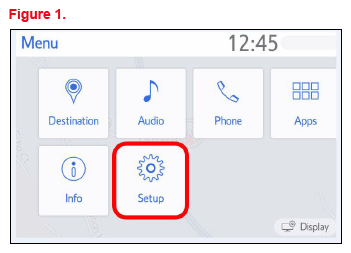
- Press the Menu button on the radio faceplate, then select Setup.
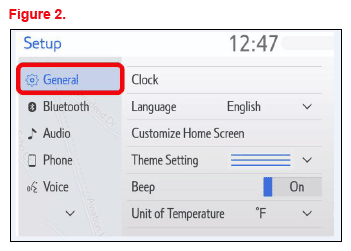
- Select General on the Setup screen.
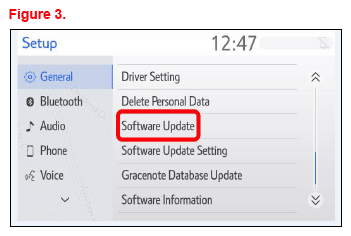
- Scroll down and select Software Update.
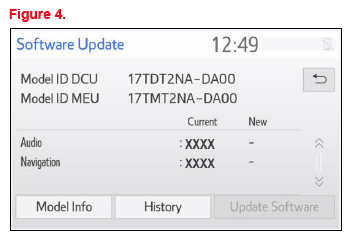
- Verify that the software version is the same or earlier as indicated in the Introduction.
- If the software needs to be updated, download the software from the Software Update Information section onto an empty USB flash drive.
- Insert the prepared USB flash drive into the vehicle's USB data port.
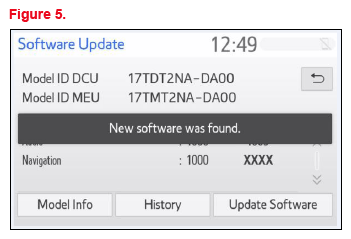
- Verify that the NEW software is up to date on the Software Update screen.TABLE 1. SOFTWARE VERSION INFORMATION FOR ALL MODELS EXCEPT FOR VENZA AND MIRAI
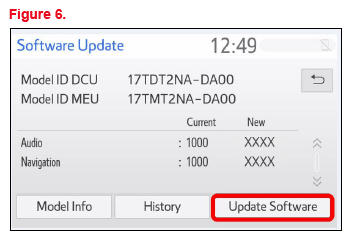
TYPE AUDIO PLUS PREMIUM AUDIO CURRENT VERSION NEW VERSION CURRENT VERSION NEW VERSION Audio <1162 1225 <1162 1225 Navigation - - <1150 TABLE 2. SOFTWARE VERSION INFORMATION FOR VENZA 12.3-IN TOUCH SCREENTYPE PREMIUM AUDIO CURRENT VERSION NEW VERSION Audio <1162 1225 Navigation <1100 1100 TABLE 3. SOFTWARE VERSION INFORMATION FOR MIRAITYPE PREMIUM AUDIO CURRENT VERSION NEW VERSION Audio <1162 1225 Navigation <1045 1045 - Press the Update Software button in the lower right-hand corner.
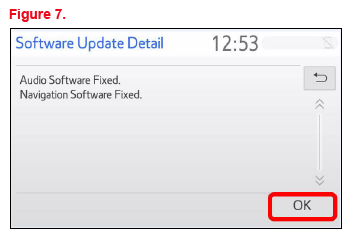
- Select OK on the Software Update Detail screen.
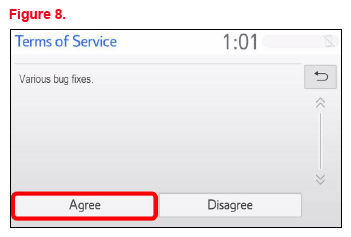
- Select Agree on the Terms of Service screen.
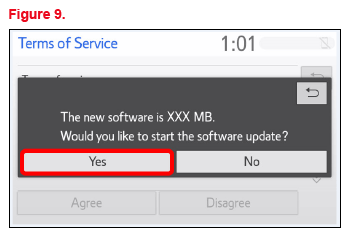
- Select Yes on the "Would you like to start the software update?" pop-up.
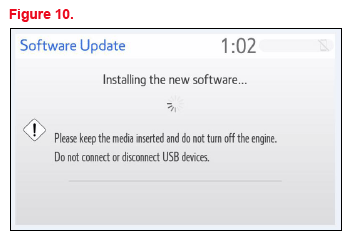
- Once the head unit begins installation, the update will take about 10 minutes.NOTE:
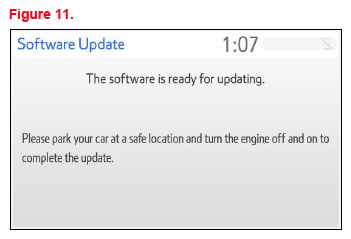
- Do NOT turn OFF the engine or ACC BEFORE the software is ready for updating.
- Do NOT remove the USB flash drive out of the vehicle USB port before the software is ready for updating.
- When "The software is ready for updating" screen appears, turn the engine OFF.
- Turn the ignition ON to complete the software update.
- Once the software update is complete, remove the USB flash drive.
- Perform steps 1 - 4 to verify that the software version matches the current Software Version Information table below.
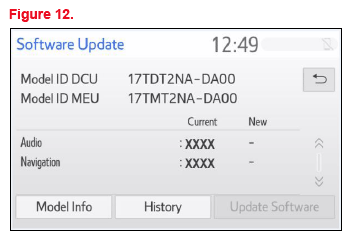
| TYPE | AUDIO PLUS | PREMIUM AUDIO | ||
|---|---|---|---|---|
| CURRENT VERSION | NEW VERSION | CURRENT VERSION | NEW VERSION | |
| Audio | 1225 | - | 1225 | - |
| Navigation | - | |||
| TYPE | PREMIUM AUDIO | |
|---|---|---|
| CURRENT VERSION | NEW VERSION | |
| Audio | 1225 | - |
| Navigation | 1100 | |
| TYPE | PREMIUM AUDIO | |
|---|---|---|
| CURRENT VERSION | NEW VERSION | |
| Audio | 1225 | - |
| Navigation | 1045 | |