Audio Head Unit Software Update (Pioneer) (T-SB-0025-21 REV1)
Reference number: T-SB-0025-21 REV1
Supersedes refnos: T-SB-0025-21
AUDIO HEAD UNIT SOFTWARE UPDATE (PIONEER)
TECHNICAL SERVICE BULLETIN
| TOYOTA: | 2020-2022 4Runner, C-HR, Camry, Camry HV, Corolla Hatchback, Highlander, Highlander HV, RAV4, RAV4 HV, Tacoma; 2021-2022 Avalon, Avalon HV, Corolla, Corolla HV, Prius, RAV4 Prime; 2022 Corolla Cross; 2020-2021 Tundra |
| SERVICE CATEGORY: | Audio/Visual/Telematics |
| SECTION: | Navigation/Multi Info Display |
| MARKET: | USA |
| COPYRIGHT: | © 2021 Toyota, USA License Agreement TMS1002 |
APPLICABILITY
| YEAR(S) | MODEL(S) | ADDITIONAL INFORMATION |
|---|---|---|
| 2020 - 2022 | 4Runner, C-HR, Camry, Camry HV, Corolla Hatchback, Highlander, Highlander HV, RAV4, RAV4 HV, Tacoma | |
| 2021 - 2022 | Avalon, Avalon HV, Corolla, Corolla HV, Prius, RAV4 Prime | |
| 2022 | Corolla Cross | |
| 2020 - 2021 | Tundra |
REVISION NOTICE
December 10, 2021 Rev1:
- The Applicability, Introduction, Multimedia Software Update, and Software Update Procedure sections have been updated.
Any previous printed versions of this bulletin should be discarded.
INTRODUCTION
Some 2020 - 2021 model year vehicles equipped with Audio, Audio Plus, or Premium Audio (versions 1784) or earlier may exhibit one or more of the following conditions:
- Intermittent blank screen.
- Navigation map update fails.
- Album art inoperative.
- Pause function intermittently inoperative in CD mode.
- Intermittent DTC B15FE present.
- Abnormal energy flow screen appearance on Hybrid models.
- Abnormal phone call operation during Apple CarPlay®.
- "No Information" displayed in Information Screen.
- No audio after voice guidance in Android Auto.
- Abnormal charging scheduling operation on RAV4 Prime models.
- Abnormal XM operation when using Apple CarPlay®.
Some 2020 - 2022 model year vehicles equipped with Audio, Audio Plus, or Premium Audio (versions 1785) or earlier may exhibit one or more of the following concerns:
- Abnormal average fuel consumption operation.
- Abnormal transition when switched to Bluetooth Audio mode.
- Abnormal tune knob operation.
- Intermittent rebooting.
- "Waiting for the beep" is displayed but voice recognition does not start.
Follow the Multimedia Software Update Procedure in this bulletin to install the latest software version.
WARRANTY INFORMATION
| OP CODE | DESCRIPTION | TIME | OFP | T1 | T2 | ||
|---|---|---|---|---|---|---|---|
| EL9063 | Software Update | 0.3 | 86140-#####(1) | 87 | 74 | ||
|
|||||||
APPLICABLE WARRANTY
- This repair is covered under the Toyota Basic Warranty. This warranty is in effect for 36 months or 36, 000 miles, whichever occurs first, from the vehicle's in-service date.
- Warranty application is limited to occurrence of the specified condition described in this bulletin.
MULTIMEDIA SOFTWARE UPDATE
| MODEL | MODEL YEAR | HEAD UNIT | SOFTWARE UPDATE FILE |
|---|---|---|---|
| 4Runner | 2020 - 2022 | Audio | 19TDT0NA-EA0E 1790.kwi |
| Audio w/XM | 19TDT1NA-EA0E 1790.kwi | ||
| Avalon, Avalon HV | 2021 - 2022 | Audio Plus | 19TDT1NA-EAPC 1790.kwi |
| Premium Audio | 19TDT2NA-EAPA 1790.kwi | ||
| 17TMT2NA-DA50 0066.kwi | |||
| C-HR | 2020 - 2022 | Audio | 19TDT0NA-EA0R 1790.kwi |
| Audio w/XM | 19TDT1NA-EA0S 1790.kwi | ||
| 19TDT1NA-EA0R 1790.kwi | |||
| Camry, Camry HV | 2020 | Audio | 19TDT0NA-EA0P 1790.kwi |
| Audio w/XM | 19TDT1NA-EA0P 1790.kwi | ||
| 2021 - 2022 | Audio | 19TDT0NA-EAPC 1790.kwi | |
| Audio w/XM | 19TDT1NA-EAPG 1790.kwi | ||
| Corolla Hatchback | 2020 - 2022 | Audio | 19TDT0NA-EAP4 1790.kwi |
| Audio w/XM | 19TDT1NA-EAP4 1790.kwi | ||
| Audio Plus | 19TDT1NA-EAP5 1790.kwi | ||
| Premium Audio | 19TDT2NA-EAP4 1790.kwi | ||
| 17TMT2NA-DA50 0066.kwi | |||
| Corolla Cross | 2022 | Audio | 19TDT0NA-EAPA 1790.kwi |
| Audio w/XM | 19TDT1NA-EAPA 1790.kwi | ||
| Corolla, Corolla HV | 2021 - 2022 | Audio | 19TDT0NA-EAP7 1790.kwi |
| Audio w/XM | 19TDT1NA-EAP7 1790.kwi | ||
| Audio Plus | 19TDT1NA-EAP8 1790.kwi | ||
| Premium Audio | 19TDT2NA-EAP7 1790.kwi | ||
| 17TMT2NA-DA50 0066.kwi | |||
| Highlander, Highlander HV | 2020 - 2022 | Audio | 19TDT0NA-EA09 1790.kwi |
| Audio w/XM | 19TDT1NA-EA09 1790.kwi | ||
| Prius | 2021 - 2022 | Audio | 19TDT0NA-EAPC 1790.kwi |
| Audio w/XM | 19TDT1NA-EAPG 1790.kwi | ||
| RAV4, RAV4 HV | 2020 - 2022 | Audio | 19TDT0NA-EAP1 1790.kwi |
| Audio w/XM | 19TDT1NA-EAP1 1790.kwi | ||
| RAV4 Prime | 2021 - 2022 | Audio | 19TDT0NA-EAPA 1790.kwi |
| Audio w/XM | 19TDT1NA-EAPA 1790.kwi | ||
| Tacoma | 2020 - 2022 | Audio | 19TDT0NA-EA0B 1790.kwi 19TDT1NA-EAPE 1790.kwi |
| Audio w/XM | 19TDT1NA-EA1B 1790.kwi | ||
| Premium Audio | 19TDT2NA-EA0B 1790.kwi | ||
| 17TMT2NA-DA50 0066.kwi | |||
| Premium Audio w/JBL | 19TDT2NA-EA1B 1790.kwi | ||
| 17TMT2NA-DA50 0066.kwi | |||
| Tundra | 2020 - 2021 | Audio | 19TDT0NA-EA0F 1790.kwi |
| Audio w/XM | 19TDT1NA-EA0F 1790.kwi |
MULTIMEDIA SOFTWARE FILE DOWNLOAD
The multimedia software update file may be downloaded directly from this Service Bulletin by clicking on the file name in the table above. Once downloaded, the file may be extracted (unzipped) from the zip folder and saved directly to a blank USB flash drive.
For USB flash drive requirements and download instructions, refer to TIS - Diagnostics -Reprogramming - Reference Documents - Multimedia Software Download Instructions.
SOFTWARE UPDATE PROCEDURE
- Start the engine.
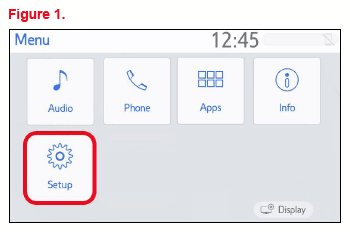
- Press the Menu button on the radio faceplate, then select Setup.
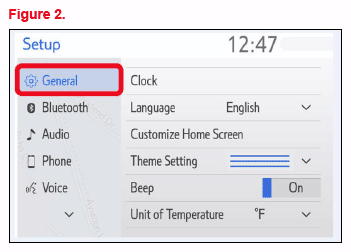
- Select General on the Setup screen.
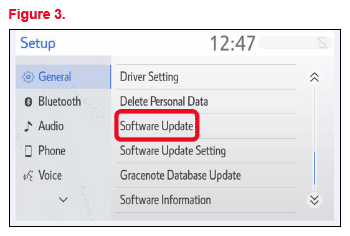
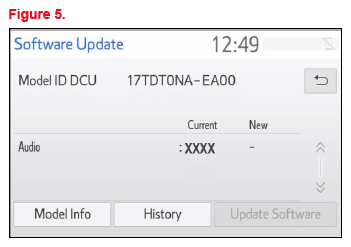
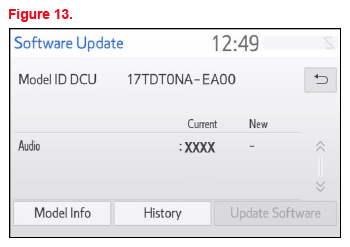
- Scroll down and select Software Update.
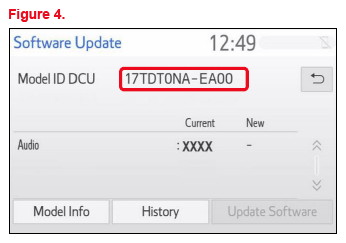
- Record the Model ID.
- Match the Model ID to the software update file, then download the appropriate multimedia software update file from the Software Update Information section.
- Verify that the software version is the same or earlier than indicated in the Introduction.
- If the software needs to be updated, download the software from the Software Update Information section onto an empty USB flash drive.
- Insert the prepared USB flash drive into the vehicle's USB port.
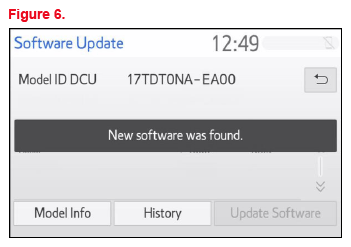
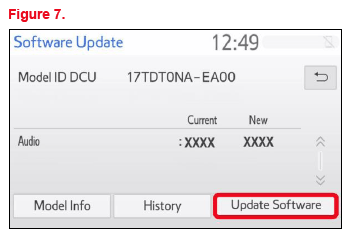
- Verify that the NEW software is up to date on the Software Update screen.TABLE 1. SOFTWARE VERSION INFORMATION
TYPE AUDIO AUDIO PLUS PREMIUM AUDIO CURRENT NEW CURRENT NEW CURRENT NEW Audio '<1784 1790 '<1784 1790 '<1784 1790 Navigation - '<1109 1150 *Certain models may have 1040 as the current version and will need to be updated to 1045.
- Select the Update Software button in the lower right corner.
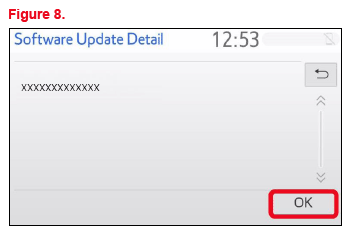
- Select OK on the
Software Update Detail screen.
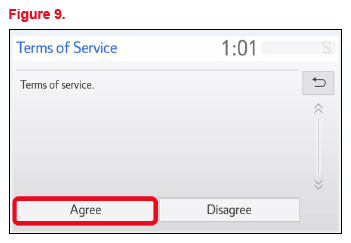
- Select Agree on the Terms of Service screen.
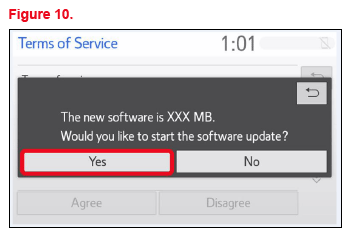
- Select Yes on the "Would you like to start the software update?" pop-up.
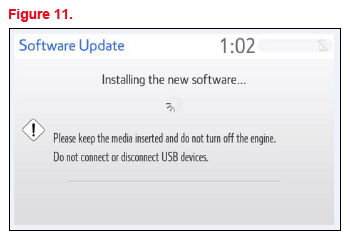
- Once the head unit begins installation, the update will take approximately 10 minutes.NOTE:
- Do NOT turn OFF the vehicle or ACC BEFORE the software is ready for updating.
- Do NOT remove the USB flash drive until instructed in step 18.
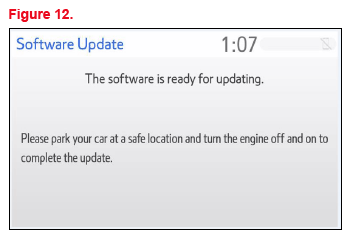
- When the "The software is ready for updating." screen appears, turn OFF the vehicle.
- Turn the vehicle ON to complete the software update.
- Once the software update is complete, remove the USB flash drive.
- Perform steps 1 - 4 to verify the software version matches the current software version information table below.
| TYPE | AUDIO | AUDIO PLUS | PREMIUM AUDIO | |||
|---|---|---|---|---|---|---|
| CURRENT | NEW | CURRENT | NEW | CURRENT | NEW | |
| Audio | 1790 | - | 1790 | - | 1790 | - |
| Navigation | - | 1150 | ||||