Premium Audio Navigation Map Update Process (T-SB-0106-22 REV2)
Reference number: T-SB-0106-22 REV2
Supersedes refnos: T-SB-0106-22, T-SB-0106-22 REV1
PREMIUM AUDIO NAVIGATION MAP UPDATE PROCESS
TECHNICAL SERVICE BULLETIN
| TOYOTA: | 2020 - 2024 4Runner; 2019 - 2022 Avalon, Avalon HV, C-HR, Corolla Hatchback, RAV4, RAV4 HV; 2018 - 2022 Camry HV, Mirai; 2018 - 2024 Camry; 2022 Corolla Cross; 2020 - 2022 Corolla, Corolla HV, Highlander, Highlander HV, Prius, Prius Prime, Sequoia; 2021 - 2022 RAV4 Prime, Venza HV; 2021 - 2024 Sienna HV; 2018 - 2020 Sienna; 2020 - 2023 Tacoma; 2020 - 2021 Tundra |
| SERVICE CATEGORY: | Audio/Visual/Telematics |
| SECTION: | Navigation/Multi Info Display |
| MARKET: | USA |
| COPYRIGHT: | © 2018 Toyota, USA License Agreement TMS1002 |
APPLICABILITY
| YEAR(S) | MODEL(S) | ADDITIONAL INFORMATION |
|---|---|---|
| 2020 - 2024 | 4Runner | |
| 2019 - 2022 | Avalon, Avalon HV, C-HR, Corolla Hatchback, RAV4, RAV4 HV | |
| 2018 - 2022 | Camry HV, Mirai | |
| 2018 - 2024 | Camry | |
| 2022 | Corolla Cross | |
| 2020 - 2022 | Corolla, Corolla HV, Highlander, Highlander HV, Prius, Prius Prime, Sequoia | |
| 2021 - 2022 | RAV4 Prime, Venza HV | |
| 2021 - 2024 | Sienna HV | |
| 2018 - 2020 | Sienna | |
| 2020 - 2023 | Tacoma | |
| 2020 - 2021 | Tundra |
REVISION NOTICE
February 11, 2025 Rev2:
- Applicability has been updated to include 2022 model year Corolla Cross, 2023 model year Tacoma, and 2023 - 2024 model year Camry, 4Runner, and Sienna Hybrid vehicles.
- The Introduction, Required Tools & Equipment, and Dynamic Navigation Update sections have been updated.
February 20, 2024 Rev1:
- The Required Tools & Equipment section has been updated.
Any previous printed versions of this bulletin should be discarded.
SUPERSESSION NOTICE
The information contained in this bulletin supersedes Service Bulletin No. T-SB-0119-20.
- Applicability has been updated to include 2021 - 2022 model year Toyota vehicles.
- The Introduction section has been updated.
Service Bulletin No. T-SB-0119-20 is obsolete and any printed versions should be discarded.
INTRODUCTION
Some 2018 - 2024 model year Toyota vehicles equipped with a Premium Audio with Dynamic Navigation System require a Special Service Tool (SST) USB flash drive to update the map, points of interest, and system software. The SST is used with applicable vehicles to deliver the update, however, the process for generating license keys differs from previous generations.
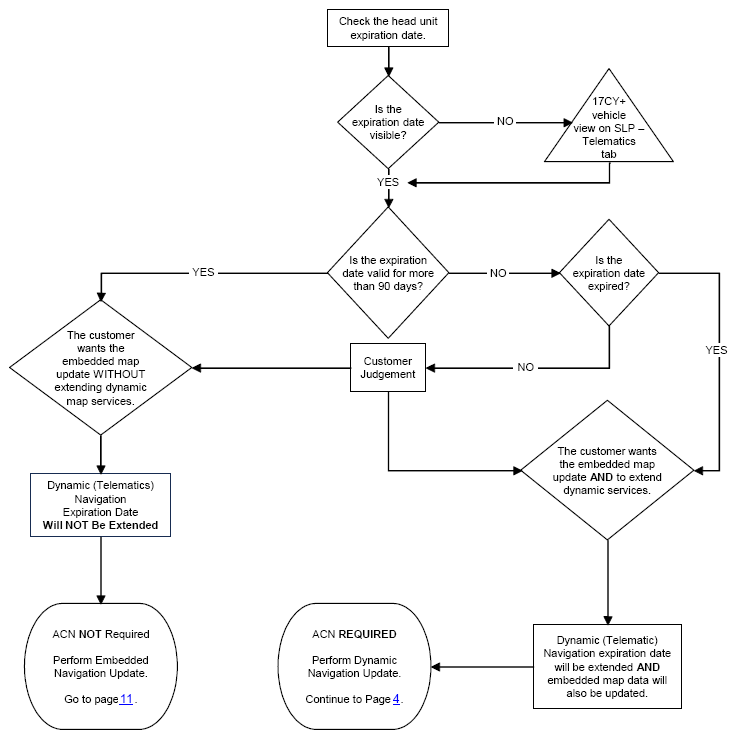
Before attempting to perform a map update, the expiration date of the dynamic subscription (stored in the head unit), must be checked. If the expiration date has not passed, a license key may be generated without the purchase of an Activation Card Number (ACN). Updating the map without the use of an ACN is considered an Embedded Navigation Update (refer to pg. 11 ) and performing this update does not extend the subscription to dynamic map services. If the subscription period has expired, or is expiring within the next 90 days, it should be recommended to the customer to purchase an ACN. Utilizing an ACN, will initiate the Dynamic Navigation Update (refer to pg. 4 ). This Dynamic Navigation Update will perform the embedded navigation update and provide dynamic map services for a period of two years from the date that the Dynamic Navigation Update is performed.
ACNs are provided in a pamphlet available through the normal parts ordering system. Follow the process in this bulletin to perform the update.
WARRANTY INFORMATION
| OP CODE | DESCRIPTION | TIME | OFP | T1 | T2 |
|---|---|---|---|---|---|
| N/A | Not Applicable to Warranty | - | - | - | - |
PARTS INFORMATION
| PART NUMBER | PART NAME | QTY |
|---|---|---|
| 86271-HDD09-00 | NAV ACN Card V.20.00 | 1 |
REQUIRED TOOLS & EQUIPMENT
| SPECIAL SERVICE TOOLS (SST) | PART NUMBER | QTY | ||
|---|---|---|---|---|
| USB Drive Navigation Update - AWTEC(1) | TLAW-SD017-24F | 1 | ||
|
||||
DYNAMIC NAVIGATION UPDATE
- Search TIS for ANY available firmware updates for the selected model and model year. Complete the firmware update(s) BEFORE installing the map data.
- Cycle the ignition ON (Engine/Hybrid/EV system OFF).NOTE:
- Vehicles WITHOUT Smart Key system:
Turn the ignition key to the ON position.
- Vehicles WITH Smart Key system:
Press the Engine Start/Stop switch two times with the brake pedal released.
- Vehicles WITHOUT Smart Key system:
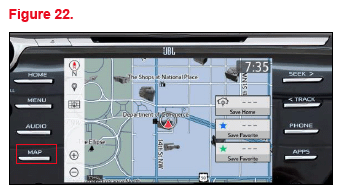
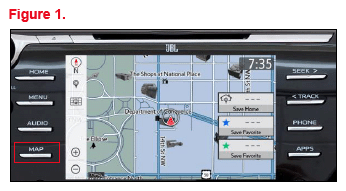
- Select the Map button on the navigation head unit.
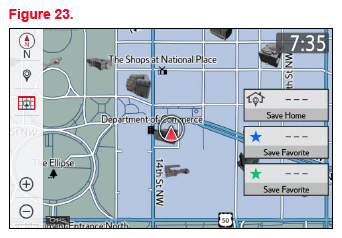
- Select the Map Options icon on the navigation screen.
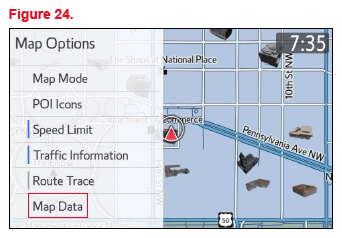
- Select Map Data on the Map Options menu.
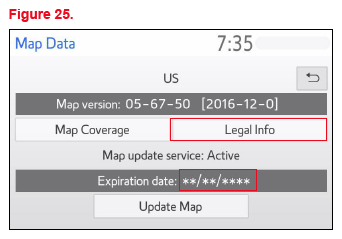
- Record the old map date (YYYYMMD) from the navigation screen.
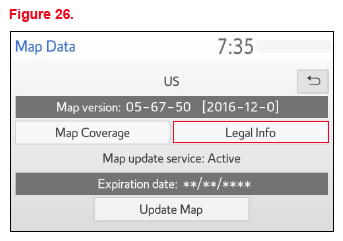
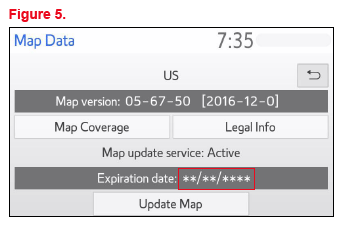
- Is the expiration date displayed as shown in Figure 5?
- YES - Record the expiration date from the navigation screen and go to step 10.
- NO - Continue to step 8.
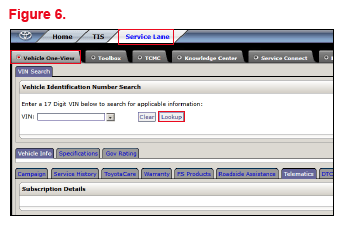
- Login to TIS, go to Service Lane - Vehicle One-View,
input the VIN, and select Lookup.
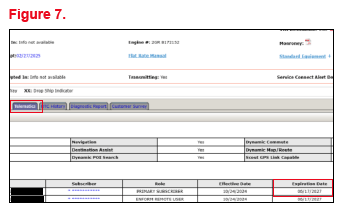
- Click the Telematics tab and record the subscriber's expiration date.
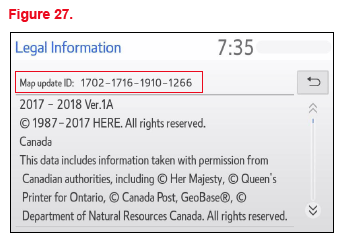
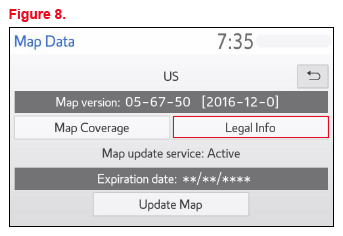
- Select Legal Info.
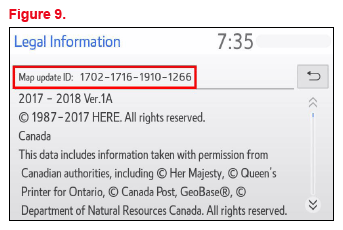
- Record the map update ID.
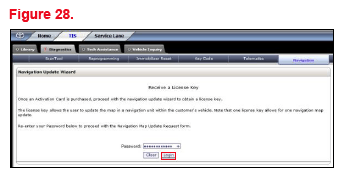
- Login to TIS.
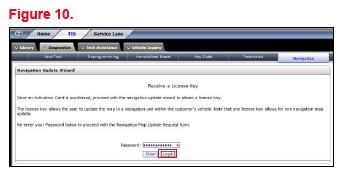
- Log into the Navigation Update Wizard.
- Select the TIS tab.
- Select the Diagnostics tab.
- Select the Navigation tab.
- Re-enter your password.
- Select Login.
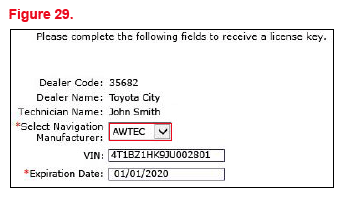
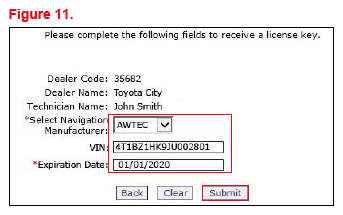
- Select AWTEC from the Select Navigation Manufacturer dropdown menu.
- Enter the vehicle's VIN and head unit expiration date, then select Submit.NOTE: It is recommended to perform a Dynamic Navigation Update under the following conditions:
- The expiration date is expired.
- The expiration date will expire in 90 days or less.
- The customer would like to continue the dynamic navigation system for a period of two years from the date of the update.
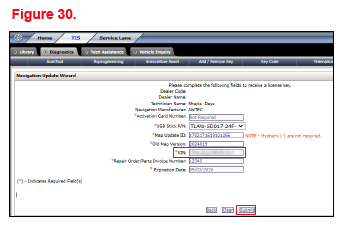
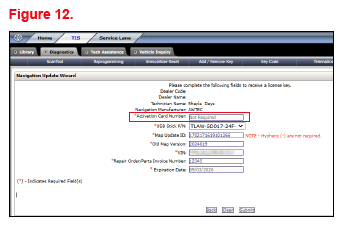
- Enter the ACN from the inside of the pamphlet (obtained from the parts department).
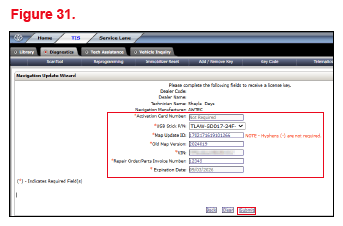
- Enter the navigation data into the Navigation Update Wizard form.
- Select the correct USB part number (found on the SST packaging, starts with "TLAW").
- Input the map update ID into TIS (without hyphens).
- Input the old map date into TIS using the following format: YYYYMMD (without hyphens).
- Enter the VIN.
- Enter the repair order number.
- Enter the expiration date.
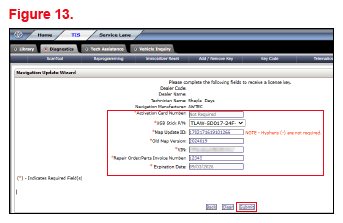
- Select Submit.
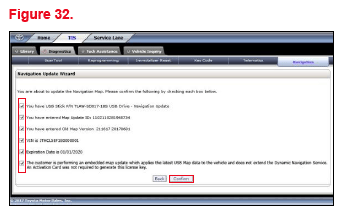
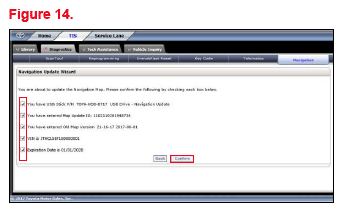
- Check off each item AFTER confirming that it is correct. If ANY of the information is incorrect, select the back button.
- Select Confirm.NOTE: If ANY of the navigation data is entered incorrectly, the update will NOT complete successfully, and it is possible a NEW ACN will be required.
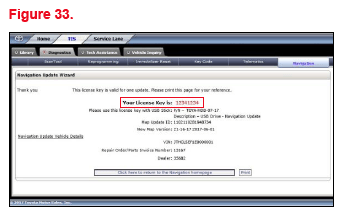
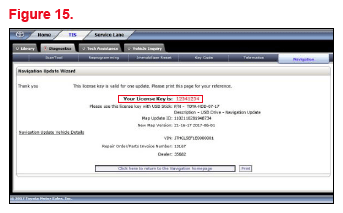
- Note the license key that is generated. (It is recommended to print this page.)
- Insert the USB flash drive SST into the USB port of the vehicle (usually located under the navigation head unit, in the center console/armrest, or glove box).
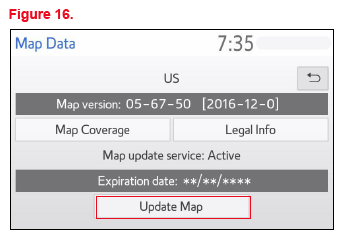
- Select Update Map on the Map Data screen.
- Select YES.
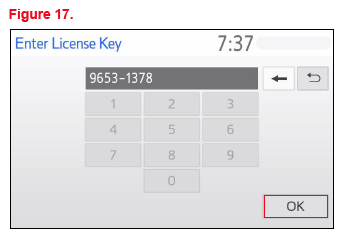
- Enter the license key from step 20.
- Select OK.
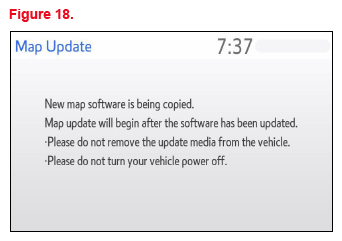
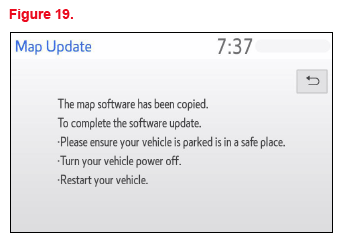
- The head unit software MUST be updated first. Figure 18 will display during the update.
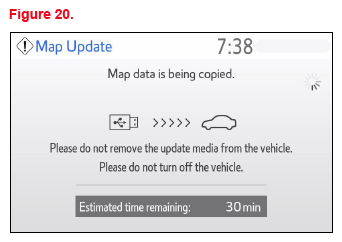
If the head unit software is already updated, Figure 20 will display. If Figure 20 displays, continue to step 27.
NOTE: Navigation map data will load when this process completes. - After completing the head unit software update, the Map Update screen will display and the navigation map update will begin automatically.NOTE: This process will take approximately 45 minutes.
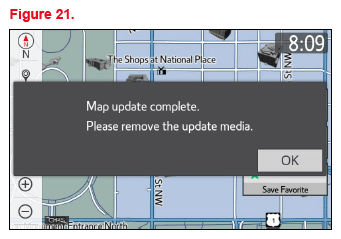
- When prompted, remove the USB flash drive from the vehicle's USB port.
- The map update is complete.
- Verify navigation operation.
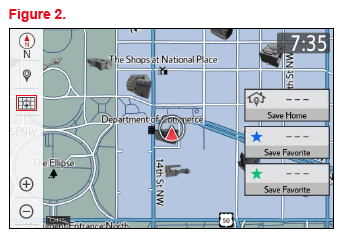
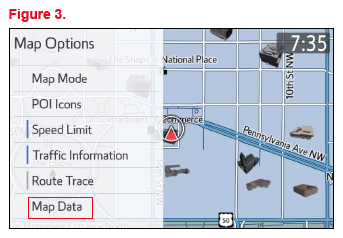
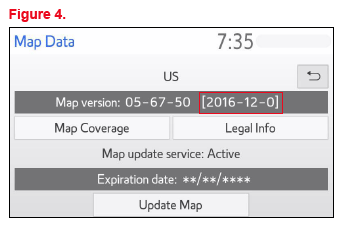
EMBEDDED NAVIGATION UPDATE
- Search TIS for ANY firmware updates that are available for the selected model and model year. Complete the firmware update(s) BEFORE installing the map data.
- Cycle the ignition ON (Engine/Hybrid/EV system OFF).NOTE:
- Vehicles WITHOUT Smart Key system: Turn the ignition key to the ON position.
- Vehicles WITH Smart Key system:
Press the Engine Start/Stop switch two times with the brake pedal released.
- Press the Map button on the navigation head unit.
- Press the Map Options icon on the navigation screen.
- Select Map Data on the Map Options menu.
- Record the old map date (YYYYMMD) and expiration date from the navigation screen.
- Select Legal Info.
- Record the map update ID.
- Log into TIS.
- Log into the Navigation Update Wizard.
- Select the TIS tab.
- Select the Diagnostics tab.
- Select the Navigation tab.
- Re-enter your password.
- Select Login.
- Select AWTEC from the Select Navigation Manufacturer dropdown menu.
- Enter the vehicle's VIN and head unit expiration date.NOTE: It is recommended to perform an Embedded Navigation Update under the following conditions:
- The head unit's expiration date is valid and NOT expired.
- The head unit's expiration date will NOT expire in the next 90 days.
- The customer would like to perform an Embedded Navigation Update during the last 90 days. (This process will NOT extend the dynamic navigation system.)
- Select Submit.
- Enter the navigation data into the Navigation Update Wizard form. (An ACN is NOT required.)
- Select the correct USB part number (found on the SST packaging, starts with "TLAW").
- Input the map update ID into TIS (without hyphens).
- Input the old map date into TIS using the following format: YYYYMMD (without hyphens).
- Enter the VIN.
- Enter the repair order number.
- Enter the expiration date.
- Select Submit.
- Check off each item AFTER confirming that it is correct. If ANY of the information is incorrect, select the back button.
- Select Confirm.
- Note the license key that is generated. (It is recommended to print this page.)
- Insert the USB flash drive SST into the USB port of the vehicle (usually located under the navigation head unit, in the center console/armrest, or glove box).
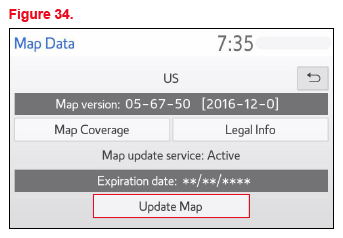
- Select Update Map on the Map Data screen.
- Select Yes.
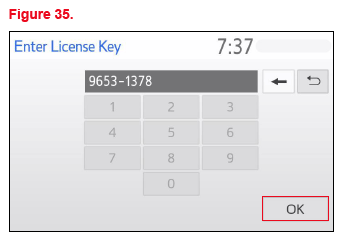
- Enter the license key from step 17.
- Select OK.
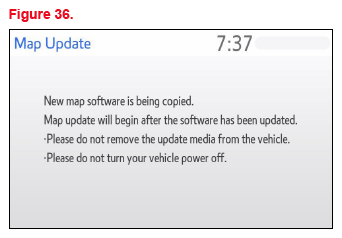
- The head unit software MUST be updated first. Figure 36 will display during this process.
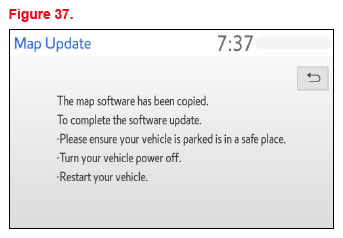
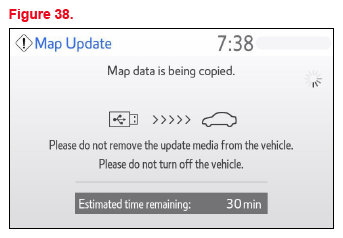
If the head unit software is already updated, Figure 38 will display. If Figure 38 displays, continue to step 24.
NOTE: Navigation map data will load when this process completes. - The Map Update screen will display and the navigation map update will begin automatically.NOTE: This process will take about 45 minutes.
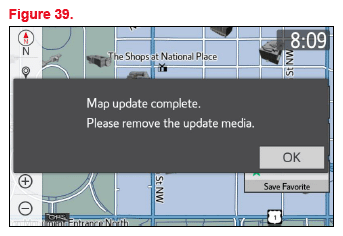
- When prompted, remove the USB flash drive from the vehicle's USB port.
- The map update is complete.
- Verify navigation operation.