Installation [12/2019 - ]: Procedure
- INSTALL CAMERA CLEANER NOZZLE ASSEMBLY
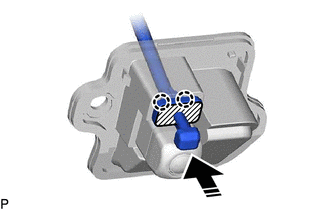
- Press the push area until the 2 claws engage to install the camera cleaner nozzle assembly as shown in the illustration.

Push Area 
Install in this Direction NOTE:- Make sure to press only the push area.
- Confirm the engagement of the camera cleaner nozzle assembly and television camera assembly by listening for the click sound of the lock engaging.
- Press the push area until the 2 claws engage to install the camera cleaner nozzle assembly as shown in the illustration.
- INSTALL CAMERA CLEANER NOZZLE ASSEMBLY (w/ Digital Inner Mirror)
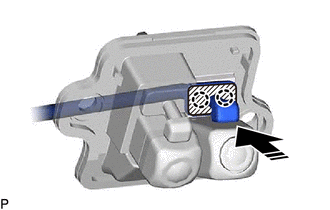
- Press the push area until the 2 claws engage to install the camera cleaner nozzle assembly as shown in the illustration.
Push Area Install in this Direction NOTE:- Make sure to press only the push area.
- Confirm the engagement of the camera cleaner nozzle assembly and television camera assembly by listening for the click sound of the lock engaging.
- Press the push area until the 2 claws engage to install the camera cleaner nozzle assembly as shown in the illustration.
- INSTALL TELEVISION CAMERA ASSEMBLY WITH NOZZLE
w/o Digital Inner Mirror: Refer to PROCEDURE - Step 5
w/ Digital Inner Mirror: Refer to PROCEDURE - Step 6
- INSTALL BACK DOOR TRIM PANEL ASSEMBLY
Refer to PROCEDURE - Step 35
- INSTALL BACK DOOR SERVICE HOLE COVER LH
Refer to PROCEDURE - Step 36
- INSTALL BACK DOOR SERVICE HOLE COVER RH
HINT:
Use the same procedure as for the LH side.
- PERFORM CALIBRATION (w/ Parking Assist Monitor System)
Refer to CALIBRATION [12/2019 - 10/2022] , or refer to CALIBRATION [10/2022 - ]
- PERFORM CALIBRATION (w/ Panoramic View Monitor System)
Refer to CALIBRATION [12/2019 - 10/2022] , or refer to CALIBRATION [10/2022 - 11/2023] , or refer to CALIBRATION [11/2023 - ]