Target Adjustment (Triangle Target) [10/2022 - ]: Procedure
- PREPARATION FOR MILLIMETER WAVE RADAR SENSOR ASSEMBLY ADJUSTMENT
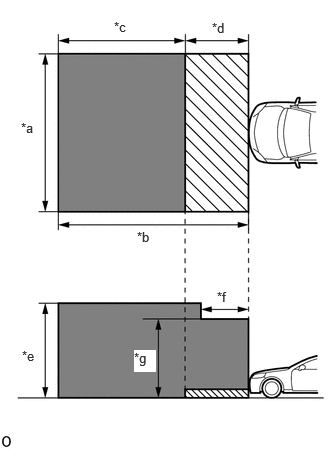
- Park the vehicle on a level surface where the area in front of the vehicle shown in the illustration is free of metal objects.
*a 5 m (16.4 ft.) *b 6 m (19.7 ft.) *c 4 m (13.1 ft.) *d 2 m (6.56 ft.) *e 3 m (9.84 ft.) *f 1.5 m (4.92 ft.) *g 2.5 m (8.2 ft.) 
Do not place any metal objects in this area 
Do not place metal objects with a height of more than 50 mm (1.97 in.) in this area HINT:
Metal objects that have a height of 50 mm (1.97 in.) or less do not affect adjustment within 2 m (6.56 ft.) from the front of the vehicle.
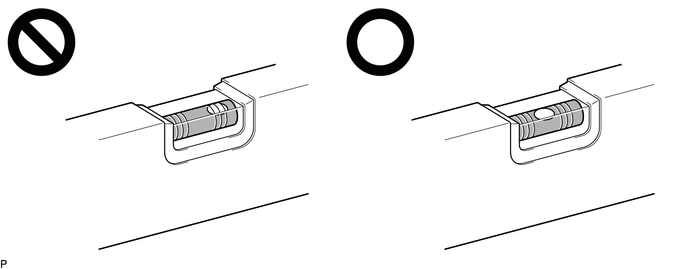
- Check the levelness of the ground.
- Adjust the tire inflation pressure to the specified pressure.
Refer to PROCEDURE - Step 1
- Clean the front emblem or millimeter wave radar sensor assembly.
- Visually inspect the front of the vehicle.
HINT:
Confirm that there is no damage or deformation.
- Visually inspect the front bumper assembly, radiator grille and stays.
HINT:
Confirm that there is no damage or deformation.
- Park the vehicle on a level surface where the area in front of the vehicle shown in the illustration is free of metal objects.
- ADJUST MILLIMETER WAVE RADAR SENSOR ASSEMBLY VERTICALLY AND HORIZONTALLY
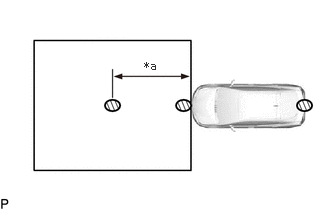
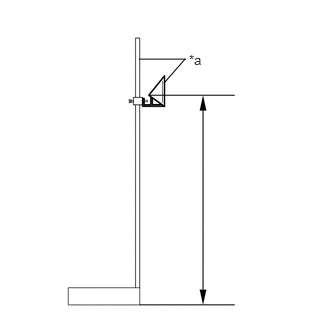
*a SST (reflector) Adjust SST (reflector) height.
- Adjust SST (reflector) so that the center of SST (reflector) is the same height as the millimeter wave radar sensor.
HINT:
Make sure to align the center of SST (reflector) with the millimeter wave radar sensor (the center of the emblem).
Reference Value
896 mm (2.94 ft.)
- SST: 09870-60000
- 09870-60010
- SST: 09870-60040
- SST: 09870-60000
- Adjust SST (reflector) so that the center of SST (reflector) is the same height as the millimeter wave radar sensor.
- Place SST (reflector).
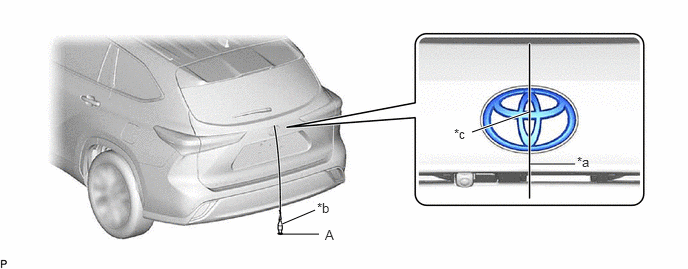
- Hang a weight with a pointed tip from the center of the rear emblem, and mark the rear center point of the vehicle (point A) on the ground.
*a String *b Weight *c Center - - HINT:
Lightly flick the string with your fingers several times to confirm that the string is perpendicular to the ground.
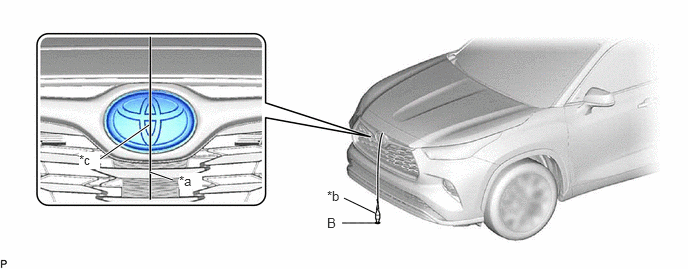
- Hang a weight with a pointed tip from the center of the front emblem, and mark the front center point of the vehicle (point B) on the ground.
*a String *b Weight *c Center - - HINT:
Lightly flick the string with your fingers several times to confirm that the string is perpendicular to the ground.
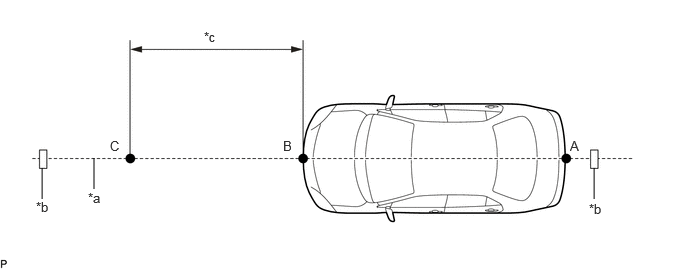
- Using tape and a string, create a line that connects point B to point A and extends at least 3000 mm (9.84 ft.) beyond the front center point of the vehicle.
*a String *b Tape *c 3000 mm (9.84 ft.) - - HINT:
- Make sure the string is taut when securing it with tape.
- Lightly flick the string with your fingers several times to confirm that the string is aligned with point B.
- Mark point C (SST (reflector) placement position) at a position 3000 mm (9.84 ft.) from point B.
- Place SST (reflector) at point C.
- Hang a weight with a pointed tip from the center of the rear emblem, and mark the rear center point of the vehicle (point A) on the ground.
- Front Beam Axis Adjustment:NOTE:
- Close all of the doors.
- Ensure that nobody enters the adjustment area during the adjustment.
- Do not move or shake the vehicle during adjustment (do not get in or out of the vehicle).
- Do not turn off the GTS or ignition switch.
- If the vehicle moves or is shaken during beam axis adjustment such as during strong winds or a door is opened or closed, perform the adjustment again.
- Connect the GTS to the DLC3.
- Turn the ignition switch to ON.
- Turn the GTS on.
- Enter the following menus: Body Electrical / Front Radar Sensor / Utility / Front Beam Axis Adjustment.
for Type A:
Body Electrical > Front Radar Sensor > Utility
Tester Display Front Beam Axis Adjustment for Type B:
Body Electrical > Front Radar Sensor > Utility
Tester Display Front Beam Axis Adjustment - Confirm the conditions displayed on the screen and then press "Next".
- Select "Trigonal pyramid" and then press "Next".
- Perform the adjustment according to the display on the GTS.NOTE:
If an error code is displayed, perform troubleshooting according to the following table, then perform the adjustment again.
Error No. Error Description Cause of Error Action to be Taken 1 No target abnormality - SST (reflector) is placed incorrectly.
- The front emblem or millimeter wave radar sensor assembly is covered by dirt or snow.
Place SST (reflector) in the correct position. (See ADJUST MILLIMETER WAVE RADAR SENSOR ASSEMBLY VERTICALLY AND HORIZONTALLY (b) Place SST (reflector)) Clean the front emblem or millimeter wave radar sensor assembly. Check the installation condition of the front bumper assembly and radiator grille. 2 Target distance abnormality - SST (reflector) is placed incorrectly.
Place SST (reflector) in the correct position. (See ADJUST MILLIMETER WAVE RADAR SENSOR ASSEMBLY VERTICALLY AND HORIZONTALLY (b) Place SST (reflector)) 3 Plural targets abnormality - There is a reflective object near SST (reflector).
- A person entered the adjustment area.
Remove any reflective objects. Ensure that nobody enters the adjustment area during the adjustment. (See PREPARATION FOR MILLIMETER WAVE RADAR SENSOR ASSEMBLY ADJUSTMENT) 4 Target move abnormality - SST (reflector) was moved out of position or shaking during the adjustment due to wind.
- A person entered the adjustment area.
Place SST (reflector) in the correct position. (See ADJUST MILLIMETER WAVE RADAR SENSOR ASSEMBLY VERTICALLY AND HORIZONTALLY (b) Place SST (reflector)) Perform adjustment in an area with no wind. Ensure that nobody enters the adjustment area during the adjustment. (See PREPARATION FOR MILLIMETER WAVE RADAR SENSOR ASSEMBLY ADJUSTMENT) 5 Axis adjustment - Optical axis adjustment has not been performed.
Optical axis adjustment. (See ADJUST MILLIMETER WAVE RADAR SENSOR ASSEMBLY VERTICALLY AND HORIZONTALLY (c) Front Beam Axis Adjustment) 6 Target angle abnormality - SST (reflector) is placed incorrectly.
- The beam axis of the millimeter wave radar sensor assembly is outside the automatic correction range.
Place SST (reflector) in the correct position. (See ADJUST MILLIMETER WAVE RADAR SENSOR ASSEMBLY VERTICALLY AND HORIZONTALLY (b) Place SST (reflector)) Check the condition of the millimeter wave radar sensor assembly, radiator grille and front bumper assembly. 7 Radar abnormality - Operation of the millimeter wave radar sensor assembly is abnormal.
Replace the millimeter wave radar sensor assembly. 8 Radar dirtiness - There is dirt on the front emblem or millimeter wave radar sensor assembly.
Clean the front emblem or millimeter wave radar sensor assembly. 9 Temperature abnormality - The temperature around the millimeter wave radar sensor assembly is too high.
Wait until the temperature drops to the operable range (-30 to 50°C). 10 Voltage abnormality - IG power source voltage is outside the operable range of the millimeter wave radar sensor assembly.
Check the battery voltage (specified condition: 10 to 16 V).
for A25A-FXS: Refer to PROCEDURE - Step 2 [12/2019 - 11/2023] , or refer to PROCEDURE - Step 2 [11/2023 - ]
for T24A-FTS: Refer to PROCEDURE - Step 111 External communication abnormality - CAN communication between forward recognition camera and the millimeter wave radar sensor assembly is abnormal.
Check the condition of the connectors and wire harness. 12 Radar axis aiming failure upward - The beam axis of the millimeter wave radar sensor assembly is deviated.
- Road inclement is outside the standard value.
Check the condition of the millimeter wave radar sensor assembly, radiator grille and front bumper assembly. Confirm road gradient. 13 Radar axis aiming failure downward - The beam axis of the millimeter wave radar sensor assembly is deviated.
- Road inclement is outside the standard value.
Check the condition of the millimeter wave radar sensor assembly, radiator grille and front bumper assembly. Confirm road gradient. 14 Vehicle speed abnormality - The vehicle is not stationary.
Ensure that the vehicle remains stationary. 15 Other - A mode change error occurred.
- Operation of the yaw rate sensor is abnormal.
- The vehicle is shaking.
Check for DTCs.
Refer to DTC CHECK / CLEAR [12/2019 - ]Check for DTCs.
for HV Model: Refer to DTC CHECK / CLEAR [12/2019 - ]
for Gasoline Model: Refer to DTC CHECK / CLEAR [12/2019 - ]Ensure that the vehicle remains stationary. 16 Time out - The vehicle cannot communicate with GTS normally.
- The vehicle does not keep still during beam axis adjustment.
- Operation of the millimeter wave radar sensor assembly is abnormal.
- Ensure that the vehicle is connected with the GTS correctly.
- Ensure that the vehicle remains stationary.
- Perform beam axis adjustment again and replace the millimeter wave radar sensor assembly if the same error code is output.
17 Target parameter abnormality - Wrong mode is selected.
Perform beam axis adjustment again. 18 Vehicle information undefined - CAN communication between forward recognition camera and the millimeter wave radar sensor assembly is abnormal.
Check the condition of the connectors. - Press "Exit" to finish front beam axis adjustment.
- Front Beam Axis Misalignment Reading:NOTE:
- Close all of the doors.
- Do not move or shake the vehicle during adjustment (do not get in or out of the vehicle).
- Ensure that nobody enters the adjustment area during the adjustment.
- Do not turn off the GTS or ignition switch.
- Enter the following menus: Body Electrical / Front Radar Sensor / Utility / Front Beam Axis Misalignment Reading.
Body Electrical > Front Radar Sensor > Utility
Tester Display Front Beam Axis Misalignment Reading - Confirm the conditions displayed on the screen and then press "Next".
- Select "Trigonal pyramid" and then press "Next".
- Perform the adjustment according to the display on the GTS.
Specified Condition
Vertical -0.5 to 0.5 deg. Horizontal -0.5 to 0.5 deg. NOTE:If the result is not as specified, perform beam axis adjustment again.
- Front Radar Acceleration Sensor Calibration:
- After beam axis adjustment completes, clear the following system vehicle control history entries.
- Clear vehicle control history (Dynamic Radar Cruise Control System).
for HV Model: Refer to VEHICLE CONTROL HISTORY [09/2020 - 11/2023] , or refer to VEHICLE CONTROL HISTORY [11/2023 - ]
for Gasoline Model: Refer to VEHICLE CONTROL HISTORY [09/2020 - 11/2023] , or refer to VEHICLE CONTROL HISTORY [11/2023 - ]
- Clear vehicle control history (Lane Control System).
Refer to DTC U0100-87: Lost Communication with ECM/PCM "A" Missing Message; DTC U0125-87: Lost Communication with Multi-axis Acceleration Sensor Module Missing Message; DTC U0126-87: Lost Communication with Steering Angle Sensor Module Missing Message; DTC U0129-87: Lost Communication with Brake System Control Module Missing Message; DTC U0131-87: Lost Communication with Power Steering Control Module Missing Message; DTC U0155-87: Lost Communication with Instrument Panel Cluster (IPC) Control Module Missing Message; DTC U0293-87: Lost Communication with Hybrid Powertrain Control Module Missing Message [12/2019 - 11/2023] , or refer to DTC U0100-87: Lost Communication with ECM/PCM "A" Missing Message; DTC U0101-87: Lost Communication with TCM Missing Message; DTC U0126-87: Lost Communication with Steering Angle Sensor Module Missing Message; DTC U0129-87: Lost Communication with Brake System Control Module Missing Message; DTC U0131-87: Lost Communication with Power Steering Control Module Missing Message; DTC U0155-87: Lost Communication with Instrument Panel Cluster (IPC) Control Module Missing Message; DTC U0293-87: Lost Communication with Hybrid Powertrain Control Module Missing Message [11/2023 - ]
- Clear vehicle control history (Road Sign Assist System).
Refer to VEHICLE CONTROL HISTORY [10/2022 - 11/2023] , or refer to VEHICLE CONTROL HISTORY [11/2023 - ]
- Clear vehicle control history (Front Radar Sensor System).
Refer to VEHICLE CONTROL HISTORY [09/2020 - ]
- Clear vehicle control history (Pre-collision System).
Refer to VEHICLE CONTROL HISTORY [10/2022 - 11/2023] , or refer to VEHICLE CONTROL HISTORY [11/2023 - ]
- Clear vehicle control history (Lighting System).
w/ AFS: Refer to VEHICLE CONTROL HISTORY [09/2020 - 11/2023] , or refer to VEHICLE CONTROL HISTORY [11/2023 - ]
w/o AFS: Refer to VEHICLE CONTROL HISTORY [09/2020 - ]
- Clear vehicle control history (Dynamic Radar Cruise Control System).