Driving Adjustment [10/2022 - ]: Procedure
- PERFORM MILLIMETER WAVE RADAR SENSOR OPTICAL AXIS LEARNING (When driving with GTS connected to vehicle)
- Adjust the tire pressures to the standard values.
Refer to PROCEDURE - Step 1
- Make sure the surfaces of the radiator grille emblem and millimeter wave radar sensor assembly are clean and have no dirt, snow, or other matter adhering to them.
- Clean away any foreign matter adhering to the surface of the radiator grille emblem.
- Check that there is no damage or deformation around the front exterior area of the vehicle.
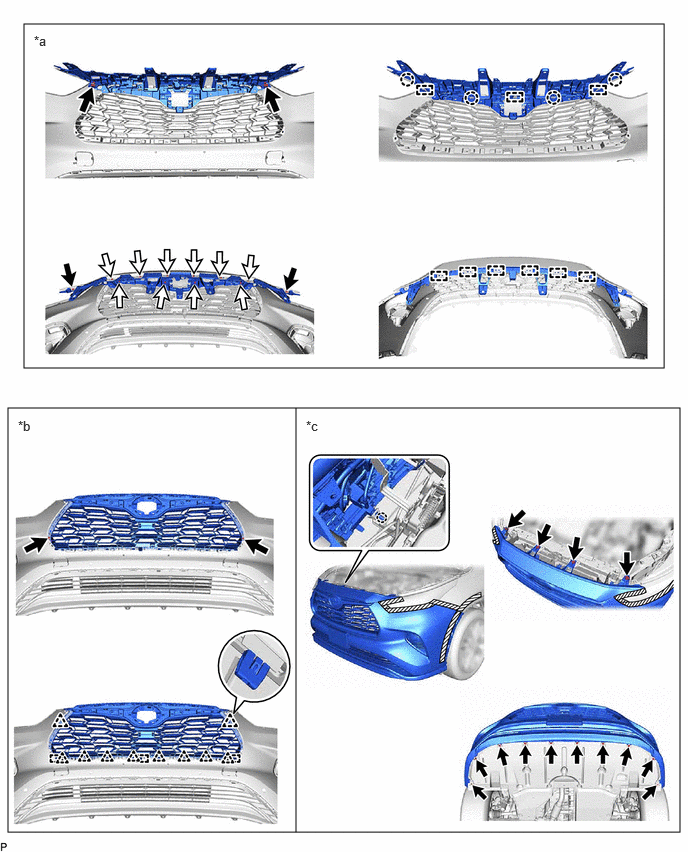
- Check that the radiator grille and front bumper assembly are securely installed, and that there is no damage or deformation around the installation areas. If any abnormalities are found, repair or replace parts as necessary.
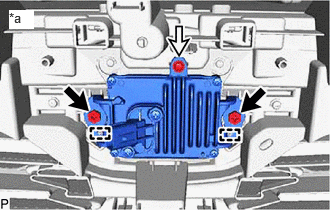
*a Radiator Grille Bracket Installation Areas to Inspect *b Radiator Grille Sub-assembly Installation Areas to Inspect *c Front Bumper Assembly Installation Areas to Inspect - - - Check that the millimeter wave radar sensor assembly is securely installed and if any abnormalities are found, securely install the millimeter wave radar sensor assembly and then perform optical axis learning.
*a Millimeter Wave Radar Sensor Assembly Installation Areas to Inspect - Front Radar Acceleration Sensor Calibration
- With the ignition switch off, connect the GTS to the DLC3.
- Turn the ignition switch to ON.
- Enter the following menus: Body Electrical / Front Radar Sensor / Utility / Front Radar Acceleration Sensor Calibration.
Body Electrical > Front Radar Sensor > Utility
Tester Display Front Radar Acceleration Sensor Calibration - Perform the calibration according to the display on the GTS.NOTE:
If an error code is displayed, perform troubleshooting according to the following table, then perform the calibration again.
Error No. Error Description Cause of Error Action to be Taken 12 Radar axis aiming failure upward - The beam axis of the millimeter wave radar sensor assembly is deviated.
- Road inclement is outside the standard value.
Check the condition of the millimeter wave radar sensor assembly, radiator grille and front bumper assembly. Confirm road gradient. 13 Radar axis aiming failure downward - The beam axis of the millimeter wave radar sensor assembly is deviated.
- Road inclement is outside the standard value.
Check the condition of the millimeter wave radar sensor assembly, radiator grille and front bumper assembly. Confirm road gradient. 14 Vehicle speed abnormality The vehicle is not stationary. Ensure that the vehicle remains stationary. 15 Other - A mode change error occurred.
- Operation of the yaw rate sensor is abnormal.
- The vehicle is shaking.
Check for DTCs.
Refer to DTC CHECK / CLEAR [12/2019 - ]Check for DTCs.
for HV Model: Refer to DTC CHECK / CLEAR [12/2019 - ]
for Gasoline Model: Refer to DTC CHECK / CLEAR [12/2019 - ]Ensure that the vehicle remains stationary. 16 Time out - The vehicle cannot communicate with GTS normally.
- Operation of the millimeter wave radar sensor assembly is abnormal.
- Ensure that the vehicle is connected with the GTS correctly.
- Perform acceleration sensor calibration again and replace the millimeter wave radar sensor assembly if the same error code is output.
18 Vehicle information undefined CAN communication between forward recognition camera and the millimeter wave radar sensor assembly is abnormal. Check the condition of the connectors.
- Transition to online axis alignment mode
- Enter the following menus: Body Electrical / Front Radar Sensor / Utility / Transition to Online Axis Alignment Mode.
for Type A:
Body Electrical > Front Radar Sensor > Utility
Tester Display Transition to Online Axis Alignment Mode for Type B:
Body Electrical > Front Radar Sensor > Utility
Tester Display Transition to Online Axis Alignment Mode - Confirm the conditions displayed on the screen and then press "Next".
- Select "Front radar sensor" and then press "Next".
- Check the GTS screen and confirm that it has transitioned to online axis alignment mode.
- Press "Next".
- Enter the following menus: Body Electrical / Front Radar Sensor / Utility / Transition to Online Axis Alignment Mode.
- Online axis adjustment (Optical Axis Learning)
- Drive the vehicle to perform optical axis learning.
HINT:
If the alignment is performed with the GTS connected to the vehicle, the alignment progress can be monitored through 5 stages on the GTS screen.
- If the online axis alignment completes normally, the buzzer will sound intermittently for 2 seconds.NOTE:
- If the alignment terminates abnormally, the buzzer will sound for 3 seconds continuously.
- If an error code is displayed, perform troubleshooting according to the following table, then perform the beam axis alignment again.
Error No. Error Description Cause of Error Action to be Taken 6 Target angle abnormality The beam axis of the millimeter wave radar sensor assembly is outside the automatic correction range. Check the condition of the millimeter wave radar sensor assembly, radiator grille and front bumper assembly. 7 Radar abnormality Operation of the millimeter wave radar sensor assembly is abnormal. Replace the millimeter wave radar sensor assembly. 8 Radar dirtiness There is dirt on the front emblem or millimeter wave radar sensor assembly. Clean the front emblem or millimeter wave radar sensor assembly. 9 Temperature abnormality The temperature around the millimeter wave radar sensor assembly is too high. Wait until the temperature drops to the operable range (-30 to 50°C). 10 Voltage abnormality IG power source voltage is outside the operable range of the millimeter wave radar sensor assembly. Check the battery voltage (specified condition: 10 to 16 V).
for A25A-FXS: Refer to PROCEDURE - Step 2 [12/2019 - 11/2023] , or refer to PROCEDURE - Step 2 [11/2023 - ]
for T24A-FTS: Refer to PROCEDURE - Step 111 External communication abnormality CAN communication between forward recognition camera and the millimeter wave radar sensor assembly is abnormal. Check the condition of the connectors and wire harness. 14 Vehicle speed abnormality The vehicle is not stationary. Ensure that the vehicle remains stationary. 16 Time out - The vehicle cannot communicate with GTS normally.
- Operation of the millimeter wave radar sensor assembly is abnormal.
- Ensure that the vehicle is connected with the GTS correctly.
- Perform online axis adjustment again and replace the millimeter wave radar sensor assembly if the same error code is output.
18 Vehicle information undefined CAN communication between forward recognition camera and the millimeter wave radar sensor assembly is abnormal. Check the condition of the connectors.
- Press "Exit" to exit the Online axis adjustment mode.
- Turn the ignition switch off.
- Turn the ignition switch to ON and check that the warning light turns off.
- Turn the ignition switch off.
- Disconnect the GTS from the DLC3.
- Drive the vehicle to perform optical axis learning.
- After beam axis adjustment completes, clear the following system vehicle control history entries.
- Clear vehicle control history (Dynamic Radar Cruise Control System).
for HV Model: Refer to VEHICLE CONTROL HISTORY [09/2020 - 11/2023] , or refer to VEHICLE CONTROL HISTORY [11/2023 - ]
for Gasoline Model: Refer to VEHICLE CONTROL HISTORY [09/2020 - 11/2023] , or refer to VEHICLE CONTROL HISTORY [11/2023 - ]
- Clear vehicle control history (Lane Control System).
Refer to VEHICLE CONTROL HISTORY [10/2022 - 11/2023] , or refer to VEHICLE CONTROL HISTORY [11/2023 - ]
- Clear vehicle control history (Road Sign Assist System).
Refer to VEHICLE CONTROL HISTORY [10/2022 - 11/2023] , or refer to VEHICLE CONTROL HISTORY [11/2023 - ]
- Clear vehicle control history (Front Radar Sensor System).
Refer to VEHICLE CONTROL HISTORY [09/2020 - ]
- Clear vehicle control history (Pre-collision System).
Refer to VEHICLE CONTROL HISTORY [10/2022 - 11/2023] , or refer to VEHICLE CONTROL HISTORY [11/2023 - ]
- Clear vehicle control history (Lighting System).
w/ AFS: Refer to VEHICLE CONTROL HISTORY [09/2020 - 11/2023] , or refer to VEHICLE CONTROL HISTORY [11/2023 - ]
w/o AFS: Refer to VEHICLE CONTROL HISTORY [09/2020 - ]
- Clear vehicle control history (Dynamic Radar Cruise Control System).
- Adjust the tire pressures to the standard values.
- PERFORM MILLIMETER WAVE RADAR SENSOR OPTICAL AXIS LEARNING (When driving with GTS not connected to vehicle)
- Adjust the tire pressures to the standard values.
Refer to PROCEDURE - Step 1
- Make sure the surfaces of the radiator grille emblem and millimeter wave radar sensor assembly are clean and have no dirt, snow, or other matter adhering to them.
- Clean away any foreign matter adhering to the surface of the radiator grille emblem.
- Check that there is no damage or deformation around the front exterior area of the vehicle.
- Check that the radiator grille and front bumper assembly are securely installed, and that there is no damage or deformation around the installation areas. If any abnormalities are found, repair or replace parts as necessary.
*a Radiator Grille Bracket Installation Areas to Inspect *b Radiator Grille Sub-assembly Installation Areas to Inspect *c Front Bumper Assembly Installation Areas to Inspect - - - Check that the millimeter wave radar sensor assembly is securely installed and if any abnormalities are found, securely install the millimeter wave radar sensor assembly and then perform optical axis learning.
*a Millimeter Wave Radar Sensor Assembly Installation Areas to Inspect - Front Radar Acceleration Sensor Calibration
- With the ignition switch off, connect the GTS to the DLC3.
- Turn the ignition switch to ON.
- Enter the following menus: Body Electrical / Front Radar Sensor / Utility / Front Radar Acceleration Sensor Calibration.
Body Electrical > Front Radar Sensor > Utility
Tester Display Front Radar Acceleration Sensor Calibration - Perform the calibration according to the display on the GTS.NOTE:
If an error code is displayed, perform troubleshooting according to the following table, then perform the calibration again.
Error No. Error Description Cause of Error Action to be Taken 12 Radar axis aiming failure upward - The beam axis of the millimeter wave radar sensor assembly is deviated.
- Road inclement is outside the standard value.
Check the condition of the millimeter wave radar sensor assembly, radiator grille and front bumper assembly. Confirm road gradient. 13 Radar axis aiming failure downward - The beam axis of the millimeter wave radar sensor assembly is deviated.
- Road inclement is outside the standard value.
Check the condition of the millimeter wave radar sensor assembly, radiator grille and front bumper assembly. Confirm road gradient. 14 Vehicle speed abnormality - The vehicle is not stationary.
Ensure that the vehicle remains stationary. 15 Other - A mode change error occurred.
- Operation of the yaw rate sensor is abnormal.
- The vehicle is shaking.
Check for DTCs.
Refer to DTC CHECK / CLEAR [12/2019 - ]Check for DTCs.
for HV Model: Refer to DTC CHECK / CLEAR [12/2019 - ]
for Gasoline Model: Refer to DTC CHECK / CLEAR [12/2019 - ]Ensure that the vehicle remains stationary. 16 Time out - The vehicle cannot communicate with GTS normally.
- Operation of the millimeter wave radar sensor assembly is abnormal.
- Ensure that the vehicle is connected with the GTS correctly.
- Perform acceleration sensor calibration again and replace the millimeter wave radar sensor assembly if the same error code is output.
18 Vehicle information undefined CAN communication between forward recognition camera and the millimeter wave radar sensor assembly is abnormal. Check the condition of the connectors.
- Transition to online axis alignment mode
- Enter the following menus: Body Electrical / Front Radar Sensor / Utility / Transition to Online Axis Alignment Mode.
for Type A:
Body Electrical > Front Radar Sensor > Utility
Tester Display Transition to Online Axis Alignment Mode for Type B:
Body Electrical > Front Radar Sensor > Utility
Tester Display Transition to Online Axis Alignment Mode - Confirm the conditions displayed on the screen and then press "Next".
- Select "Front radar sensor" and then press "Next".
- Check the GTS screen and confirm that it has transitioned to online axis alignment mode.
- Press "Next".
- In accordance with the instructions on the screen press "Exit" and then disconnect the GTS from the DLC3.
- Enter the following menus: Body Electrical / Front Radar Sensor / Utility / Transition to Online Axis Alignment Mode.
- Online axis adjustment (Optical Axis Learning)
- Drive the vehicle to perform optical axis learning.
- If the online axis alignment completes normally, the buzzer will sound intermittently for 2 seconds.NOTE:
If the alignment terminates abnormally, the buzzer will sound for 3 seconds continuously.
- Turn the ignition switch off.
- Turn the ignition switch to ON and check that the warning light turns off.
- Turn the ignition switch off.
- After beam axis adjustment completes, clear the following system vehicle control history entries.
- Clear vehicle control history (Dynamic Radar Cruise Control System).
for HV Model: Refer to VEHICLE CONTROL HISTORY [09/2020 - 11/2023] , or refer to VEHICLE CONTROL HISTORY [11/2023 - ]
for Gasoline Model: Refer to VEHICLE CONTROL HISTORY [09/2020 - 11/2023] , or refer to VEHICLE CONTROL HISTORY [11/2023 - ]
- Clear vehicle control history (Lane Control System).
Refer to VEHICLE CONTROL HISTORY [10/2022 - 11/2023] , or refer to VEHICLE CONTROL HISTORY [11/2023 - ]
- Clear vehicle control history (Road Sign Assist System).
Refer to VEHICLE CONTROL HISTORY [10/2022 - 11/2023] , or refer to VEHICLE CONTROL HISTORY [11/2023 - ]
- Clear vehicle control history (Front Radar Sensor System).
Refer to VEHICLE CONTROL HISTORY [09/2020 - ]
- Clear vehicle control history (Pre-collision System).
Refer to VEHICLE CONTROL HISTORY [10/2022 - 11/2023] , or refer to VEHICLE CONTROL HISTORY [11/2023 - ]
- Clear vehicle control history (Lighting System).
w/ AFS: Refer to VEHICLE CONTROL HISTORY [09/2020 - 11/2023] , or refer to VEHICLE CONTROL HISTORY [11/2023 - ]
w/o AFS: Refer to VEHICLE CONTROL HISTORY [09/2020 - ]
- Clear vehicle control history (Dynamic Radar Cruise Control System).
- Adjust the tire pressures to the standard values.